
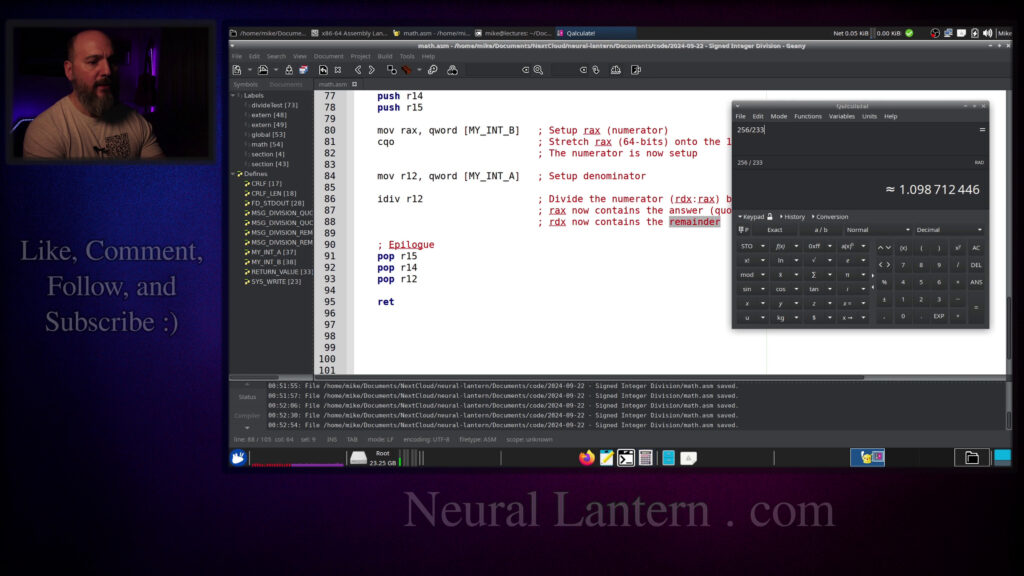

In this video, I walk through how to perform signed integer division in x86-64 assembly language using Yasm on Ubuntu/Linux.
We focus on 64-bit signed integers and the IDIV instruction. I explain the setup: loading the dividend into RAX, using CQO for proper sign extension into RDX, loading the divisor, and executing IDIV. After division, the quotient ends up in RAX and the remainder in RDX.
I reference the excellent free book “x86-64 Assembly Language Programming with Ubuntu” and show practical code examples, including a complete working program that prints both the quotient and remainder.
We test with small numbers (256 / 233) and larger ones to see it in action. I also touch on the difference between signed (IDIV) and unsigned (DIV) division, and why CQO is needed for correct sign handling.
Perfect for anyone learning low-level programming, assembly language, or wanting to understand how integer division really works under the hood.
Introduction to Signed Division 00:00:00
Referencing the Assembly Book 00:00:28
IDIV Instruction Overview 00:01:16
Dividend and Divisor Setup 00:01:24
Sign Extension and CQO 00:04:18
Quotient and Remainder Results 00:04:40
Setting Up the Program 00:05:13
Data Section and Strings 00:06:22
Function Prologue and Preservation 00:09:20
Loading the Dividend into RAX 00:10:00
Sign Extension with CQO 00:11:24
Loading the Divisor 00:12:36
Performing IDIV 00:14:19
Saving Quotient and Remainder 00:16:48
Printing the Results 00:17:20
Running and Testing the Program 00:18:51
Testing Larger Numbers 00:19:48
Returning the Remainder 00:21:42
Signed vs Unsigned Division 00:23:48
Conclusion and Thanks 00:25:02
Thanks for watching!
Find us on other social media here:
- https://www.NeuralLantern.com/social
Please help support us!
- Subscribing + Sharing on Social Media
- Leaving a comment or suggestion
- Subscribing to our Blog
- Watching the main “pinned” video of this channel for offers and extras
Hello there.
In this video, I’d like to talk to you about dividing signed integers in an x86-64 Yasm
assembly program.
I’m going to be focusing on 64-bit integers and I’m going to use an instruction called
iDiv.
Okay, so for starters, I just want to give you an overview of the process.
I’m going to use an awesome book that I love to reference.
awesome book that i love to reference i did not write this book the book is titled x86 64 assembly
language programming with ubuntu i mention it in a lot of other videos the author here
is a genius and this book is open source and freely available so go look it up get yourself a
copy and become an assembly expert too anyway so what i’m going to do is go into this book
instruction set overview and then inside of that i’m going to click on 7.5 integer arithmetic
instructions or arithmetic i don’t know whatever you prefer to say it as but and then i’m going to
go inside of there and i’m going to click on 754 integer division so you know the basic idea for
dividing integers in a yasm assembly program on x86 64 is just to load up your dividend you know
top portion I guess that is the numerator and then the divisor which
would be the denominator with separate registers so load up the dividend with a
register or put the dividend into a register and then put the divisor into
another register they’re going to be special registers we’re going to be
using the A and D registers you can kind of see that at the bottom already and
then once that’s set up properly you just sort of use the IDIV function or
instruction and there’s another instruction we can use to make things a
little bit more simple because if you kind of notice what what this is saying
here it’s saying that the the dividend usually needs to be stacked between two
other registers at the same time and that’s a little bit confusing
especially if these registers right here notice how a DX colon ax that means it
16-bit versions of two different registers just sort of like pushed up against each other so
Obviously if you know how to manipulate bits which I’m gonna do other videos for in the future
Then you could do that with any size, but just I’m gonna make the easiest example that I can here. I
Love this line. I just found it today
As always division by zero will crash the program and damage the space-time continuum. So try not to divide by zero. I love it
nifty little table inside of the book that sort of shows you how you’re supposed to set up the
numerator and denominator or the divisor what was the other word that they used dividend and divisor
i usually say numerator and denominator anyway so remember in in if you watched my previous videos
then you’ll know that we have smaller versions of our registers like for example uh this eax right
here that’s actually the rax register but it’s only about half of it uh half of those bytes are
half of those bytes are being ignored so all of these different versions that you’re seeing are
just different sizes of the a and d registers so i’m going to go to the simplest example here and
just kind of show you that basically what they’re trying to do is force you to have a numerator that
is bigger than the denominator that way it’s guaranteed you’ll have some kind of a quotient
or you know more likely that you’ll have some kind of a quotient and and a remainder that kind of
that kind of makes sense because if you divide a number that’s much smaller than
the denominator then you’ll just end up with zero remainder the original number
pretty much in integer division this video is not about float division float
division is more precise so in other words if I want to divide something by a
64-bit integer then I need to first set up a 128-bit integer and that means I
and that means I have to take two 64-bit integers, the D register and the A register.
I have to load both of those registers up with 64 bits each so that when you imagine them being combined,
it’s a 128-bit register or 128-bit value.
Once I have something that is sufficiently large, then I can divide it by something else.
Then the result will show up in the A and D registers.
the actual quotient, you know, the actual result of dividing without a fractional part at the end,
just, you know, truncated data. Then the remainder will be in the D register, the RDX register. So at
least for this form, I just want you to know you can do it with all these other forms if you want
to. But in this example, I’m just going to take 128 bits, divide it by 64 bits, and then I’ll get
So that’s the basic idea. Here’s some sample code in the book. I love it. It’s wonderful.
But I’m going to go ahead and start writing my own program now.
Okay, so I got a solution up here. I’m going to just copy paste my data section and explain it briefly.
Okay, so here is, oh, maybe I should first say, here’s a sample program that I’m using.
You don’t have to worry too much about what’s actually inside of it.
The C module and the make file, they’re standard stuff that I usually use in all of my videos.
all of my videos this is not a make file video see my other videos if you want to learn how to
make your own make files but long story short i’m just going to type you know make run in order to
just get this program to run and then for the c program i’m compiling a hybrid program so i mean
it’s just easier for me to just kind of get started this way so i have my main entry point sitting
inside of a c source code file that gets compiled and linked into my main program and it just calls
a function called math right here which is just going to be you know this source code right here
so if you want to make hybrid programs you want to learn the basics of assembly you want to learn
anything that i’m not really talking about in this video see my other videos
for today or for this video it’s just going to be integer division anyway i’m going to paste in
some starter code here for my math module i’ve got a data section and i’ve got some strings
strings or anything but just keep in mind I’m going to eventually print the division result
quotient is and then I’m going to actually print it and then I’m going to print the division
remainder is and then actually print it so I’m just I’m just setting up strings to make my
results look a little bit prettier that’s all I’m really doing crlf that’s just new line stuff
system calls here’s the system service code for writing to something writing to a file or standard
standard output again that’s in another video file descriptor one another video and then return
value I’m just choosing to return the number seven from this module I don’t know why I just
I like to reuse code and I’m not going to change it and then we’re going to take two different
integers here and uh 56 and oh I think in my starter code I actually hard-coded those numbers
after everything is working so um i’m going to start my text section here by just copy pasting
a little thing that says okay here’s where my code is going to go now all my instructions
and then uh here’s my entry point which is just my function called math you want to write functions
see my other videos but this is basically it you just kind of have something enter and then return
from it when you’re done and if you mess up any registers you have to preserve them with push and
you have to preserve them with push and pop pairs.
Another thing that I’m going to add that I’m not going to explain in this video
is I’m going to do calls to one of my own personal libraries.
And basically I’m just going to mark two functions as external.
They’re sitting in a shared object that I made.
Don’t worry about that. This video is not about printing.
It’s just about dividing. But I want to be able to easily print.
So I’m just going to use that library.
So don’t worry about that.
for this video is my function called divide test because notice how in the entry point of math
remember the c module the driver it calls on this math function the math function eventually or
immediately calls on divide test and so here’s the prototype basically for my divide test function
I’m just going to say it’s void takes no arguments that way it can just do everything by itself
as a little demo and it’s a little bit easier so that means I don’t really need to preserve any
I am using them and if you see here well I guess if it was going to take arguments you don’t need
to preserve the argument register so I should have just said yeah we are going to use some
registers and therefore we’re going to preserve them so our 12 14 and 15 oh why am I not using
13 I must have erased that at an earlier date whatever we’re going to use these three registers
make this an official function and because I know I’m going to use r12 14 and 15 I’m just going to
preserve them with a push pop pair so I’m going to say this is the prologue whoops and I’m going to
push r12 push r14 push r15 respect the abi if you don’t other pro other parts of the program
will probably crash epilogue is just popping all those in reverse order so that I can basically
basically preserve them for the caller.
Okay, so now we’re good with all our registers.
Next thing I want to do is I want to load up, let’s see,
I want to load up RAX with a number.
Now maybe I’ll fix this right now.
What was 256?
It was the my integer B.
So I’m going to hit main memory,
which is a little slower than using an immediate,
but hey, it’s more flexible.
but hey it’s more flexible and so basically i’m going to set up rax which is the numerator if we
go back to the book real fast if our intention is to divide a 128 bit uh uh like combined register
by a 64 bit something then uh well rax is the lower 64 bit so that’s why i’m loading that up
first i’m just saying well i’ve got 64 bits worth of stuff a quad word worth of stuff sitting in
so i’m just going to load that into rax then i just have to somehow take care of rdx so obviously
if you wanted to you could just you know take rdx and just set a bunch of zeros to it but that
would probably only work if you were guaranteed that rax was a positive number so that its sign
bit was zero at the very left if it was a negative number its sign bit would be a one at the very
And that wouldn’t be very good if RDX plus RAX, you know, lined up are supposed to be a negative number because you would want ones all the way through to RDX.
So there’s a special instruction we can use called CQO.
I’m just going to paste that in here just to make things a little bit easier because I’m really trying to divide a 64-bit integer by something.
The system wants a 128-bit integer.
basically this instruction right here CQO whoops what happened how come it’s not lined up
CQO basically just takes RAX whatever is in there and stretches it onto the 128 bit combination of
RDX colon RAX so remember when you see this kind of thing remember when you see RDX colon RAX or
just like a register colon another register that’s usually telling you that the system will think of
in a combined way as one longer register so that’s really what it is cqo is going to say
let’s look at rex and let’s uh you know fix it up and then also fix up uh rdx so that when they’re
combined they make sense as just one number um and you know that that would work pretty easily
like i said before if it was a positive number but not necessarily in all cases so we’ll just use
is, let’s see, set up the denominator. So let’s see, here, I’m going to say set up denominator.
And you know, we can hard code the 233 there, but I think I’ve already decided,
let’s just use variables. So the A, I think has 233. Where the heck’s my A? There we go.
So I’m going to say my integer A. And here I’m going to put the pointer to the A variable,
to the a variable and then i’m going to dereference it and um oh one thing that we have to remember is
when the system is using your registers like rax here it knows rax is the 64-bit form of the a
register so if you use different forms of your register then it knows how many bits you want
like for example here we just kind of go back up uh this eax that’s still the a register but the e
that it’s a you know 32 bits instead of 64 bits but there’s no there’s no way for
the system to really know that that memory location is 64 bits how does it
how does it know if I’m if I’m trying to load from memory a one byte integer or
two byte integer or four bytes or eight bytes it doesn’t really know so I kind
of have to specify what the data size is of the integer at that place in memory
this probably wouldn’t even compile. But if it did compile, you probably should be nervous that
it would compile and do something wrong. So I’m just going to specify exactly what the data size
is for that. So now we’ve set up our numerator and also set up our denominator. And the next step is
to just actually divide. Let me copy paste that real fast. So now we actually divide. Why is my
Oh, I know what’s going on.
I have the tab size set up differently between my two editors.
I got to fix that.
Or how about never fix it so I can always complain and you can laugh at me.
That’s okay.
So on line 85, we’re going to divide the numerator by the denominator.
And we’ll say the numerator is, you know, RAX with RDX in front of it.
the denominator is just one register which is uh what have I done wrong here oh no no I’m okay I’m
okay r12 so if you look back at the I got a little confused here because uh the book you know it
wants uh the d and the a registers as the numerator but then it says op64 as the denominator you can
just kind of use a bunch of different stuff for that but I’m choosing to divide by another register
So basically I’m taking the denominator and loading it up into R12.
And then when I call my idiv instruction, I’m just saying integer division.
And I want you to divide whatever’s in the RDX, RAX set as I want you to divide it by R12.
At that point, RAX and RDX will be overwritten.
So that data is now destroyed, but they contain the answer.
So RAX now contains the answer.
I’m just gonna say quotient and the RAX register contains the remainder so for
example if you are familiar with the let me pull this up real fast is that the
calculator no there is if you’re familiar with the modulo instruction like if we
said let’s see what was it again 233 okay so let’s do 256 divided by 233 this
this gives us the number one and then some sort of like a fractional remainder
with integer division we’re not going to get the fractional remainder it’s just literally going to
be the number one sitting in rax and then in rdx it’s going to give us the result of using the
modulo operator which is going to be 23 so it’s going to be one remainder 23
is what we should see unless i’m totally wrong so then right away
of our division which is a good practice you know like the rex and rdx those are registers that
could be quickly destroyed especially if you called another function or a system call or
something so i’m just going to save them right away so that’s why we saved 14 and 15
in addition to r12 so r12 we were using for the denominator and then we’re using 14 and 15 to
save them real fast and now I’m just going to do easy stuff that I’ve talked about in other videos
just to sort of print out an answer so I’m just going to I’m just going to write this up real
fast copy paste this and then just kind of briefly talk about oh look I’m using a system call
explained in another video to print out that little prefix message you know the result of your
division here’s the quotient and then a colon and then I can actually print the number
personal library to print a 64-bit integer and so that way it’s easy for me and notice how I’m
printing r14 I’m giving it to the call to the function as the first argument which is rdi
what is r14 again that’s just the quotient so here I’m printing the quotient and then I do the
same thing for the remainder and then we’re going to do a paste here and I’m just going to print my
prefix of the remainder you know here’s your remainder and then I’m going to actually print
And then I’m going to actually print it.
And the remainder was in R15.
So 14 and 15 had the answer.
And then the other register just kind of had, or the R12 just kind of had the denominator.
So I think that’s pretty much all I need.
Oh, there’s one more function that I forgot to put in there.
I’m fond of writing a little CRLF function.
This is not part of the video, really.
But it’s just a special function that I can call on to do a carriage return line feed.
And I’m just, I just can never stop using this.
stop using this. I know I could just prefix or suffix my strings, you know, with like a CRLF,
but I like to be able to call every time I want to see our lab. Okay. So we have the program now.
Let’s see if it actually works. Is that my terminal? Yeah. Okay. I’m going to go clear
and make, hopefully it actually works. So, oh yeah, there we are. Okay. So everything seemed
It printed hello from the driver.
And then when we went inside of the assembly module,
this is really what we’re interested in.
It said the division result, the quotient is the number one
and the division remainder is the number 23.
That’s what we said before, right?
So it’s going to be 23 is the remainder.
If you just do the modular operator or if you’re dividing,
whoops, if you’re dividing, then you’ll just get a one.
Remember like the quotient is just going to, you know,
truncate or remove or throw away all the extra data.
all the extra data it’s not going to round up or down or anything it’s just going to say
anything past the decimal point is gone and that’s why the uh the remainder is pretty important
then of course you know just for fun we could i don’t know put like some other numbers in here
if we wanted to maybe i’ll copy paste this just put some other numbers let’s put like a giant
number and see what happens because these are 64-bit numbers we can do it um i probably should
have switched a and b right because doesn’t it kind of feel like a’s on top so it should be the
top so it should be the numerator or whatever so I’m just gonna hit a bunch of stuff here and then
divide that by some other stuff see if this comes up with a more fun answer so one more time clear
and make and it’s telling me that uh whoa that’s the result I guess probably should have printed
out the original numbers but let me just put that into the calculator just for fun we’ll say this
just sort of go back to the calculator it enters so uh oh the squiggly lines
that means that’s not exactly the result i got to figure out how to change the mode on
this calculator so i can get precise let’s see can i do that right here
exact no can i try it again with exact all right this is not a tutorial on the
it as is maybe i’ll do can i do a slightly smaller number yeah there we go okay i’ll take
off three digits so that the calculator will at least show me something okay run it one more time
and then so now we have smaller stuff the answer should have been 38677662 38677662 yeah that looks
the decimal point so the point six is not on there and then we run the modulo
to see what the remainder is and it should say one two eight six three yeah
okay and then the seven is getting returned I don’t know do you want to
return the remainder for some reason we could do it let’s just return the
remainder might as well make this video a little bit more fun so recall that in
order to return something if the return value is an integer and not a float or
float or if it’s a pointer then you’ll just use RAX as the return register so I’m just going to do
move return the remainder to the color okay I’m going to move something into RAX it’s going to be
R15 nice now this is a function with a return type I’m going to say along here and then
up here, I guess, RAX is already going to be pre-filled now after that call.
But you could imagine if you were doing more stuff between the call and the return,
you would probably want to save the return value from RAX in some other register like R12.
And then that means you got to add a push pop pair to preserve it.
And then we’ll definitely just, well, maybe I’ll say move RAX into RAX
totally useless. That’s why I’m commenting it out. So we’ll do one less instruction.
So basically after we get back from divide test, RAX is going to have the
return value and math, this function would also use RAX for its return value. So if we just sort
of don’t do anything, we should now see that the driver receives the remainder as its return value.
Let me open that up again real fast just to make sure we understand what’s going on with
the driver.
Even though this is not a driver video, it says external long math.
It names that as a long function.
And then when we call the function, we just kind of grab a long result, 64 bit int, and
then we print it with printf because this is a C program, not C++.
integers, assigned integers. Let’s see in assembly. Let’s see. Where’s that? Yeah, there we go.
So just keep in mind what I’ve been showing you is idiv, which is a signed integer, which is what
you probably want, which means the integer can be positive or negative. And, you know, if you know
for sure that you’re going to be dividing two positive numbers, and there’s no chance that
that the numerator or denominator or the quotient or you know any of those things are going to be
negative then you could you could divide unsigned integers and then you can use larger values
because remember when we have signed values we basically lose half of the I guess maximum
possible value that we can represent because we lose one bit to the fact that the integer is signed
is for signed sorry i div is for signed and regular div is for unsigned and then
yeah i guess that’s basically all i really needed to show you there’s a bunch of nice code in this
book i’m not gonna i’m not gonna look at it right now so okay thank you so much for watching this
video i hope you learned a little bit of stuff and had a little bit of fun i’ll see you in the next
Hey everybody! Thanks for watching this video again from the bottom of my heart. I really
appreciate it. I do hope you did learn something and have some fun. If you could do me a please,
a small little favor, could you please subscribe and follow this channel or these videos or
whatever it is you do on the current social media website that you’re looking at right now. It would
really mean the world to me and it’ll help make more videos and grow this community. So we’ll be
able to do more videos, longer videos, better videos, or just I’ll be able to keep making
or just I’ll be able to keep making videos in general.
So please do me a kindness and subscribe.
You know, sometimes I’m sleeping in the middle of the night
and I just wake up because I know somebody subscribed or followed.
It just wakes me up and I get filled with joy.
That’s exactly what happens every single time.
So you could do it as a nice favor to me
or you could troll me if you want to just wake me up in the middle of the night.
Just subscribe and then I’ll just wake up.
I promise that’s what will happen.
Also, if you look at the middle of the screen right now,
the screen right now you should see a qr code which you can scan in order to go to the website
which i think is also named somewhere at the bottom of this video and it’ll take you to my
main website where you can just kind of like see all the videos i published and the services and
tutorials and things that i offer and all that good stuff and uh if you have a suggestion for uh
clarifications or errata or just future videos that you want to see please leave a comment or
what’s going on you know just send me a comment whatever I also wake up for those in the middle
of the night I get I wake up in a cold sweat and I’m like it would really it really mean the world
to me I would really appreciate it so again thank you so much for watching this video and
enjoy the cool music as as I fade into the darkness which is coming for us all
Thank you.
you