
Quick practical guide showing how to implement a classic for loop (i=0; i<n; i++) in x86-64 assembly with YASM. We break the for loop into init/check/update parts, convert it to while-style logic, then build it with compares, conditional jumps, inc, and unconditional jumps back to the top. Includes real working code, user input, and printed output.
Great for students learning assembly after C/C++, OSdev hobbyists, or reverse engineering beginners.
Introduction to For Loops in Assembly 00:00:00
For Loop Structure in High-Level Languages 00:00:28
Breaking Down For Loop Parts: Init, Check, Update 00:01:04
Converting For Loop to While Loop 00:01:52
Why While Loop Style Helps in Assembly 00:03:16
Program Overview and Setup 00:04:12
Data Section – Strings and Messages 00:04:40
External Functions and Hybrid Program 00:06:11
Entry Point – Looper Function 00:07:12
For Test Function and Register Usage 00:07:42
Preserving Callee-Saved Registers 00:08:05
Printing Welcome Message 00:09:00
Prompting User for Number 00:09:48
Getting User Input 00:10:25
For Loop Structure in Assembly – Comments 00:11:12
Initialization – Setting Counter to Zero 00:12:50
Loop Top Label and Condition Check 00:14:28
Conditional Jump Setup (jl) 00:15:07
Handling Jump Distances 00:15:34
Loop Body – Printing Current Number 00:16:58
Update Part – Increment Counter 00:18:40
Unconditional Jump Back to Loop Top 00:19:14
Loop Done Label and Exit 00:19:55
Printing Goodbye Message 00:20:23
Testing the Program 00:22:08
Final Results and Demo 00:22:24
Outro and Call to Action 00:23:25
Thanks and Subscribe Request 00:23:45
Website and QR Code Mention 00:24:38
Closing Thanks 00:25:16
=-=-=-=-=-=-=-=-=
Thanks for watching!
Find us on other social media here:
- https://www.NeuralLantern.com/social
- Twitter / X: https://x.com/NeuralLantern
- Rumble: https://rumble.com/c/c-3696939
- BitChute: https://www.bitchute.com/channel/pg1Pvv5dN4Gt
- Daily Motion: https://www.dailymotion.com/neurallantern
- Minds: https://www.minds.com/neurallantern/
- Odysee: https://odysee.com/@NeuralLantern:5
Please show your support!
- Buy me a coffee: https://ko-fi.com/neurallantern
- Subscribe + Sharing on Social Media
- Leave a comment or suggestion
- Subscribe to Blog: https://www.NeuralLantern.com
- Watching the main “pinned” video of this channel for offers and extras
Hey there! In this video I’m going to teach you how to implement for loops in YASM x86-64 assembly.
Although if you’re using a different type of machine or a different assembler,
this video should still be useful to you because it’s mostly about the concepts involved in implementing a for loop.
Okay, so for starters here, what am I even talking about? Let’s do…
are you even talking about dude imagine in a higher level language we have a for loop here
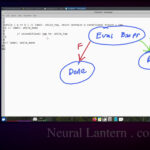
and so we have like four size type i equals zero i is less than 99 i plus plus right probably most
programmers looking up assembly uh on the internet probably are interested in uh or probably already
know how to implement for loops in c plus plus so let’s just pretend that you do and so inside of
your for loop we’ll do stuff and what happens here is uh well you know this for loop is going to run
Well, you know, this for loop is going to run 99 times.
It’s going to start at zero.
And, you know, so we have like an initialization part right here.
Maybe I should copy paste this and kind of break down the parts.
We have an init part here for the for loop.
We’ll say init part.
And then here we have a check part.
We’ll continue to loop as long as this expression is true.
You can make a big complicated expression if you want to,
but we’ll just keep it simple for this video.
So I’ll call this the check part.
And then we have sort of an update or a maintenance part.
an update or a maintenance part. So I’m going to call this the update part where we increment our
counter variable, move pointers, even call functions, do whatever it is you think you need
to do to update the loop so that it runs it, you know, so that the loops don’t actually have to be
integers. But in this case, I think it’s better, it’s easier to understand what the loop is doing
if we just kind of break down these parts. Anyway, so what is really a while loop? Sorry,
but a while loop that breaks and has break has like a nit logic and breaking logic and checking logic just in specific places.
Imagine this. What if I said before the loop starts, I’ll let’s let’s say we’re going to do a while loop before the loop starts.
I’m going to initialize a variable size type I equals zero, right?
That’s the initialization part that’ll only happen one time.
And then when you have a while loop and it checks to see if it should keep going, that’s
the check part of the for loop.
So I’ll just say while i is less than 99.
And then for the update part, we just have to stick that inside of the while loop somewhere.
Depending on your logic, you might want to put it at the top or the middle or the bottom.
I’m going to put it at the bottom because I’m going to expect that it happens right
before we do the next check.
So I’m going to maybe do a comment here and call it the update part and I’m just going
So maybe if I update this code to print something, it’ll seem a little bit more clear.
Value of I is, and then I’ll just say I end L, and then I’ll copy paste that to here.
And then I can also put this inside of the while loop.
And now we have transformed our for loop into a while loop.
transform your for loop into a while loop it’s pretty easy to implement in assembly if you
already know how to implement while loops so i should again say that there are lots of parts
i don’t know if i said that during this video but there are lots of things in this video that i’m
not going to that i’m not going to explain specifically because i’ve already explained
them in other videos so for example implementing a while loop is in another video so if you don’t
already know how to implement while loops if you don’t know how to use conditional branching or
If you don’t know the basics of assembly, hybrid programs, make files, all the basic stuff that I’m going to skim over in this video,
then you should probably check out my other videos first.
But for now, I’m just going to assume that you know how to implement a while loop.
And really the lesson is, hey, just take your for loop and convert it into a while loop.
And then you can implement the while loop pretty easily.
That’s the secret as far as I’m concerned.
So imagine this now. Let’s do some assembly code.
I have a source code file here called looper.asm for assembly.
And you can imagine that I have a hybrid program running under the hood.
I’m not going to show you all the code involved.
I’m not going to show you the make file or the C++ driver that calls on this module.
We’re just going to write the assembly here.
So, you know, if you’re writing pure assembly at home to practice, that’s fine.
Just keep in mind, there’s like a few things under the hood that I’m not showing in this specific video.
So first off, I’m going to copy paste my data section.
paste my data section of my assembly program. The first thing to note is we have a bunch of
C strings here. We’re basically going to be telling the user, hey, we’re going to begin
the four tests. Maybe I should have capitalized for, I’ll leave it. And then we’re going to prompt
the user for a number. We’re going to say, please enter a number. The loop will print from zero to
the number minus one, which is like the typical four loop that you usually write in the most
and then we’re going to have a little prefix we’re going to say you know like an arrow and then we’re
going to print the number back to the user that we’re looping through so if the user enters a
10 it’s going to print the arrow 0 and then arrow 1 arrow 2 all the way up to arrow 9
and then when we’re done we’re going to print an ending message so this is nothing new if you know
assembly already just c strings that will print with system calls see my other videos if you don’t
And then a CRLF string, just basically doing a new line, a carriage return new line feed
on the system.
And then we’re going to output using system call code one.
And we’re going to use file descriptor one so we can print to standard output.
Okay.
So now the real fun begins.
Let’s start our text section, which is where the instructions of our assembly program go.
So I’m going to do text section, section text right there.
And I’m going to use two external functions to just help me input and output numbers to the user.
If you wanted to, you could use a system call that just inputted a character.
And then you could just kind of like loop printing various characters.
And like, let’s say if the user typed A, maybe you could imagine doing a loop that increases the character that they typed all the way until it hits Z.
Or if they hit, you know, F, it’ll just print F all the way to Z.
to z you could do that without using an external library for printing integers this video is not
about this library right here so i’m not really going to go over it but uh you know you could
hard code the start and end points when you’re practicing um you could you could use a different
library or a different function call to get the inputs you could use a system call just to input
one character um or you could you know use a hybrid program to to utilize printf and scanf
f. Either way I’m just going to be using these two functions just to like get input and output.
It’s not really part of the idea of looping. So now let’s start our entry point.
Our function is called looper. Since this is a hybrid program you can imagine there’s a C++
module elsewhere calling on the looper function and so that’s why I mark it as global so it can
be called upon. And then I have another function called for test. I don’t really know why I chose
it this way but i wanted to make another function that was called upon by our entry point here
so the looper function really doesn’t do anything except recall the for test function
so now let’s start the for test function actually maybe this is where the fun begins
so i’m gonna put it down here and so you can see the signature it doesn’t take any arguments it
doesn’t return anything it just does stuff and then i have a note to myself this is how we’re
going to use the registers we’re going to use r12 for the user’s number and then we’re going to use
And then we’re going to use R13 to keep track of where we’re going.
So let’s see.
I’m going to start by saying let’s preserve R12 and R13
because you have to respect the application binary interface, the ABI,
and that designates R12 and R13 as Kali saved registers.
If I don’t preserve those and my program is even a little bit complicated,
I’m probably going to be debugging forever
debugging forever or I’m going to just crash my program for no reason. So I’m going to just
do a push pop pair. Notice how the pops are in reverse order. This is not a push pop video,
but just so you know, I guess while I’m here, I’m going to copy paste my crlf function,
which really does nothing. It just prints out the crlf string with a system call. That’s all
Okay, so do I even need CRLF in this program?
I think I just modified this.
Maybe I don’t even need it anymore.
No, I guess I do.
The first thing we’ll do is we’ll print an introduction message to the user.
So inside of the for test, we’ll just use a system call to print out, you know, a welcome
message to the user.
And then I’m going to call CRLF, which will just give us a new line.
And yeah, you can hard code, you know, the 13, 10 at the end of these strings, but I
don’t really like doing that.
doing that. Okay, so we should have a working program at this point. Let me see if it actually
does work. Clear and make run. Okay, so the driver prints a little welcome message. You don’t see the
driver code, but that’s what it’s doing. And then the for test prints the welcome message that we
just added. And then the driver lets us know it’s retained control. And then it’s responsible for
returning to the operating system for us. Okay, so then the next thing we’re going to do is we’re
we’re going to ask the user for a number so that we know how many times to loop.
And again, you could hard code this number if you don’t want to do IO right now.
You could even print a character a certain number of times
if you don’t want to even deal with printing an integer.
But I’m going to ask the user for a number.
That’s going to be the prompt string.
And if we run it again, now you should see it asks the user for a number.
So it’s going to say, please enter a number.
The loop will print from zero to N minus one.
print from 0 to n minus 1. It doesn’t actually ask for the number though. It doesn’t actually
I guess take the number so that’s going to be my external library that this video is not about
where I just call a function called input assigned 64 integer and I’m going to receive that back in
rax and I’m just going to save rax into r12. So r12 is now going to be the number that the user
inputted and that’s why up here I have it designated as the user’s number. So really not a big deal but
a big deal but uh you know if we run it again it’ll ask for a number and then it won’t do
anything else it’ll just kind of quit okay so now we can implement our for loop this is going to be
a little tricky so we’re going to start off with the initialization part remember we had several
parts here if i just kind of drag this off to the side maybe pin it up to the top so we can see it
aren’t we? If I move it a little bit to the side. So remember that for loop, it’s got an init part
and a check part and an update part. And I’ve kind of added that as a comment just to remind myself
of the way my mind is supposed to be wrapped around this concept. And so I made another comment
here with four and then empty parentheses just to denote that some comments that come below
I guess the top of the for loop
So now I’m going to make a label here and what I like to do with my labels is I like to
prefix them with the name of the function that I’m currently in and then an underscore and that kind of helps me keep track of
My symbols a little bit more easily, especially if I have a large module the symbols are less likely to overlap if I prefix them with the
The function names
to be Fortest underscore something and since I’m only doing one thing inside of the Fortest function
I’m just going to have a suffix only for the most part but you can imagine if you had more
parts inside of your function and it started getting a little cluttered you might want to have
you know another label you know that just sort of another I guess like part to your label that names
the part of your function you’re in although this is assembly it gets really hard really fast so
really hard really fast so if your function is even a little bit complicated you should probably
consider breaking it up into multiple functions if you can. We can’t really do that at this point
because it’s just a for loop but keep that in mind. Okay so we’re going to initialize. Remember
the first thing we had to do to initialize was you know setting i to zero or you know whatever
it is that we’re going to set up in the init part so I’m just going to do that here. I’m going to say
That’s the first part, the update part where we set size type i equals zero.
In fact, maybe I could do another copy paste of this.
Where instead of using a size type, we’ll just say that the register r13 equals zero.
I know that’s not going to make sense in a higher level language right now,
but just so that the for loop looks a little bit more like assembly.
We’ll keep going as long as r13 is less than r12.
and then we increase R13.
So I’m just going to put ink R13
so it looks more assembly-like,
even though this completely and totally
would not compile in C++.
I hope that this helps your understanding a little bit.
So yeah, we can do everything
except for just the increase part at the very top.
I’m going to choose to increase it at the bottom.
If you wanted to, I guess you could start off R13
as a negative number and then increase it at the top.
But I personally don’t feel that’s like very clean.
feel that’s like very clean it also forces you to use signed integers maybe you wanted to use an
unsigned integer so you could get like a gigantic um maximum number that you looped up to i don’t
know so we’ll just initialize here and we’ll say r13 is equal to zero the init part should not be
part of the actual like looping like every time you loop up to the top of the for loop you should
not repeat that part again it should only happen once so the next label that i have is called loop
have is called loop top and that’s just going to be the top of the loop that I
continue to go back up to every time I want to see if we’re supposed to
continue looping and then go into the loops body so maybe I should say that’s
why this is named to underscore loop top and I don’t know you don’t have to do
camel casing and your labels you know you could just do loop in it or whatever
but I’m just choosing to do it this way so at the top of our loop we’ll be
Remember that was the check part, right?
So we’re going to check to see that R13 is still less than R12.
If it is, we’ll continue with the for loop.
If it’s not, then we jump out of the for loop.
So that means probably the true case where R13 is indeed less than R12,
that’s going to be a short jump just into the loop’s body.
And the false case where R13 is not less than R12,
that should probably end up being a much longer jump.
on how big your your loop is maybe that jump is too long too far away for a conditional branching
instruction to reach if you’ve watched my previous videos you should know already that
the conditional branching instructions like jl like jump less than they can only reach about 128
bytes away if you try to go further than that the assembler will actually stop and block you from
finishing your compilation it’ll say i think it’s like jump out of range or something like that
So you want to try to keep the short jump points with your conditional branches.
And then in the false case, where the conditional branch doesn’t actually do anything,
then it falls through to the next instruction where you will have an unconditional jump.
And remember, the unconditional jumps, they don’t have a limitation of 128 bytes.
They can jump like all over the place.
Like they can jump anywhere, basically.
that means if you think about it, we come in to the loop top right here.
We immediately do a compare instruction and a conditional branch.
So if R13 is less than R12, meaning we should continue to for loop,
then we’ll just do a short jump into the loop’s body and actually execute its body.
And if not, we will end up falling through to line 92,
where there’s just an unconditional jump instruction that just says,
all right, let’s jump all the way down to being done.
Let’s jump all the way down to being done, which could be very far away for all we know.
Okay, so we’ve done that.
Now let’s implement the loops body because the first thing that we did is we wanted to
jump into the loop body to actually execute our instructions, which in this case, we’ll
just be, you know, printing a number every time we loop and then increasing that number.
So I’m going to do a little like new line there.
I’m going to paste the loop body.
little comments to help remind myself that this is actually the loop’s body. So for test loop body
that takes care of the branching instruction, hitting on that and actually going into the body.
And then later we’re going to have to implement a label for the loop being done. But for now,
we’ll just say the body. What does it do? It just prints a little message to the user.
If you look at the message for current number string, if I go up real fast,
message for current number, it’s just an arrow. So the user’s going to see an arrow and then
So the user is going to see an arrow and then their current number, I guess of the loop’s
current number.
And then every time it loops, it’s just going to continue printing that arrow with a number
on it.
So we’re doing that.
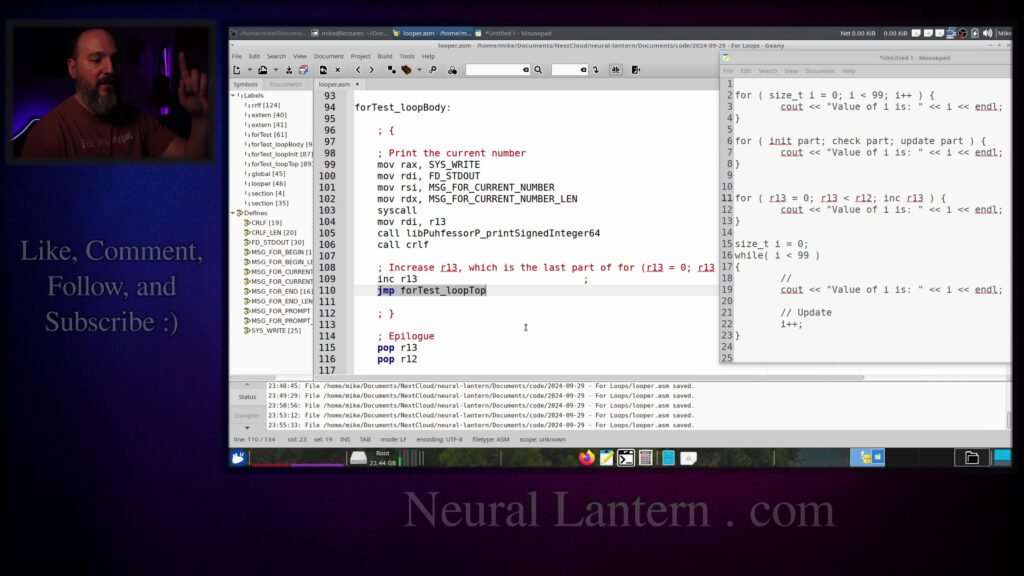
And then we’re going to say R13, which is the current counter variable, which started
at zero is going to get loaded into RDI, which if you watched my other videos, it’s just
the first integer argument for a function call.
So I’m just going to call this other function here, which is not part of the video to just
which is not part of the video to just say hey please print this number for me so the first
time this iterates it’s going to print zero because it’s going to print r13 and then it’s
going to print a new line so that the cursor goes to the next you know line of the terminal
so that’s all the body does it just kind of like prints the current number with an arrow and does
a new line and then at the very bottom of the loop body we just sort of maintain the for loop this is
for loop this is going to be the update part so like let’s see maybe scooch this up a little bit
the update part where we have let’s see on the very right side of the for loop which is like i
plus plus or in more assembly speak increasing the counter variable so i’m just going to increase r13
and then that way the loop can progress you know we’re always looking at r13
to decide if we need to stop or not you know we’re comparing r13 to r12
So we’re just increasing at the very bottom of the loop and then we unconditionally jump back up to the top.
Probably a better idea to unconditionally jump back up to the top because maybe the jump to the top is very very far and if it’s greater than 128 bytes it won’t work.
So the regular jump instruction doesn’t have that limitation. So now we’re jumping up to the loop top.
So you can imagine now that you know we’re not going to the initialization part. That would be bad.
We’re just jumping up to the top here where we immediately ask you know are we done?
If we’re not done, we jump into the loop body and print another number.
And then at the very bottom of the body, we say, all right, increase the counter and then jump back up to the top.
So this is a simple for loop, but you can see what it’s doing, right?
It’s just going to be printing a number over and over again as the number increases.
And then eventually it’ll stop when it hits the correct number.
The last thing we need is the loop done label.
If you look back up at the top here on line 92, if R13 was not less than R12,
less than r12 then execution would fall through to line 92 and there is our unconditional jump
instruction basically saying if r13 is not less than r12 then we’ll jump to the loop done label
which means we’re just totally finished with this loop so we have to make that real fast
and all it’s going to do is just basically say goodbye it’s just going to print a message to
to the restoration functions.
Oh, did I ruin my return somewhere?
Uh-oh, what did I do wrong?
I lost my return statement.
Did I accidentally delete that somehow?
That’s a bad program.
Or did I not even…
Hmm, I wonder if it like…
I wonder if I didn’t have my return statement
and it fell through into the CRLF function
and then the CRLF function returned to the caller
to the caller on behalf of the for test function I don’t even know only all only
the spirits know at this point I don’t know leave a comment or something if
you know what happened but every function has to have its own return for
sure so you know the loop done label is usually where you want to jump to when
you know the for loop is finished or the while loop is finished when it comes to
saying goodbye it probably would be a little bit more clear of me to add an
you know for test you know say goodbye just so that I that I remember that this
is this is the place where we’re done and this other place this is just
something else that’s happening maybe I’m doing more instructions or more
operations or calling a function or whatever so obviously if I did it this
way then the loop done label would just end up falling through to the goodbye
label and it would be fine but it’s just more visually clear I’m gonna take it
Anyway, so at this point we might have a program that actually works.
Let’s see if it does.
What else do I need to add?
No, I think we’re done with that.
Okay, let’s try it.
So we’ll do a make run and we’ll enter the number five and let’s see if it works or it
crashes.
It worked on the first try.
So I had a solution though.
Not fair, but I could have typoed.
Anyway, so it says we entered a five, the loop will print from zero to N minus one.
print from zero to n minus one so we should see from zero to four and so then every iteration of
the loop it’s just that little message we’re just printing a zero printing one printing a two you
know the number increases because we did did that little inc instruction the increase instruction
we unconditionally jump to the top of the loop where we decide if we’re supposed to uh finish
you know be done with the loop by jumping to the done label eventually after we uh let’s see
it prints this four here it’ll do the increase instruction at the bottom of the loop’s body
and then it’ll jump to the loop’s top then the loop’s top will see that it’s a five because we
just increased the four it will see that five is definitely not less than five so that’s a false
which means execution will you know fall through where the heck is that it’ll fall through to the
line 92 jump instruction which is just the loop being done so that’s here where it says goodbye
says goodbye and then we have successfully implemented a basic for loop
all right so thank you so much for watching this video I hope you learned
a little bit and had a little bit of fun I will see you in the next video happy
coding and happy studying hey everybody thanks for watching this video again
from the bottom of my heart I really appreciate it I do hope you did learn
hope you did learn something and have some fun. If you could do me a please, a small little favor,
could you please subscribe and follow this channel or these videos or whatever it is you do on the
current social media website that you’re looking at right now. It would really mean the world to
me and it’ll help make more videos and grow this community. So we’ll be able to do more videos,
longer videos, better videos, or just I’ll be able to keep making videos in general. So please
and subscribe. You know sometimes I’m sleeping in the middle of the night and I just wake up because
I know somebody subscribed or followed. It just wakes me up and I get filled with joy. That’s
exactly what happens every single time. So you could do it as a nice favor to me or you could
you could troll me if you want to just wake me up in the middle of the night just subscribe
and then I’ll just wake up. I promise that’s what will happen. Also if you look at the middle of the
screen right now you should see a QR code which you can scan in order to go to the website which
at the bottom of this video and it’ll take you to my main website where you can just kind of like
see all the videos I published and the services and tutorials and things that I offer and all
that good stuff and if you have a suggestion for clarifications or errata or just future videos
that you want to see please leave a comment or if you just want to say hey what’s up what’s going on
you know just send me a comment whatever I also wake up for those in the middle of the night I get
I wake up in a cold sweat and I’m like,
it would really mean the world to me.
I would really appreciate it.
So again, thank you so much for watching this video
and enjoy the cool music as I fade into the darkness,
which is coming for us all.
Thank you.