

Learn pointers & dereferencing in x86-64 YASM assembly and how to pass them correctly between assembly and C++ in a hybrid program. We build a small working example that sends strings, longs, and doubles both directions using pointers, modifies values across module boundaries, and explains why pointer-to-double still uses general-purpose registers. Includes a quick demo of stack misalignment crash + fix.
Great for assembly beginners moving to real programs, systems programming students, or anyone curious how low-level code talks to C/C++.
00:00 Introduction to Pointers and Dereferencing in x86-64 Assembly
00:28 Pointers explained in C++
01:02 Changing values via pointers in C++
01:43 Pointers in assembly basics
02:09 Defining variables and pointers in YASM data section
03:23 Pointers are always integers even to doubles
04:20 Function arguments are pointers treated as 64-bit integers
05:00 Driver C++ code overview
05:58 Marking extern “C” functions
06:40 Local stack variables and passing pointers
07:51 Stack lifetime warning
08:34 Assembly data section strings and numbers
09:39 Print null-terminated string helper functions
10:38 External symbols and hey_driver_print_this
11:29 Point function prologue and stack alignment
13:04 Extra push for 16-byte alignment
14:20 Printing welcome message from assembly
16:00 Driver sees initial long value
16:58 Printing received string from C++
18:20 Using received char pointer without dereference
20:21 Modifying incoming long via dereference
21:46 Driver sees modified long value 101
22:43 Calling back to C++ to print assembly-owned data
23:48 Passing pointers to assembly string long and double
25:08 Driver prints assembly-owned values and addresses
26:14 Summary of pointer passing between modules
26:36 Stack alignment crash demonstration
27:39 Adding extra push/pop fixes segfault
28:00 Closing remarks and call to subscribe
=-=-=-=-=-=-=-=-=
Thanks for watching!
Find us on other social media here:
- https://www.NeuralLantern.com/social
- Twitter / X: https://x.com/NeuralLantern
- Rumble: https://rumble.com/c/c-3696939
- BitChute: https://www.bitchute.com/channel/pg1Pvv5dN4Gt
- Daily Motion: https://www.dailymotion.com/neurallantern
- Minds: https://www.minds.com/neurallantern/
- Odysee: https://odysee.com/@NeuralLantern:5
Please show your support!
- Buy me a coffee: https://ko-fi.com/neurallantern
- Subscribe + Sharing on Social Media
- Leave a comment or suggestion
- Subscribe to Blog: https://www.NeuralLantern.com
- Watching the main “pinned” video of this channel for offers and extras
Hey there! In this video we’re going to talk about pointers and dereferencing in a YASM x8664
assembly program, also as a hybrid program so that assembly and C++ can talk to each other
and send each other pointers and send each other data and things like that.
for what pointers are.
I’m going to write in C++ for a second.
Suppose you have a pointer for an integer.
We’ll call it P.
Suppose you have an integer by itself.
We’ll call it A.
Let’s say that the value of A is 5.
And if you wanted to say that P points to A,
you could say P equals the address of A.
I’ll put C++ at the top here.
And so now if I set A to 6
then I print P a dereference of P this is not like a full pointers tutorial
but basically by changing a I’m changing what P thinks it sees as a value
assuming ID reference it I could also let me do a print 6 here I could also
just change the value through P I could say dereference P and I could say equals
would actually print a seven right so you know you can have regular variables global variables
whatever kind of you know memory stuff on the stack and to get a pointer to it you really just
need to get its memory location in c++ it’s kind of easy syntactically you can see what’s happening
in assembly you really just need the memory location stored somewhere you could store that
variable that just simply stored the memory location of some other variable.
You could have a 64-bit register store the value of a variable.
Let’s say we have like a, I don’t know, my whatever, my number let’s say inside of assembly.
I’ll do ASM here and we say it’s a quad word and it starts off as this number or whatever.
So if you haven’t seen my previous videos, go see them for the basics of assembly and
of assembly and linking and make files and all that stuff but you know if you
have an assembly program and you have a data section and you define a global
variable like this what you’re basically saying is I want to take this giant
number and I want to write it into eight bytes that’s the DQ it says data quad
word I want to write that giant number across eight bytes and then I want to
get a pointer to it stored in the my number symbol so my number is not
actually the value it’s a pointer to the value so you know later if you want to
you know later if you want to move you know something into a register if you did this
that would move the pointer into rax but if you did this
with deref symbols after it or around it then you would move
maybe i’ll put that into rex you’d move that actual number that we specified into rex
into Rx. It’s important to understand also that pointers are integers even when we’re pointing to
doubles. So for example sometimes people make this mistake they’ll say you know my double
and they’ll say it’s a quad word meaning this is going to be a 64-bit double precision floating
point number and they’ll do like 44.55 or whatever. So that is a double and it is in memory
you know what is the symbol of my double remember it’s supposed to be just a
pointer right it can’t be an actual double because a memory location is not
a double a memory location is an integer so that means if you wanted to move a
pointer into a register you would only be able to move the pointer into a
regular general purpose register not a floating point register and you should
use the regular movement instructions for just regular general purpose
So keep that in mind if you see a signature like this like let’s say function F and we have
You know, let’s say long a and long B and actually let’s do pointers
Let’s say long pointer a and long pointer
B and double pointer C all three of those arguments are actually 64 bit integers
Because they’re all pointers even if one of the pointers points to adult a double
double why did I say dull pointers aren’t dull they’re exciting okay so I’m gonna open up some
code here real fast so usually I don’t explain my uh my driver I’m gonna explain it to you this time
because it’s kind of doing a little bit more than my other videos um again if you don’t have uh the
knowledge of how to make a make file see my other videos because that’s explained there for now I’m
what we really need to do is write a driver and an assembly module for a
hybrid program again hybrid programs covered in other videos so the driver is
pretty easy I’m just going to copy paste it honestly here and then just kind of
explain it to you the driver is pretty easy we’re going to do I O stream so we
can print stuff we’re going to mark an external function called point as extern
C so that just disables name mangling which means the C++ module will be able
will be able to call on this function called point and it won’t expect that
the point function has its name mangled like C++ does the reason being is that
point is actually going to be in a side it’s going to be inside assembly where
its name will not be mangled this disables the ability to overload but
that’s okay we don’t care it’s going to take two pointers a pointer to a character
and a pointer to a long since both of those are pointers they’re both
64-bit integers even the character pointer and then we have a function that is internal to this
module called hey driver print this remember we’re inside of the driver program right now
so if you look at the bottom it’s just a function that takes in some pointers
and then prints some stuff so it’s going to print like it’s going to print what the string is
it’s going to print what the long is my dog’s growling at me i’m going to ignore him because
i literally just let him pee and poop at this point now he’s harassing me for treats
now he’s harassing me for treats he always does this okay so uh the string the long the double
this function expects to receive three pointers to different data types it’s just going to print
all of them and the point get it the point of this function is we’re going to go inside of
the assembly module and then have the assembly module call on this function so that we can we
can prove that we can have stuff sent from assembly to c plus plus or c using pointers
using pointers we can have data sent over so anyway that’s why both of these
are in here the point needs to be marked as no name mangling because point is
inside of assembly which will not name mangle and then hey driver print this
that needs to have name mangling disabled also so that the assembly
module can call on this other than that we’re just basically inside of a main
saying hey this is the c string we’re making a c string inside of the main function notice how
this is a local variable so that c string is going to show up on the stack it’s going to show up in
the area that is owned by main for main stack area same thing for my long that’s a local variable on
the stack um and but then we can actually send pointers to those pieces of data to another
function in another module you don’t have to only transport globals or stuff on the heap
or stuff on the heap, you can transport pointers to local variables. Just make sure that by the
time this function finishes, then nowhere else is actually using that data because,
well, being on the stack, once main function or once any function finishes, then its portion of
the stack will be cleaned up and removed and it’ll be junk data. You’ll probably get a seg fault.
But for now, we’re not going to use anything on the stack. We’re not going to use these local
just going to use them quickly on this call to point and then we’re going to return to the
operating system and finish the program. So that’s the driver. Now the hard part. Let’s do this in
assembly. So for starters, I’m going to make a data section and just explain it to you very,
very quickly. Again, if you don’t understand the basics of YASM x86-64 assembly, did I mention
that that’s what this language is at the beginning of the video? I guess I should put that in the
put that in the description or record an announcement that I can tack on at the beginning
or something. Anyway, so if you don’t understand how to do this, see my other videos, but basically
we’re going to make a data section. We’re going to define some strings. Here’s like an announcement.
Oh, we’re inside of, you know, the module now, the assembly module. And now we’re going to print
the received string. And then we’re going to make a string that is owned by assembly, which we can
into C++ when we call the function inside of the driver.
So this string is owned by the assembly module.
Notice how these are null terminated strings.
I just have like a comma zero there,
which means I have some extra functions
I’m gonna paste in that we’re not really gonna talk about
because they’ve been discussed in other videos
just so that we can print null terminated strings.
Then I’ve got a new line here,
you know, carriage return line feed.
And then I’ve just got some numbers
that are owned by the assembly module.
Then I’ve got a system write call,
call code one for the system call writes and file descriptor standard output so I
can print just to the terminal again if you don’t understand this see my other
videos so now let’s start the actual text section so this is where our
instructions start so we got the text section here and we’re going to use some
external symbols don’t worry about these I’m just using my own little library to
and input integers if you have access to this library use it if you don’t if you’re watching
at home and you don’t have this library then that’s fine you can use you know printf or
scanf or something like that to get and print floats from and to the user
but yeah I’m just using that and then I’m marking an external function here called hey driver print
this if you recall the driver module has a function called hey driver print this so
just allows my assembly code to call on that external function. Okay now next
piece of code. This is going to be… actually I’m going to paste the print
null terminated string function and related code because it’s just like a
big giant mess and we’re mostly going to ignore it. So just to show you what I’m
doing here I have a function called print null terminated string so that I
can print these strings up here and then I have it rely on a function called
string length that I have implemented up here and all it does is just
implemented up here and all it does just calculates the length of the string and
then a crlf function so I can just call that so that’s all explained in other
videos don’t worry about it for now we’re going to start the actual entry
point remember the driver was just gonna call point right so now we just have to
implement point in the assembly module so that’s gonna be like down here our
our entry point so the signature for this function is going to be character
pointer and then a long pointer and it doesn’t return anything and remember
that if we look back at the driver that should match the signature right it’s a
character pointer and a long pointer and of course this is just a comment that
reminds me of what to do in assembly you don’t really have a signature you just
sort of use registers but I’m reminding myself that RDI is going to be a
character pointer and RSI is going to be a long pointer.
Here’s a note to myself that I’m going to use R12 and R13, which means
the first thing that I should do, well actually before I even do that, I should
return from this function because it is a function. I marked it as global
so that the other module could call it, the driver module could call it. Again,
see my other videos for hybrid programs.
But so now the, you know, if the driver calls this function, then now we’re inside of
and there’s a return statement so it’s a valid function I should preserve the
registers that I’m going to use that are marked as Kali saved for the ABI so I’m
going to go prologue and then an epilogue and I’m going to say push r12 and push
r13 and then I’m going to pop r13 pop r12 they should be in reverse order if
you’ve seen my other videos you’ll know this and the the thing about this
the thing about this particular program is we’re going to run into stack alignment issues
so uh if you don’t know about stack alignment and how it can crash your program without you
realizing what’s wrong see my other videos but for now we’ll assume you know that and uh i i
already know from running this program in advance that it’s going to be out of alignment by eight
bytes so i’m just going to push an extra register onto the stack and that’s going to put it back
I know it looks weird, but this is going to work.
Let me get rid of this here.
Okay, so.
And then maybe if I can remember at the end of the video,
I can just remove that extra push-pop pair,
and you’ll see the program starts crashing.
But at home, you can do it just to double check.
So the first thing I really want to do is,
after I push and pop,
is save our incoming arguments.
Remember, the first integer argument
and the second integer argument,
argument they come in as RDI and RSI in assembly per the ABI if both of these
things are pointers it doesn’t matter what the data type is it could be
pointing to anything including a double and these would still be considered
integer arguments because well RDI and RSI are just going to be loaded up with
memory locations which which are integers so I’m going to save our
arguments to R12 and R13 now justifying our push and pop pair then I’m going to
little welcome message so print a little welcome message again you don’t need to know about this
function but it’s explained in other videos that I’ve already published we’re going to print our
hello beginning message I’m getting nervous he needs to take a second poop sometimes it’s poopoo
number two time for him and he’s not really just lying about a treat but he did go pee and poop
But he did go pee and poop already.
Okay, he just left and walked away.
Okay, if he comes back, I’m letting him out this time.
I’ll pause the video if he does it again.
Okay, I’m pausing the video.
No pee lied.
He went outside, lifted up his little leg, and a couple of drops of pee came out.
Now he’s staring at me like he deserves a treat.
Sorry, buddy.
I wish I could eat constantly all day long, too.
But life isn’t always fair.
isn’t always fair anyway let’s see I might even lined up on the camera
anymore I don’t even know so we’re looking at this code here is going to
print a welcome message let’s see if that actually works so I’m gonna do make
run again make files are whoops what did I do loader dot asm what did I do what
did I do I somehow copy pasted the wrong make file
What’s the name of my source code file?
It’s point.
I guess I’ll just change it, and then it’ll probably work.
It’s still in assembly module.
Hopefully that didn’t mess it up too bad by copy-pasting the wrong source code.
Okay.
What is going on here?
Floater.
Oh, I need to change that.
Hang on.
Let me fix this.
I don’t know if I’m going to edit this out.
out. It’s fun to watch me struggle sometimes. There we go.
Point.
Alright, let’s give it another try.
Oh no, star dot so no such file a directory. Dang it.
Okay, now this seems to work. I may or may not have edited
that out. I copy pasted the wrong source code into my make
file. So I had to manually adjust it. Then I forgot to
copy paste my library file into the build directory. So I had
The driver sees my long as whatever.
What’s going on?
Print an alternate string begin.
Oh, the driver is printing a bunch of stuff.
Okay.
I started to think, why does it look like the program has a lot of stuff going on?
Oh, that’s the driver.
Okay.
So the driver says it sees its long as 100.
And then now we’re inside of the point module.
So that’s the only thing we’ve done in assembly so far.
so far then the driver has regained control maybe I should add a couple of
new lines in there so I don’t get confused again we will do a C out and L
and we’ll do two of those run the program again and then I won’t get
confused about the messages okay so now we’re inside of the point module and
nothing is happening so points let me get rid of the make file here and
and we’re just printing a welcome message nothing else so now let’s print
the received string so what am I talking about so we’re gonna print a prefix
basically saying hey we received the following string right so if you look at
the symbol message received string it’s just gonna say we’re now printing the
received string and then it’ll print it so what are we actually printing we’re
What is R12? R12 is a character pointer to the print me string. And so basically this
function print null terminated string, it takes a character pointer. So we’re giving it a character
pointer that we received. When point was called by the driver, notice how it gave a pointer to
the C string. You know, all arrays are basically pointers. They’re just different syntactically
just different syntactically sometimes so if i declare an array of some length and i give the
symbol somewhere that symbol is really a character pointer so um by calling point with my c string
i’m calling point inside of the assembly module with this character pointer so that means even
though this c string is owned by the driver by the c plus plus module the assembly module has access
So that means we should be able to print it right now already.
So just the rest of it is just like giving a pointer.
And notice how I’m not dereferencing R12.
If I did dereferencing around R12, then we would be looking to that address and seeing what’s there,
which wouldn’t work for printing a null terminated string.
So let’s just run it again.
I don’t know if you can hear him.
This dude is growling at me still because he wants another treat.
He just got denied.
He’s trying to do it again.
do it again. I let him outside people. He’s been outside like three times already and he just went
out like two minutes ago. Okay. I love him so much. It hurts my heart and he knows eventually he’s
going to break me because it hurts my heart or I’m like too distracted. It’s like, you know,
pulling the crank on a slot machine in Vegas. You know, eventually something comes out.
That’s what he does to me. I’ve accidentally trained him. So now printing the received
Now printing the received string and notice how it prints.
Hello, this is a C string owned by me.
So our assembly module is able to print a C string that was created locally by a C++ module.
So we’re handing around pointers.
Nice.
Can you hear me?
He’s getting louder.
So now let’s modify the incoming long.
Can you shush your freaking pants, please?
Shush your pants.
shush your pants you know the sad thing also is he’s so old that he’s deaf now
so he used to know what shush your pants meant it meant I’m not listening to you
and you might as well stop because I’m not gonna do anything based on your
harassment but now he can’t hear me say shush your pants so he just harasses me
all day and all night okay um so I’m gonna copy paste a little bit more code
Modify the incoming long.
So remember again that the point function, it received a pointer to a long.
We’re calling the long change me on the inside of this, but it’s coming in as R13.
And if you notice what I’m doing here is I’m just saying let’s increase the long.
So I’m going to dereference R13 because R13 is a pointer.
So I’m saying let’s go to the memory and change the long that is inside of memory.
And we have to specify that it is a keyword.
it as a keyword so that we you know we don’t confuse the system the system might think are
you modifying a keyword or like a double word or like a word like how big is your data all we know
is it’s an integer because it’s the increase instruction so I’m saying we got a keyword you
know a 64-bit integer sitting at that memory location I want you to dereference it and increase
it and going back to the driver we’re providing a pointer to our long so the long starts off is 100
and we’re just giving a pointer to it the next thing that we can do is we can
ask the driver to print our own stuff actually you know what let’s run the program right now
just to show that the driver can see the change in the long so i’m going to run it again notice how
first when the driver says hello it sees its own long as 100 then we’re inside the assembly module
long and then we return to the caller which is the driver notice how at the
very end of the program the driver sees its long as being 101 so we were able to
modify data that was owned by a different module just by passing pointers
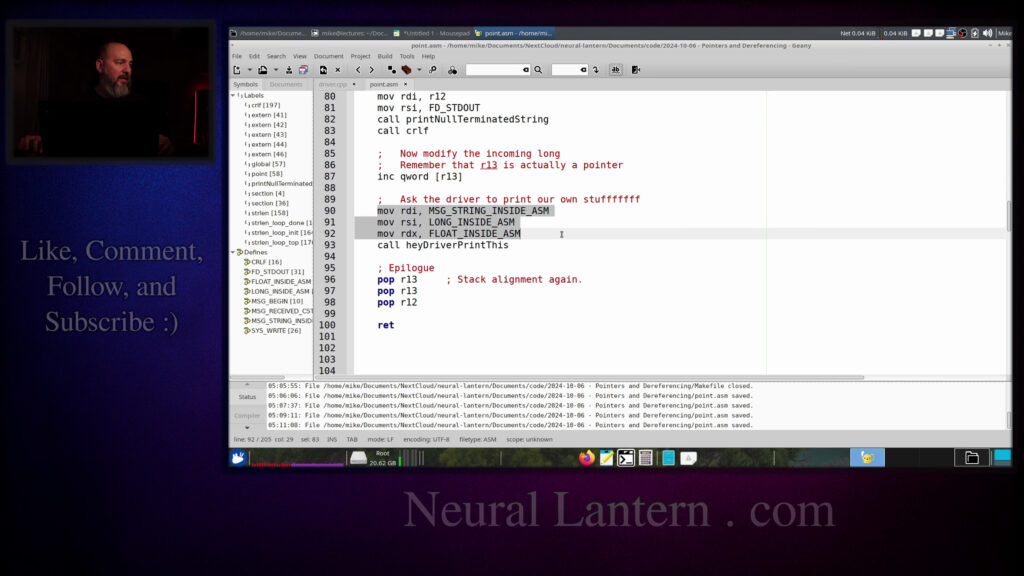
and de-referencing them okay cool so now the next thing that we should do is let’s
ask the driver to print our own stuff that we own because remember if you go
to the very top you know we own some stuff we own some we own a long we own
float, right? So we want to be able to do something with that. So I’m going to copy paste this,
ask the driver to print our own stuff. So I’m going to move three items inside of arguments
for a function call. And then I’m going to make a function call calling the function,
Hey driver, print this again, Hey driver, print this is actually owned by the C++ module.
a pointer to a long and a pointer to a double remember even pointers to doubles are actually
integers so they use the general purpose register so that’s the three arguments right there rdi rsi
and rdx m and then we’re giving the first pointer is going to be the c string so message string
inside asm so you can see that’s this right here and then the next pointer is the long
inside ASM and the third is the float where did I just go I’m getting confused my dog is harassing
me right now so bad notice how I’m not dereferencing so like if when we were increasing the incoming
long before R13 was a pointer so we dereferenced while we increased so that we would increase the
actual value and not the pointer and not the pointer’s memory location but here we’re not
C++ module the actual pointers to our data. We don’t want to give it the data itself. We want
to give pointers to the data so we’re not derefing with the brackets. So then we call it and when we
get back in here it should just be able to print everything. So I’m going to run it one more time.
We’re going to make it and run it and so now let’s see. So here we’re inside of our assembly module
And then here the assembly module has just called on hey driver print this.
Remember the C++ module doesn’t actually call this function.
The assembly module calls it.
So we’re like going back and forth.
We’re kind of crisscrossing.
So now the drivers print this function says we got the following string.
Notice how that’s the string that is owned by assembly.
So we define that inside of our data section in the assembly module.
And then it prints the long.
It prints it as hex.
And it just sort of prints the value.
it just sort of prints the value then it prints it as hex again and then prints at the value
i think actually not hex i think this prints the memory location let’s double check real fast
yeah so remember um in c plus plus i know this is not like a c plus plus video but um
if the long is a pointer then if we just print it without dereferencing it we should see a memory
location so it’s telling us uh that the long’s memory location is this and the doubles memory
location is that and if you stare at those two numbers long enough and you understand hex which
And do you understand hex, which you can see my other videos for?
You’ll see that those memory locations are right next to each other because that’s the way we define them inside of assembly.
So we now have the ability to have data that is owned by assembly and give it to C++ or C using pointers.
No problem at all.
And then the printing driver thing exits and then the actual driver regains control.
And it just says that it sees it’s long as 101.
it sees it’s long as 101 so uh yeah that’s that’s pretty much all i wanted to show you for this
now you hopefully are an expert at passing data back and forth between various modules using
pointers we’re not using references because references are like a little bit a little bit
less compatible pointers are just really easy they totally work in assembly no problem
one more thing i just wanted to show you real fast before we go even though there’s another
video you should check out for stack alignment I just want you to see what
happens if I remove this extra push-pop pair so now my stack is about eight
bytes off of its previous alignment because you know we’re not pushing an
extra eight byte value and somewhere inside of the let’s see print null
terminated string and then the hey driver print this oh and then we go into
like a bunch of C stuff the program should probably crash because anytime
you use a GCC function or a GCC library or something like that the stack has to
be aligned to 16 bytes so if it’s off by 8 then it’ll crash and how did I know
that I needed this well I just ran it first and it crashed and then I added
the extra push pop pair and it didn’t crash and I realized it was definitely
one more time we should get a seg fault yeah we get a seg fault stack alignment oh no with no
description of what’s going on if you were in gcc you could i mean sorry if you were in gdb you
could probably figure that out eventually but why not just give it a try add another push pop pair
run the program again with no other modifications now it totally works
okay well uh i think that’s uh that’s all i have for this video thank you so much for watching i
I hope you learned a little bit of stuff and you had a little bit of fun.
I will see you in the next video.
Hey everybody.
Thanks for watching this video again from the bottom of my heart.
I really appreciate it.
I do hope you did learn something and have some fun.
If you could do me a please, a small little favor,
could you please subscribe and follow this channel or these videos
or whatever it is you do on the current social media website
that you’re looking at right now.
It would really mean the world to me
would really mean the world to me and it’ll help make more videos and grow
this community so we’ll be able to do more videos longer videos better videos
or just I’ll be able to keep making videos in general so please do do me a
kindness and and subscribe you know sometimes I’m sleeping in the middle of
the night and I just wake up because I know somebody subscribed or followed it
just wakes me up and I get filled with joy that’s exactly what happens every
single time so you could do it as a nice favor to me or you could you control me
up in the middle of the night just subscribe and then I’ll just wake up I promise that’s what will
happen also if you look at the middle of the screen right now you should see a QR code which
you can scan in order to go to the website which I think is also named somewhere at the bottom of
this video and it’ll take you to my main website where you can just kind of like see all the videos
I published and the services and tutorials and things that I offer and all that good stuff and
for
Clarifications or errata or just future videos that you want to see please leave a comment or if you just want to say hey
What’s up? What’s going on? You know, just send me a comment, whatever
I also wake up for those in the middle of the night. I get I wake up in a cold sweat. I’m like this
It would really it really mean the world to me. I would really appreciate it. So again, thank you so much for watching this video and
darkness, which is coming for us all.
Thank you.