
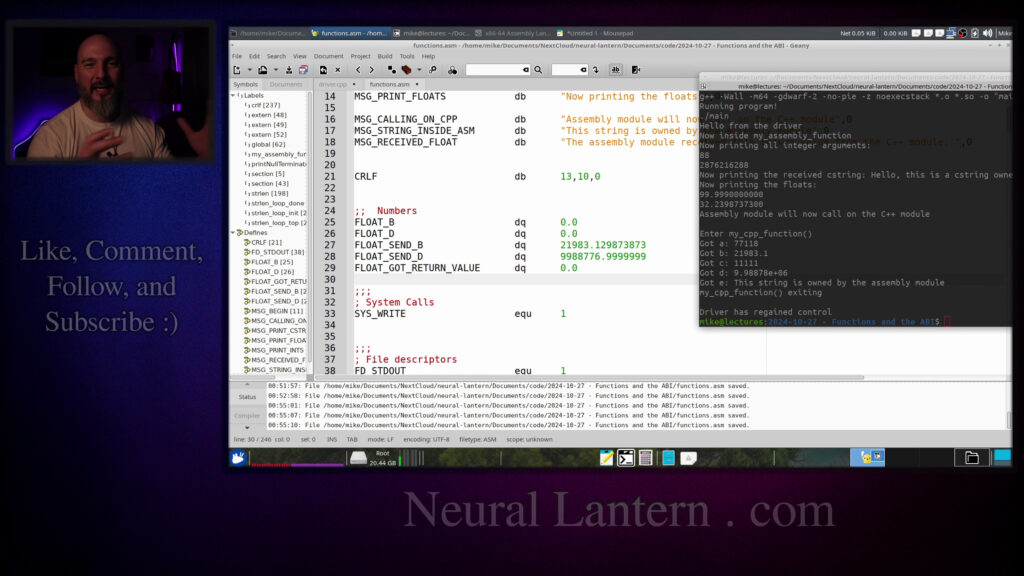

Quick but complete guide to writing proper functions in YASM x86-64 assembly on Linux. See how to pass integers, pointers & floats, return values, follow the ABI, disable C++ name mangling with extern “C”, and call back and forth between C++ and assembly in a real working example.
Great for people moving from NASM/GAS or trying to mix assembly with higher-level code.
00:00 Introduction and Video Overview
00:28 What Are Functions in Programming
00:56 Why Functions Are Harder in Assembly
01:24 Topics Covered in This Video
01:59 About the Makefile and Prerequisites
02:28 Hybrid C++ and Assembly Program Plan
03:01 Using extern “C” to Disable Name Mangling
04:03 Main Driver Function in C++
05:00 Adding a Callable C++ Function for Assembly
05:42 Explaining extern “C” Placement
06:16 Assembly File Skeleton and Data Section
06:41 Creating Null-Terminated Strings
07:49 Section .text and External Symbols
08:52 Declaring my_cpp_function as extern
09:20 Defining my_assembly_function
09:40 Labels vs Real Functions
10:31 The call Instruction and Return Address
11:16 Why Jumping Instead of Calling Crashes
11:47 Global Directive for Exporting Functions
12:32 Basic Function Structure
13:20 Implementing my_assembly_function Prologue
14:50 Receiving Arguments in ABI Registers
16:30 Printing Received Integer Arguments
18:10 Handling Pointer Arguments (C Strings)
19:40 Passing Floating-Point Arguments in XMM
21:15 Printing Floats from Assembly
23:00 Calling Back to C++ Function
25:40 Preparing Arguments for my_cpp_function
27:20 Loading XMM0 and XMM1 for Floats
29:10 Making the Call to C++ Function
30:50 Receiving Double Return Value in XMM0
32:30 Saving Returned Float to Memory
34:10 Printing the Returned Value
36:00 Final Messages and Program Flow
38:20 Fixing String Pointer Crash Issue
40:00 Correcting Argument Loading
42:10 Passing String Owned by Assembly
44:00 Observing Successful Output
45:47 Saving and Restoring XMM0 Safely
47:14 Printing Final Returned Float
48:32 Importance of Following the ABI
50:29 Summary of Covered Topics
51:03 Closing Remarks and Call to Subscribe
=-=-=-=-=-=-=-=-=
Thanks for watching!
Find us on other social media here:
- https://www.NeuralLantern.com/social
- Twitter / X: https://x.com/NeuralLantern
- Rumble: https://rumble.com/c/c-3696939
- BitChute: https://www.bitchute.com/channel/pg1Pvv5dN4Gt
- Daily Motion: https://www.dailymotion.com/neurallantern
- Minds: https://www.minds.com/neurallantern/
- Odysee: https://odysee.com/@NeuralLantern:5
Please show your support!
- Buy me a coffee: https://ko-fi.com/neurallantern
- Subscribe + Sharing on Social Media
- Leave a comment or suggestion
- Subscribe to the Blog: https://www.NeuralLantern.com
- Watch the main “pinned” video of this channel for offers and extras
Hello there.
In this video I’m going to teach you how to write functions in YASM x86-64 assembly inside
of Ubuntu, although probably any YASM assembler will be fine.
I’ve covered these topics before in other videos, but I thought it would be nice to
put them all here in one single video to make it a little bit easier to understand.
Okay, so first off, what the heck am I talking about?
Well, you know, when you have a program, let’s say we have a higher level language program
and we have like, you know, void or actually probably not void main, let’s say int main
and we’ll forget about the arguments and inside of main, it just sort of calls f and then
we have an f function over here and it, you know, does stuff, right?
So that’s the basic idea of having a function that you can call and calling it.
We sort of take the whole process for granted in higher level languages, but in assembly,
in assembly we have to do a lot more from scratch so I’m going to show you about how to pass
arguments how to pass integer arguments pointer arguments floating point arguments return types
you know double like floating return types integer return types pointer return types
how to use special registers to actually pass the arguments into the functions how to write a
so that’s basically what we’re going to do before before i get any further here i just want to point
out that um this video is not about the basics of assembly nor is it about the basics of um
make files or some of the other related technologies that i’m going to show
i’ve covered everything in this video in a previous video um so if you if you find yourself
getting lost and you don’t understand what i’m saying or what i’m doing you probably want to
look at my previous videos because this is sort of a summary video to kind of help you
of help you help you really lock down on the concepts of writing functions okay so for starters
this right here that you’re looking at is a make file this is not a make file video if you want to
learn how to make make files or why they’re awesome see my other videos but i’m just going to assume
at this point you’re either willing to research my other video or you already know or you don’t care
how to make a make file so you know we’re just going to skip this i’m going to close it
function or sorry a driver module and what I’m going to do is I’m going to write this program
that I’m showing you now as a as a hybrid program a program with modules of different languages so
this module right here is going to be c++ and then we’re going to have an assembly module and
then they’re going to be able to call each other so the first thing that I’m going to do is I’m
going to name some functions that are going to be inside of my assembly module and also name some
module and also name some functions that are going to well name a function that’s
going to be just inside of the C++ module but it should be callable by the
assembly module so for that we use a little block called extern C and long
story short that disables name mangling which C++ does in order to provide
overloading functionality so we’re basically going to disable overload
functionality in order to have simple function names that way assembly can
and also when we attempt to call a function inside of assembly we’ll just call it by its
simple name rather than try to mangle the name based on the the arguments and return type and
such so that that’s something we have to do for compatibility at least for this video and I’m just
going to move on so basically you just take you just take the keyword extern and you put a c in
a quote and then you make a block right a little braces scope and then you just list prototypes of
types of either the functions inside of the current module which you would like to demangle
or other modules functions that you would like to be able to call in a demangled or
I guess a non-mangled way.
Mangled meaning name mangling.
Okay, so then I’m going to copy paste the main function that I’m going to do.
So this is a hybrid program, which means you know there are several different modules of
different languages.
driver which just launches the program and it contains like the entry point
like see how there’s like the the main entry point which if you know how to do
other languages this is usually where you start in C++ or like the GCC
libraries so this is the entry point for our whole program and then once we’re
inside of here we’re just kind of print out a message to the user we’re gonna
make a C string and then we’re gonna call on the assembly function we’re
gonna give it you know some numbers some integers and some floats and we’re
gonna give it our C string and then when we’re inside of the assembly
and then when we’re inside of the assembly function we’re just going to print those things to prove
that we know how to call and we know how to receive data from c or c plus plus into assembly
and then we’re just going to print you know goodbye basically okay so uh i’m going to make
another uh let’s see another function in the driver so that assembly has something to call
because i don’t just want to be able to call assembly from c i also want to be able to call
put in something that we can call on from assembly here.
I’m going to call it my CPP function.
And it’s just going to have like some arguments,
just some nonsense arguments.
And all it’s going to do is just print out that it’s entering,
print out the arguments and then just sort of say goodbye.
And then just return a value to the caller.
We’re going to return a floating point value to the call.
And we’re going to return a floating point value to the caller.
floating point value to the color okay so notice how at the top here i have uh in the extern c my
cpp function it’s the same thing that we see at the top is now at the bottom and that just means
uh this normally would be compiled and linked with name mangling and so because it’s in the
extern c block there’s no name mangling and the reason that works with an extern c block is
because there’s no name mangling in c that’s sort of like a c plus plus thing with overloads and like
whatever okay so we have like the basics for our driver it’s a simple module the hard work is going
to be inside of assembly so uh maybe before we write assembly oh you know what let’s write the
skeleton of the assembly and then i’ll start explaining uh what it means to call back and
forth and to make functions and things like that okay so for starters i’m just going to make a data
section with a bunch of stuff inside of it and i’ll explain it just very briefly again this video is
basics of assembly in Yasm. If you want to learn the basics, go see my other videos.
But for now, I’ll just assume that you understand why we’re making variables in the data section
and kind of how to do it. So I’m just, you can see here, I’m making a bunch of null terminated
strings. They’re null because they have a zero at the end. And I’m just saying, well, here’s a
message when we begin the program. Here’s a message to announce we’re about to print some integers,
to print a C string, to print some floats. Here’s another message for this, another message for
messages right then a crlf that’s just you know taking the cursor down to the
next line and then back to the very beginning so it’s like a basically a new
line and then I’m gonna have some floating point numbers and I’m gonna
have an a and a B number and then I’m gonna have a B and a D that I’ll send
somewhere else and so I’m gonna populate them with numbers from the start the B
and the D that just are not being sent they start at zero because we’re gonna
we’re going to receive those numbers from C and then we’re going to get a return value as a
floating point from the C function that we call so we’re just going to store it there so I’m just
like making a bunch of room to store some from some variables and then here we’re just going
to do system right and we’re going to send to standard output that’s covered in other videos
but basically we’re just going to be printing stuff okay so section text now this is where
actually starts. Well, sort of. This is where the program contains instructions to execute.
So section text. And the first thing I’m going to do is I’m going to name some external symbols
that I have for myself just to help me print integers and floats. So, you know, if you’ve
seen my other videos, you know that you can do a wide variety of things to sort of print characters
and numbers if you were clever. And you can also call on C library functions like printf.
functions like printf if you really wanted to print floating point numbers
and signed integers and stuff so you don’t have access to this library so
don’t worry about putting this part in your code if you’re working at this from
home unless you’re someone that has taken a class that I’ve taught somewhere
and for now just just assume that this just lets me print very easily no
problem you don’t really need that if you’re just kind of experimenting with
function this is the name of the function that we made in the driver my cpp function notice how it’s
over here my cpp function we’re just letting our assembly module know that there’s a function in
another module that we should be able to call on even though all these modules are going to be
linked into the same program we still have to do this just to let the assembly module know
okay so now we need to make a function called my assembly function if you look at the top right here
We had this other D name mingled prototype, my assembly function.
So we have to actually write that somewhere.
It’s not in the driver.
Let’s write it inside of assembly.
So my assembly function is going to start right here.
Boom, right there.
So this is when we kind of start on the basics of writing a function.
So for starters, hopefully you understand labels.
If you don’t understand labels by now, you might want to see my other videos.
just some sort of an alphanumeric symbol that you just kind of write as sort of
sort of like a variable name.
You can’t use every symbol available.
I would just start with using letters and numbers in the underscore.
Of course, you can always experiment if you want to see what’s allowed and what’s
not just type something and see if it compiles.
So the label starts with just, you know, this name and then a colon, right?
So that’s a label.
You can jump into labels.
Like if we were somewhere else in the program right now, we could like, if we
we could like if we wanted to do an infinite loop we could say jump and then the name of the label
and what would happen is execution would go back up to this label and then it would jump again
it would go back up it would be an infinite loop but we wouldn’t technically be calling a function
we’re just sort of jumping so labels are sort of the first step we have to do a little bit more to
actually make a function so we have an assembly function which right now is just a label and in
side we have to mark it as global so remember when we marked my CPP function
as extern that means we can call a function that lives somewhere else now
we’re marking this function as global which means it lives here but we want
other modules to be able to call on our function or our label okay so how do we
actually make a function let’s see the first thing that you should do is try to
understand that if that all functions return even if they don’t return any any
Under the hood, what this is actually going to do is crash the program if you just jumped
into this label and didn’t call it like a function, because the return instruction will
look onto the call stack and try to find a return address for wherever this function
was called from and then go jump, do a jump instruction to return there.
And so if you just jumped into this label and then there’s a return, it’s going to pop
something up the stack that’s not actually a return address and probably crash the program.
So that means now that we have a return statement, we definitely have to call this like a function.
And I guess that’s pretty easy because, well, if we were inside of assembly and we wanted to call another function,
let me just show you real fast.
I’ll say some other function.
If we were inside of this label, for some reason, we could call the above function by just saying call.
And then the label.
So now it’s being treated like a function.
it’s being treated like a function.
What the call instruction really does is it just looks at the address of the next instruction
that would have been executed.
So, you know, whatever, let’s say we have like a nope on the next line, whatever the
memory location or the relative memory location is of that nope instruction, it’s going to
push that onto the call stack.
And then it’s going to just do a jump instruction to this label.
So then later when we hit this return statement, then it’s going to look onto the call stack
and it’s going to find that return address, which is going to correspond with the nope
instruction and the return instruction is going to do a jump back to that address.
So basically you have to use the call instruction to get there and then use a return instruction
to return from there.
And then now we can actually call it a function.
But then there’s other things that functions have to do to behave themselves without crashing
the program.
So for example, notice up here that I have copy pasted the let’s see call on assembly.
Oh, I think I forgot to update that.
I forgot to update that. Let’s see. Call on this. Yeah. It’s supposed to be called my assembly
function now. Hold on. Let me update my, uh, my solution. Whoops. Hold on. Call on.
There we go. My assembly. Okay. So I’ve got my solution up above on another monitor.
So I have the prototype of the function here. Uh, it’s just going to return nothing. And it’s
going to like take in a long and a double and a long and a double and a character pointer.
And then my intention here is to save these arguments with some registers.
So notice how I’m saying we’re going to use R12, 13, and 14 to save the arguments A, C, and E.
And we’ll talk about why we’re not saving the other ones with those registers in a second.
But basically we’re going to use those registers.
So the thing about the registers is we have to do something called respecting the ABI.
Respect the ABI.
The ABI stands for the Application Binary Interface.
interface and it’s just sort of like a standard that governs all of the things that you can do
and you’re supposed to do when you’re working with x86 64 assembly so the abi is pretty cool
hang on a second the abi is pretty cool because it actually standardizes things
for instance if we didn’t have the abi and we didn’t respect it then we couldn’t actually call
plus or vice versa because c plus plus the higher level languages they’re going to use the abi so if
you try to do things your own way then all you’re going to end up doing is wasting time and energy
coming up with two different ways of doing things when you could have just done it the abi way
right so and one of those and one of those ways your way wouldn’t even work uh for cross you know
module calling it would only work internally to your own program so we’re going to respect the abi
does the abi say about these registers and again i’ve talked about this extensively in other videos
but let me pull up a fun book that i love to uh to talk about uh so this book right here i did not
write it uh the book here is written by a really wonderful uh professor dr ed jorgensen phd and um
this book is totally free it’s not i’m not selling you anything uh this is literally you can just go
to this this professor’s website and download his book for free and he’s already given me permission
and he’s already given me permission to just tell everybody to just share it with everybody if you
if you look in the license area it’s a copyleft license so it’s sort of like the spirit of open
source just sort of like sharing knowledge and stuff so it’s awesome so I suggest everybody you
know follow the link that I hopefully put in the video and and grab a copy of this book but
basically what I’m going to do is I’m going to go to a special area and I’m going to search for
here and so that would be I guess section 12.8.2 and it’s called register usage subsection 12.8.2
notice how it lists all of the registers and kind of how they are typically used
this falls under the scope of the abi so this is not all the abi is but this is one of the
things you’re supposed to do when you’re respecting the abi is you’re supposed to sort of like
are supposed to be used. Notice R12, which is one of the registers that we’re going to use,
is designated as callee saved. So that means whoever is being called has to preserve that
register if they intend to mess it up. So for example, if I just had this function here,
move some value into, you know, R12, I have now basically broken the program. If any, you know,
C function or other library that you didn’t write, just any anywhere else calls on this function,
anywhere else calls on this function then their version of r12 is going to get destroyed by what
i just did and so i’m not respecting the abi when this function returns to the caller they’re going
to expect that their original data was intact and if it’s not program is not going to work it’s going
to screw up so respecting the ai means you have to preserve any registered mark as callee saved or
that’s one of the things that it means so notice how r12 through r15 are callee saved so we have
the abi now and sort of preserve 12 13 and 14. we can do that pretty easily with some push and pop
statements so i’m going to do push r12 push r13 push r14 and now what happens is those values
are actually on the stack now and i can retrieve them later at the end of the function even if i
destroy them while i’m inside of the function i’ll just restore them right before i return so
because it happens before the function does anything.
And then we have to make sure that we pop those values
because you have to be careful with the stack.
If you just start pushing values
and you don’t restore the stack to its original state
by the time you return,
you’ve basically broken the program.
It’s either going to crash right away
or whoever called it is not going to function correctly anymore.
So let’s do some pops.
We’re going to do three pops
and we’ll call this the epilogue,
which means uh you know something we do right before we exit the function and keep in mind
that the order of the pops should be reverse of the order of the pushes notice how we’re popping
in reverse order from what i did before so we’re going to pop uh 14 13 and 12 where as we pushed
12 13 and 14 before if you pop in the wrong order like if you try to do it in in the same order as
the pushes then uh you’re still going to end up destroying data for the caller because you’re
because you’re going to be restoring data to the wrong registers.
So just keep that in mind.
OK, so now the ABI is being respected.
Let me see, by the way, do we have enough to actually even run the driver right now?
We’re just calling it and then it didn’t really do anything.
Yeah, I think we could probably this might compile.
OK, let me let me just check this out.
I want to say clear and make run.
Yeah, it compiles.
OK, so the driver printed its hello message.
again it’s just sort of saying like hello from the driver and then when the driver comes
back it says the driver regained control and nothing really happened because well we didn’t
do anything in our assembly function yet but at least we’re calling multiple modules and again
if you want to know how to do hybrid programs and linking and compiling and all that stuff
see my other videos for now I’m just going to move on so the next thing we have to do is we have to
have to try to understand like how are we going to receive these arguments so this is one of the
other you know building blocks to making functions notice how the assembly function i’m sending in an
integer and then a float and then another integer and then another floats i’m kind of mixing the
arguments then at the very end i’m sending in a pointer if i look back up at the prototype here
which matches what i’ve what how i’ve used it it’s a long a double a long a double and a character
longs and doubles, they actually, they’re called mixed arguments and they don’t actually count
against each other when you’re looking at the order of the registers to stuff them into.
So for example, let me show you here. We have, what did I just do? I clicked on the wrong
computer. Okay. I’m on the wrong computer. Okay. Let me close this real fast. So
When you think about registers for incoming arguments, you basically start to think about this.
RDI and RSI, those registers represent the first and the second integer arguments.
If we look back to the book real fast, we can see in that same section, RDI is the first argument,
and then RSI is the second argument, and then RDX is the third, and then the fourth.
We can do up to six arguments with R9, and then after that, we have to start pushing arguments to the stack.
stack i’m not going to go that far in this video i’ve actually done that already in a previous video
but basically we for for now we can just use six registers to push arguments but if you think
about it these registers these are not floating point registers these are general purpose registers
they’re meant for integers and pointers the reason they’re used for in it for pointers also is because
a pointer is just an integer a pointer is just a 64-bit integer unsigned which represents a memory
can use these registers only for integers and pointers but we can’t use them for floats so that
means the first integer argument is going to be RDI and the second integer argument is going to be
RSI but if there was a float argument in between then RSI would still be the second integer argument
the floats don’t count against the integers and vice versa so for example if we’re talking about
float registers you know the first one available is XMM0 and then we have XMM1 and then we have
we have XMM1 and we have XMM2 and it goes all the way up to I think XMM15 so we have 16 floating
point registers. So we could pass in 16 floating point arguments just using these registers if we
wanted to and then if we want to do even more than that we probably have to get you know funky with
the stack or something or maybe hopefully you just have an array somewhere and you’re just going to
pass in a pointer. But the way you have to think of these arguments is that even though they might
they might be mixed in the prototype of the function that you’re calling from a higher level
language you shouldn’t think of them as being mixed when you’re actually loading up registers so
again if we just kind of like go back here to this prototype
notice how that a variable we’re going to say that the a is rdi because a is along it’s an integer
but then right after that there’s a double b we would not skip rsi or assign b to rsi
b would just be the first float argument and then when we go back to long c long c is actually the
second integer argument because that double doesn’t count against the integer so it’s going to be c
is going to be rsi and then uh for double d uh same thing uh we’re not going to skip xmm1 just
because there was a an integer we’re going to go straight to saying that xmm1 is the second float
so it’s the d then for the last argument that we have i’m just going to erase this stuff down here
it was going to be e and remember pointers are integers they’re just unsigned uh 64-bit integers
we have to go on to the next one which i think i recall is like rdx let me just double check
i don’t want to say this wrong rdx yeah the third argument so i’m going to do rdx and now
that we’ve kind of like mapped this out we we know now what what registers we should be looking for
we should be looking for when the function comes in in order to receive
our data we should look at those registers for those variables another
thing to keep in mind by the way is that usually when we return something in
assembly we will move a value into RAX right like some value if you’ve been
following my assembly videos so far but that only counts if you want to return
an integer or a pointer if you instead wanted to return a floating point number
use XMM zero and I’ll just you’re not allowed to you’re not allowed to hard code a floating
point number in assembly like this or at least in the ASM so we’ll just pretend that there’s
like a float somewhere and I’ll just load it from memory and I’ll say like the float
something like that so notice how we’re using a different instruction we’re not using the regular
move instruction that works with integers we’re instead using the floating point version we’re
saying let’s move a single piece of data and let’s move a double precision floating point number
xmm zero and then we’ll just grab from memory whatever whatever that variable has we’ll just
take that floating point number and stick it into xmm zero so uh if you want to return an integer
or float you use rax if you want to re sorry if you want to return an integer or a pointer
you use rax if you want to return a float you use xmm zero you shouldn’t do that at the same time
if you have like two assembly functions calling each other you might be tempted to do that and i
you know very standard and it wouldn’t work very well with other people’s code or library code or
higher level language code so only one or the other and it just has to match your prototype
so notice how here inside of my cpp function notice how it’s going to return a double
right so when the assembly module is done calling on this function it should expect xmm0 to be
loaded up with that double precision loading point number okay so that’s the basic idea
Okay, so that’s the basic idea.
So now let’s maybe let me pin this.
Let’s kind of fill this out a little bit more.
So the first thing that we should do
is we should save our integer or pointer arguments.
So I’m gonna leave the respect ABI thing there.
And notice how I’m just looking at RDI and RSI and RDX.
And well, I guess, you know,
we have it in a comment up here, A, C and E,
but I’ll just make another comment here.
here I’ll say like a and a or sorry a C and E and maybe we’ll specify the data types for fun
it’s going to be long a and then long C and then the character pointer C even if this was a float
pointer it would still be an integer because all pointers are integers no matter what they’re
pointing to so just keep that in mind anyway so we’re going to save r12 r13 and 14 with the
14 with the incoming arguments and the reason we want to save those right away is because rdi rsi
and rdx those are not callee saved which means the moment we call in another function they’ll
possibly be destroyed because we don’t really know what’s going on in other functions that we might
call so it’s a good idea to just kind of save right away either to a global or the stack or
in this case just registers being faster okay so we have that now we have to save our float arguments
b and d were xmm0 and xmm1 so I’m just going to save both of those
and if you’re wondering what this float b and float d are that’s just
you know up here I just have a global variable so I can save them to memory
easily and not worry about the stack this is not a stack video so much
but yeah okay so I’m just saving all of the incoming arguments that’s all I’ve
done so far and let’s see it should probably still
Let me see if this works.
I’m going to go make run.
Okay.
So nothing happens, but it at least worked.
So I’m going to same as other windows for that so that we don’t have to look at it anymore.
And now that we’re done saving our float arguments, let’s, let’s print a welcome message.
So I’m going to do, you know, welcome.
And I’m going to use a special function that I’ve made in previous videos called print
null terminated string, which means I should probably copy paste that into this program
now.
What is print null terminated string?
It’s just another convenience function that I wrote.
I’m not going to explain it too much because it’s in other videos and
I’m already here trying to explain functions to you in general.
So long story short, it takes in a C string and a file handle, you know, to like where
you want to write, like if you want to write to a file or you want to write to standard
output or standard error.
And it just takes those arguments and then it sort of says, all right, how long is the
string?
And it uses another function called string length to figure out how long the string is.
how long the string is and then it just uses a system call to actually print the
string and again system calls are covered in other videos this one looks
really convoluted because it’s like you know customized for this function but
just trust me on this this prints a string next function I got a paste in
real fast again explained in other videos is the string length function so
all this does is it just takes a pointer to a string and it sort of scans the
string is and as soon as it sees a zero like a null terminator then it just says all right that’s
that’s the end of the string and it’ll just return the length to the caller so that’s all you need to
know about this covered in other videos then i’m going to make a convenience function here called
crlf and all that’s going to do is just print the new line that we talked about earlier so just
just a bunch of convenience functions on top of the real part of the program so now that we have
the convenience functions in there we should be able to see the welcome message let me just double
yeah now inside assembly entry point oh what did I do wrong now inside I keep forgetting to change
the strings on this now inside where’s that now inside my assembly function okay let me change
that in my solution to you know I’m just kind of like writing these things and I’m having fun and
I keep changing my mind about what they should be named and then I I get some inconsistencies okay
all right so then uh we printed the welcome message and now let’s print the integer arguments
but first let’s print a little introduction uh to the integers let’s just say hey we’re about
to print the integer so that’s just this other string a message saying we’re about to print the
integers nothing really that complicated so far it says now we’re printing all the integer arguments
so now we can actually print the integer arguments so we have two integer arguments
if you recall let’s see yeah we had like a and c those were integers I’m not going to talk about
e right now because that was a pointer but you know right now we’re just saying a and c so that
was r12 and r13 so I’m just going to paste some code here to actually print those and
talk about this library in other videos but basically I’m moving r12 which is the first
integer argument that functions typically receive and once that’s loaded up i’m just going to call
on my special function to just print the integer and again you could use printf from the c libraries
if you actually wanted to print it and not just experiment and stuff like that so i’m going to use
r12 and r13 and i’m just going to print both of those integer arguments and then after each one
is printed notice i’m calling the crlf function which is just the convenience function of just
which is just the convenience function of just like doing a new line.
So now we should see two numbers. Yeah.
Now printing all integer arguments,
we’ve got an 88 there and then that other giant number there.
Let’s just double check that that’s actually what we’re supposed to be seeing.
So I’m going to do this and I’m going to say,
the driver called the assembly module with these numbers.
It gave it an 88 and then for the next integer,
it gave it the 287 giant number. So great.
so great we’re printing the integers now let’s print the floats so we should see
like a 99 point something in a 32 point something next okay so let’s continue
with printing oh sorry actually let’s print the the C string because that’s a
pointer that’s still more closely related than the floats so the first
thing I’m going to do is I’m going to
print the received c string how about like announce that we will print the c string because
that’s what we’re doing right here let me change my solution to match and then we’ll uh we’ll
actually print the received c string next so same stuff as before first we call print null terminated
string to print out a little welcome message or just like an intro message like we are going to
print the c string and then we’ll use that print function again but we’ll give it the c string so
it the c string so it just prints the whole c string out and this should prove to you that we
are indeed receiving a pointer to some data owned by the c plus plus module so if we run this real
fast it should just tell us two more things it’ll give us the announcement now printing the received
c string and then on that same line it says hello this is the c string owned by main and if we just
that’s exactly what string is inside of that variable so hello this is a c string owned by
main and we gave it to the function by just kind of passing it in and we know that character arrays
are basically character pointers or any array is just a pointer to the first item in the array so
my c string is really a pointer to that h character so if we pass that in then a pointer
based print function should be able to work and that’s what happened okay so we’ve done that
So we’ve done that.
And then the next thing we should do is let’s print the floats.
So first let’s announce that we’re going to print the floats.
Same thing we’d before we’re just printing like an announcement message.
If we run the program again, it’s just like now printing the floats, but it doesn’t actually
do anything.
So then the next step is let’s, let’s grab the first float into XMM zero.
And then let’s call a function to print it.
so right here we have like that 99 number that we expected from before by
the way so why am I doing it this way why am I not just keeping XMM zero
because you remember before we had XMM zero had that had the float that we
received and then we’re using it again down here but remember XMM zero and all
the other float registers they’re not designated as callee saved which means
the moment we call any other function we should expect that that data has been
so I can’t actually count on XMM 0 surviving just this little simple function instead I have to save
it somewhere to the stack to memory you know whatever so I’m just that’s why I put that into
a global variable so it’s sitting in float underscore B right now and then we saved it at
the beginning to float underscore B and if you just kind of look up to the data area well it was
just float underscore B was just a little quad word you know eight bytes of memory that can hold
hold our float. So we have like float allocations for B and D, the first and second float arguments.
So we’re saving it there. And then we’re recalling it here. And remember, the first function argument
is going to be XMM0, regardless of where that data originally came from. So if we look at the next
one here, if we kind of like, let’s see, copy paste this, and we want to grab like the D float,
still going to load it into XMM zero because right now it’s not about what we originally
received as an argument.
It’s what this function expects as an argument.
This function only takes one argument.
It just wants a float so that it can print it and that’s it.
So both times we’re going to load it up into XMM zero and then we’re going to print a new
line.
Okay.
So let me just run the program one more time and we should now see we’ve got two floats
and they should match what the driver tried to send in.
Right?
99, that’s the first one.
And then 32 point something, that’s the second one.
So cool, we have received integers and pointers and floats.
We’ve recalled them and then we’ve printed them.
Pretty slick, what do you think?
Anyway, so we’ve done that.
And the next thing that we should probably do is…
Well, at this point, we just maybe have to mess with return types.
Even though I’ve told you about it, we’ll just mess with it a little bit.
mess with it a little bit. But let’s call the C++ module. So what I’d like to do first is just sort
of announce that we’re going to call on the C++ module. Again, typical design pattern, let’s just
print a message saying what we’re about to do. And if we run this now, it’s going to say assembly
module will now call on the C++ module. So nothing really too complicated. So now we’re going to call
on that function. Let me let me paste the name of it here. Actually, I’m going to put this one right
I want to put this one right here.
It’s the my CPP function function.
So if we look back at the driver
and look at the signature for my CPP function,
whoops, it has this signature.
And if you wanted to look up higher,
you totally can just look into the name mangling section.
Whoops, the my CPP function, it returns a double.
It takes in a long, a double, a long, a double,
and a character pointer.
Basically the same thing as the other one,
as the other one except it returns a double so what’s going to happen is when it takes all of
these in it’s just going to print all of them and then i’m just going to have it return just kind of
like some random double that i decided to type because this is not an arithmetic video okay so
cpp function and then um now how do we interpret that so if we uh let’s see let me maybe just for
help this usually helps me when i’m trying to do this i’m going to take the prototype and just sort
and just sort of like paste it right where I’m about to call the function.
So I’m going to do this just to remind myself of what I’m actually calling.
Let me add that to my solution, by the way.
Okay.
So we’re going to call myCPP function,
which means it’s expecting some registers to be loaded up with arguments.
If we don’t actually load up anything right now,
it’ll probably do some sort of nonsense.
Let’s actually see what happens right now.
If we don’t load up the appropriate registers,
then C++ will still look at those registers expecting to see valid data.
Let’s see what happens.
I don’t know if it’s going to be good or bad.
This would probably be something called undefined behavior,
meaning you did something wrong,
and probably sometimes your program will work,
and sometimes it won’t.
Sometimes you won’t understand what’s going on.
So I’m going to do this right now,
and it’s saying, oh, it’s segfaulted.
Okay.
Why did it segfault?
all right well I guess maybe because I did something naughty I don’t know
if this say faults by the end we’re going to be in trouble I’ll have to debug on camera
so uh we’re going to enter into my cpp function and then it says we got a variable a
which was a long we didn’t give it a one a one was just probably sitting in there
before we even called that function so like one is definitely not it and then b was like some
floating point number and then C was just like another seemingly random value
that kind of looks a little bit more like a pointer I’m not really sure it’s
probably not but it’s just some junk data coming from somewhere and then D
which I think D was supposed to be a character pointer it says not a number
so we just got like a a really bad value for D let me upgrade this real fast
because maybe we should be printing what printing it as a memory location so E is
So E is, let me bring this down real fast.
So E is supposed to be a character pointer.
Let me, instead of printing the C string as just like itself, let’s first print the memory location.
And I’ll just say memory.
And then we’ll do a static cast.
Oh, I wonder if this will actually change anything.
I wonder.
Let’s static cast both of them just to see what happens.
print e and uh c string here and then it’s going to be um
hmm no i don’t think that’s actually going to change anything
because if i cast it as a point as a character that’s definitely wrong
and if i don’t cast it then it’s going to show up as its original data type how do i get the memory
location hmm oh i know what to do i can static cast it maybe as a as an unsigned long okay
and unsigned long. Okay, so a character pointer, we’ll leave that for the C string. Unsigned long,
long, just in case. And I think I should see the memory location first and then the actual C
string later. If not, then whatever. Let’s try one more time. Oh dear. Invalid static cast from
a character pointer to a type long, long unsigned integer. What have I done? How about unsigned long?
long see if that works character pointer long int i guess i forgot how to cast pointers to longs
i’ll look that up and post another video in the future but i guess for now we’ll just
we’ll deal with this humiliation and i’ll just print e by itself
all right so i’m just going to run it one more time it should say fault again
is wrong let’s uh let’s just fix the arguments so before we make that call we should load up some
stuff right so i’m going to do maybe like a semicolon comment here and then i’m going to do
what else do i have i’ve got three move instructions so the first argument is going to get
77118 the second argument is going to get 1111 and the third argument looks like it’s going to
get a pointer that i’ve defined inside of the assembly module so if you look back up at the
look back up at the top let’s see message string inside asm message string inside asm so basically
i’m going to be sending a character pointer to this t right here which is just this string says
this string is owned by the assembly module and it’s a null terminated string which uh c definitely
needs in order to print correctly if we took that zero off we’d probably get a bunch of junk data
we might crash the program i don’t know so anyway basically we’re just going to be saying you know
we’re just going to be saying, you know, here you go. Here’s a pointer. Where the heck am I?
Okay. Here’s a pointer to a C string. And so we’re giving it one, two, three arguments. We’re giving
it the A and the C and the E. Now we just have to load it up with the other two floats. So
I’m going to do this real fast. Remember the first float argument is going to be XMM zero.
And the second one is going to be XMM one. And you can see that send B corresponds to the first
corresponds to the first float argument.
That’s why it’s XMM zero.
And then the float send D corresponds
to the second argument.
That’s why it’s XMM one.
And that’s the D right here.
And there’s no other floats.
And if we just kind of look back up real fast,
the float send B and D,
I just defined those arbitrarily
to just these two random numbers.
So we should see like a two one nine
and then a nine nine eight eight seven seven six
sort of, you know, weird number.
number then when we’re done loading all those things you know all of these registers up now
the function should be able to receive something i bet you the reason it crashes because we
we had like a bad address for the the string previously because we didn’t load it
so let me go up here and now it doesn’t crash so if you just kind of like look we have hard-coded a
and b sorry not not a and b a and also c so that’s the seven seven one and then the bunch of ones
of ones and then the string which was rdx which was the e so this string is owned by the assembly
module nice we’re now able to print a string that’s owned by assembly in another module in
the c plus plus module and then xmm0 and xmm1 those are the two floats so if we look back up
again that’s uh we should expect to see these two numbers right here whoops um bloat send b and d
and then D. So the printing kind of turned it into scientific notation. That’s okay. You know,
there’s other stuff you can do in C++ to just not print in scientific notation, but for now,
I don’t really care. It’s basically the same value. So it’s fine. I just want to show you
how to transport data. This is not a C++ video. Anyway, if we go back down to the end of that,
so we called the function, but then this function, if you notice, it returns a double,
we should expect to see something loaded into the XMM zero register.
So I’m going to move a single piece of data and it’s going to be a double precision floating
point number.
And I’m just going to store it into my float got return value global variable,
which I defined up above.
So let me scroll up real fast.
So where is that?
Where is that?
Float got return value.
I initialized it with a zero just because we’re going to receive something in there.
I could have used the BSS section if I wanted to, probably would have been a little bit
bit smarter and more performant but i don’t know i personally don’t like using the bss section in
yasm unless uh i want to allocate an array if i’m just doing one variable here and there then i’m
just going to put it in the globals or or the data section so float got return value i’m saving it in
there and then uh i want to grab it from xmm zero so that’s where it comes from when uh my cpp
return the double to us inside of XMM0.
So I’m just moving that into my data section into the global variable.
And then now that we have finally returned from the C++ module,
I’m just going to announce that we have indeed returned from the C++ module.
Let’s get that far real fast.
So this string is owned and then my CPP function exiting.
exiting and then now it says the assembly module received this return value from the
C++ module and then it says the driver has regained control because we were supposed
to print the float and do a line feed after that and we didn’t so basically assembly just
printed this string that was the last part we just added and then it returned right away
to the driver so let’s finish this up so next thing we’re going to do is we’re going to
move the float value back into XMM0.
Remember, anytime you call a function, all your float registers could be destroyed.
So it makes sense that we saved XMM0 and then we loaded it only several instructions later
because you don’t know what’s happening under the hood inside of print null terminated string
or any of the system calls that it uses.
Your XMM0 is likely destroyed, but you don’t know for sure, right?
If you count on it not being destroyed, you might be introducing undefined behavior to your program.
So that’s not good.
Anyway, so we’re just loading back up from that global into XMM zero.
And then we’re calling that function again to just sort of print the float.
And it wants the float as argument zero.
So we’re just sticking into XMM zero.
And then we’re printing a new line.
So then when we’re done here, run it.
and now it says the assembly module received this value from the C++ module and notice how it’s that
special value that I hard-coded 112222 whatever so that’s this value right here
and again if we had this cpp function returning along then all we would have to do is look at
the RAX register and if we had let’s let’s say for some reason that this assembly function we
function we wanted to get something from it we could say you know double temp
equals that then all we’d have to do is make sure that we returned sorry we
loaded XMM zero with our return value in the assembly module because XMM zero is
the return register for floats or if we wanted to do like a long then just load
RAX with something at the end of my assembly function and that’s how C would
C and C++ they’re following the ABI so if you personally don’t follow the ABI
you’re just going to end up memorizing two different ways of doing things and
your way is not going to be compatible with all the other modules written in
higher level languages so it’s kind of a waste of time and your modules won’t be
compatible with other people’s libraries and functions it’s just a huge waste of
time so just follow the ABI in the first place I’ve literally known people who
said you know what I don’t want to learn the ABI that’s dumb then as they wrote
they wrote a bunch of assembly they just started thinking like oh this is too confusing because i
keep forgetting what registers i was going to pass back and forth between my functions
and like a month goes by i come back to an old program i can’t remember i have to like look
through all my code again so then they started accidentally inventing their own little scheme
like oh i know what to do i’ll put the first argument in this register and i’ll put the
second argument in this all they were doing is just reinventing the abi from scratch and then
got to that point and then later wasting more time when they realized they just needed to learn the
ABI and forget about their way so don’t let that happen to you and you should probably just try to
do it the right way the first time right um a lot of things in coding and computer science in general
are just time savers that feel like wastes of time at first okay what else we have anything
that I wanted to show you that was actually I think the entirety of that program let’s run it
while I check to see if there’s any other stuff that I was supposed to show you.
So let’s do this.
Everything seems to be working.
Let’s see, I wanted to tell you about labels, return, call,
the stack, the return address, prologue and epilog,
pushing and popping, respecting the ABI.
I wanted to show you that textbook function arguments, mixed arguments,
int or pointer return types and float return types.
I guess I got through everything without forgetting something huge, which, hey,
that’s probably a first not that i recall at the moment but it probably is
anyway so uh i guess that’s it i hope you feel like function experts now in yasm x86-64 assembly
also known as a amd64 assembly in ubuntu okay thank you so much for watching this video i
hope you learned a little bit and had a little bit of fun i’ll see you in the next video
Hey everybody, thanks for watching this video again from the bottom of my heart. I really
appreciate it. I do hope you did learn something and have some fun. If you could do me a please,
a small little favor, could you please subscribe and follow this channel or these videos or whatever
it is you do on the current social media website that you’re looking at right now.
It would really mean the world to me and it’ll help make more videos and grow this community.
videos, better videos, or just I’ll be able to keep making videos in general. So please do me a
kindness and subscribe. You know, sometimes I’m sleeping in the middle of the night and I just
wake up because I know somebody subscribed or followed. It just wakes me up and I get filled
with joy. That’s exactly what happens every single time. So you could do it as a nice favor to me or
you could troll me if you want to just wake me up in the middle of the night, just subscribe
and then I’ll just wake up. I promise that’s what will happen. Also, if you look at the middle of
if you look at the middle of the screen right now you should see a QR code which
you can scan in order to go to the website which I think is also named
somewhere at the bottom of this video and it’ll take you to my main website
where you can just kind of like see all the videos I published and the services
and tutorials and things that I offer and all that good stuff and if you have
a suggestion for clarifications or errata or just future videos that you
comment or if you just want to say hey what’s up what’s going on you know just send me a comment
whatever i also wake up for those in the middle of the night i get i wake up in a cold sweat and i’m
like it would really it really mean the world to me i would really appreciate it so again thank you
so much for watching this video and um enjoy the cool music as as i fade into the darkness
which is coming for us all
Thank you.