
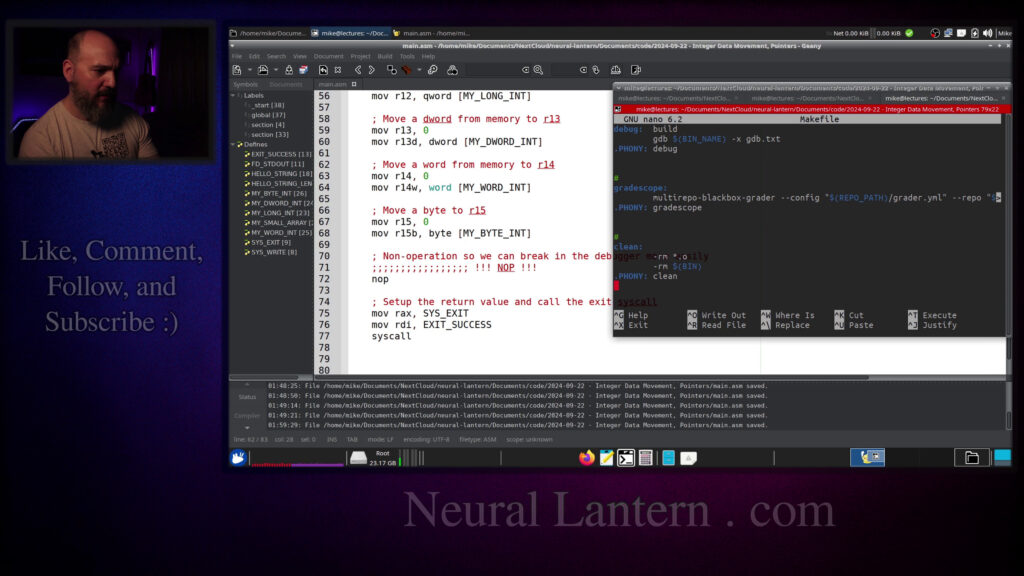

In this hands-on x86-64 assembly tutorial, we dive deep into moving integer data between registers and memory, working with pointers, dereferencing, and pointer arithmetic using YASM on Ubuntu.
You’ll see practical examples of:
- Moving immediates and data between general-purpose registers
- Loading different sized integers (byte, word, dword, qword) from memory
- Why data size specifiers matter and what happens with overflow/underflow
- The difference between moving a pointer vs dereferencing it
- Pointer arithmetic to access array elements
- Using LEA for address calculation without dereferencing
- Debugging with GDB to inspect registers step-by-step
Perfect for anyone learning low-level programming, systems programming, or wanting to truly understand how pointers work at the assembly level. No prior expert knowledge required – we build it up with clear examples.
Code and examples are shown live, compiled with YASM, linked with LD, and debugged with GDB.
If you’re into assembly, reverse engineering, operating systems, or just love understanding how computers really work, this one is for you.
Introduction to Integer Data Movement and Pointers 00:00:00
Program Setup and Makefile 00:01:16
Data Section Definitions 00:01:38
System Calls for Output and Exit 00:01:52
Text Section and Entry Point 00:04:21
Printing Hello String 00:05:05
Moving Immediates to Registers 00:06:04
Copying Between Registers 00:06:27
Dereferencing Pointers from Memory 00:07:16
Specifying Data Sizes 00:08:01
Register Size Variants 00:09:45
Reference Book Explanation 00:10:50
Loading Words and Bytes 00:13:25
Debugger Breakpoint and Registers 00:14:28
Overflow Demonstration 00:16:25
Makefile Adjustments for Warnings 00:17:44
Proving Data Size Importance 00:20:32
Underflow and Overflow Examples 00:21:34
Symbols as Pointers 00:24:16
Array Definitions and Access 00:25:20
Pointer to Array Items 00:26:08
LEA Instruction for Addresses 00:27:32
Dereferencing Manipulated Pointers 00:29:01
Final Register Inspection 00:29:50
Conclusion and Subscribe Request 00:33:26
Thanks for watching!
Find us on other social media here:
- https://www.NeuralLantern.com/social
Please help support us!
- Subscribing + Sharing on Social Media
- Leaving a comment or suggestion
- Subscribing to our Blog
- Watching the main “pinned” video of this channel for offers and extras
Hey everybody! In this video I’m going to talk to you about integer data movement and pointers
in an x86-64 YASM assembly program within Ubuntu but this should work for all of you x86 YASM people.
Okay so what am I talking about for starters? I’m just talking about moving data pretty much. If you
from one integer register to another or from one general purpose register to another.
And if you know how to manipulate pointers in assembly and all that stuff,
you probably don’t need this video.
But if you are not an expert, then this will probably help you.
Let me start off by saying, of course, that there are going to be lots of concepts in this video
that I don’t actually explain because I’ve explained them in other videos.
For example, this is not a Hello World tutorial where I show you how to actually,
you know, build a basic Yasm assembly program.
a basic yasm assembly program you can probably infer that just from this video but i’m not going
to explain it also this is not a debugging video so i’m not really going to explain too much about
gdb which is something i’m going to use to look at the registers but it might be nice for you to
get a little preview i will record a full gdb tutorial in another video anyway so let’s see
here uh for starters i’ve just kind of like created a little sample program here um well
a make file which will just compile and execute my program again this is not a
make file video tutorial check my other videos for that I’ve already made one
for now I’m just gonna start making a program and I’m gonna give it a data
section so first thing I’m gonna give it is like well let’s say I’ll give it a
bunch of data then I’ll kind of explain what I gave it again this is not a
basics Yasum tutorial so see my other videos but you know just simply put I’m
You know just simply put I’m gonna write to standard output so I do I remember the system call code for for writing
And then I’m gonna exit because this is a pure assembly program that I’m compiling. There’s this is not a hybrid program
We’re not doing GCC. We’re just doing LD
So I’m just gonna say a call code 60 to exit a file descriptor for stdin actually I don’t really need that
Let me just double check that I don’t need that in my solution
Yeah, I like to reuse these things so we don’t really need standard input
standard input. We’re just going to do standard output, you know, printing to the terminal.
We’re going to exit with a success code of zero. And then I made a couple of, well, just one C
string where I’m just basically saying, hello, my name is so-and-so. So you can know that the
program actually started in case it crashes later. That’s not my name. I just love those kinds of
names. And then I’m just going to make a bunch of integers of different data sizes. So this is kind
sizes but just real fast because these are going to be directly used in our video we uh we have a
quad word here so i’m defining an integer called my long int and i’m saying that it’s a quad word
with dq q for quad word and then i’m just giving a pretty big integer same thing for a regular d
word which is just a double word so that’s half of a quad word and then another thing with a whoops
w not a q let me just fix that in my solution oh dear then i’m going to do a word which is a six two
one one one a word is two bytes of data we’re starting to get dangerously into overflow territory
when i was originally writing this solution i had like a bunch of nines up here and the number that
i ended up seeing on the screen was totally different and i forgot oh a word is just two bytes
so even if it’s unsigned the highest thing that it can actually represent is um
- So that’s not good. Then I’m going to just store a byte here with DB and put some twos there.
And then I’m going to make an array of integers. Putting an array, making an array in the regular
data section, that’s not as good as putting it in the BSS section if you want a lot of integers.
But I’m just going to specify a small number of integers so I can just put it directly into the
BSS is for like giant arrays of uninitialized data and the data section is for whatever you can handle typing pretty much of initialized data.
So now I’m going to start my text section and my program’s entry point.
Again, this is not a Yasm basics tutorial. See my other videos.
And so we’re going to start by just saying here’s my entry point where the operating system can sort of jump into my program.
to just you know exit the program let’s actually see if that works so far it
should do nothing but but at least exit with success I’m gonna go clear and make
run and notice how it just kind of like ran it and then nothing happened okay so
that’s great how come it didn’t print though what did I do wrong oh I forgot
to copy paste the code that prints something okay let me get my solution up
here so the first thing we’re really going to do is just use a system call to
call to print the word hello again this is not a system call video see my other videos
and um so now we’re just we’re just going to print our hello string
with a system call let me run it one more time we should see like a quick hello
yeah okay my name is uh chaplain mondover it’s not maybe i should change that to it’s not my name is
not no i don’t want to do that sometimes i like to pretend that my name is chaplain mondover
name is check lane Mondover you should too it’s fun anyway so the first thing that I’m going to
do here is I’m going to move an immediate well let me copy paste a whole chunk of code and then
I’ll explain it one by one I’m basically going to use data movement instructions to move a bunch of
data into a bunch of registers and then I’m going to hit a break point or I’m going to I’m going to
sort of do like a non-operation piece of code so that I can easily break on it in my debugger so
the results. Okay so first off I’m going to move an immediate into R12. The
instruction for moving data into general purpose registers or the integer
registers is just MOV so that’s fine probably you should know that by now but
I’m going to move an immediate into R10 and I’m going to move 12876 into R10.
So that’s how you move an immediate no problem. Then I’m going to first clear
out R11 and then I’m going to move R10 into it. The reason I’m clearing out R11
reason i’m clearing out r11 first is just to prove to you that we are actually moving data from one
register into another because if i just i don’t know if i didn’t do that you might be tempted to
to think well um maybe r11 already had that data in it so first it’s going to be just a zero and
then it’s going to actually be whatever r10 had so we should see r10 and 11 both have one two eight
register or a pointer register from one to another. And by the way, integers, those are
pointers, or rather, should I say, pointers are integers. So if you’re moving an integer or you’re
moving a pointer, the system just kind of sees that as a number either way. So you can use the
move instruction for it. So now let’s use the pointer that was assigned to our long integer
to move that number into R12. So let me just go up real fast. My long int up here,
my long int up here it’s like a gigantic number and remember I said before that my long int is
actually just a pointer to the memory location that begins to hold the quad word so my long
int is really a pointer to one byte and there’s an eight byte allocation because it’s a quad word
so when you sort of put this into your code and you let the system know that you want to move a
then the system will scan eight bytes and interpret that as an integer so
putting the the keyword quad word here I don’t think that’s necessary I usually
do it anyway but you’ll see in the next few instructions that it’s a really
really good idea to specify the data size because if you don’t you’re gonna
actually get something wrong in other words if for some reason I moved I don’t
into R12 I could do it if I if I wrote it correctly but then I would be taking
part of a quad word and trying to interpret that as the entire number and
it’s probably going to be totally wrong we’ll have an example for that in a
moment but anyway so that’s how we move a quad word we just specify keyword right
before the memory location and we use the brackets to dereference if we
didn’t dereference then we would actually be moving a pointer to the long
integer into R12 we’ll do that soon too I’m going to try to do everything in this
to do everything in this video then we’ll move a d word from uh from memory into r13 this is a
little bit different notice how uh here on line 60 i kind of have to specify d word because that’s
the data size that i’m trying to move into the r13 register so this is telling the system that
there’s about four bytes that i need to scan not eight bytes and interpret those four bytes as an
Moving it into R13, you know, I could have sworn a long time ago, you could just move that sort of thing directly into R13.
But when I tried my solution before recording this video, I kept getting assembler errors until I added the D at the end.
And so I just want you to know, oh, you know what, let’s look at a book real fast.
Let’s look at my favorite book.
I just want you to know that there are other forms of every register that can specify the register’s data size.
What do I mean by that?
itself then the system thinks you’re talking about all 64 bits of the 13 register the r13 register
but if you type whoops if you type r13d then the system thinks you’re only talking about the lowest
32 bits of that register so you’re also able to specify the data size of a register again i thought
you should should a long time ago i thought i remembered moving a d word directly into r13 and
it would just clear out the extra bits but i got warnings this time maybe that’s for the best
that’s for the best forcing us to be more precise, but this will solve it. R13 just says,
let’s only talk about a D word. So let me go, let me go to my favorite book here.
Where the heck is my favorite book? Okay. I guess I have to like, there we go.
Okay. There’s my favorite book. So, um, I’m going to go to, uh, let’s, let me just search for,
just search for I can’t remember where it is our 13 D yeah there it is okay so
what we’re looking for is 2.3.1.1 let me show you real fast the top of the book
just to give a shout out to the person who wrote this book I did not write this
book this is a free and open source book that you can download for free
everybody should get a copy to turn yourselves into an expert it’s called
x86 64 assembly language programming with Ubuntu it’s written by a brilliant
professor. This is like a semi recent version. There’s probably a newer one now, but yeah,
it’s a great book. I love it. So I’m going to go back to what the heck was I just doing?
Was it 2.3.1.1? Yeah. Okay. So in this book section 2.3.1.1, the section entitled general
purpose registers, notice how there are a bunch of different versions of each register. So if you
So if you look in this column right here, we have, oh, I get to use my annotator.
We have a, what were we just looking at?
R12.
Notice how R12 here is a designated as a 64 bit register.
But if you wanted to use the R12 register and only use 32 bits of it, the lowest 32
bits, then this is the form you would use for the R12 register.
So 32 bits.
And if you wanted to use only a word’s worth, you know, 16 bits.
Well there you go.
two bytes on these systems or 16 bits and then if you just wanted to use one
byte of the register well you can you just put a B at the end of it it’s
pretty sweet and convenient it’s not too hard to remember that D is for D word and
W is for word and B is for bytes it just gets a little confusing when you’re
using the other registers like the the RAX register it’s got EAX as its 32-bit
version and then AX as its 16-bit version and AL as its 8-bit version if
it’s a 8-bit version if you can remember that there’s an L I guess that’s not too bad but you
know remembering the X and then it changes to an I over here and a P over here I’m personally not
a fan so I always come back to this book to try and remember what I’m supposed to be putting for
these registers because I can’t remember all the time or rather I can almost never remember but we
So, I want to take a D word from memory and load it up into the R13 register.
So I got to specify the R13D.
And, you know, maybe I’ll take that out and show you that it doesn’t compile later, if I can remember.
But I’m going to now take a D word, do the same thing into R13.
Oh, sorry, no.
I’m going to take a regular word and do the same thing basically into R14.
But it’s just going to be a word instead of a D word.
And then I’m going to take a single byte and load it up into R15.
single byte and load it up into R15. Then I’m going to call Nope, which is an instruction that
just does nothing. And it’s useful sometimes if you want to have a place where you can stop your
program and sort of inspect the results of your program in your debugger. So there’s a lot more
to this program. I’m going to go ahead and just run it right now, just to make sure that it compiles.
And then maybe I’ll add a breakpoint here. Let’s go clear and make run. Okay, so it ran,
Okay, so it ran, it compiled, it was fine.
And now I’m going to open up a new little window and I’m going to launch the program.
Notice how the program that has been compiled is called main.
So I’m going to launch the program into the GDB debugger.
This is not a GDB video.
So I’m going to be skimming over this, check future videos for a full GDB tutorial.
So I’m going to do a break point right there at line 72.
So that I can just kind of inspect the state of the register.
break at main.asm line 72 and then just to be sure I did that correctly I’m going to say info
breakpoints or just a b is fine and it’s like looks like I set it up correctly then I can type
run to see what’s up notice how it starts to run and immediately stops at that breakpoint
you can tell it stops there because it’s at line 72 then I’m just going to do info registers or
info r just to print out all my registers and we should see a confirmation of what we were hoping
so if I kind of like maybe I’ll pin this to the top for a second always on top how about that
so first we moved an immediate into r10 so notice how 12876 is in r10 right there and then on line
53 we basically copied r10 into r11 so that means in r11 we see the same value
and then we’ll move a quad word from the long integer we’ll dereference that pointer
at R12 it’s like this gigantic number if I scroll all the way up it’s the same number here as in our
source code so that seemed to work and then we’re going to move the D word next I guess into R13
so that’s this number right here so that seemed to have worked it’s this number right here the
D word and I’m going to get lost so fast scrolling up and down like this now we’re going to move a
one one and there it is right there and then r15 is just gonna take a bite and
it’s gonna take a bite oh now I’m hungry now I’m hungry that activated it it’s
only been like think four or five hours since I ate I guess that is usually when
I need to eat again even though I gorge and fall asleep on the floor because I
home r15 anyway holds the correct value it’s 222 i just want to show you overflow real fast
we look at r14 uh we’re using the word version so it’s only going to read you know uh two bytes
from that memory location and it’s only going to consider uh you know 16 bits as being valid in uh
in that register so if i use a number that’s too big it’ll overflow two bytes the maximum number
three, five or from zero to that number or six, five, five, three, six combinations.
So if I just stick a nine in front of that right now, that should overflow the system.
So let me try it one more time.
I want to do Q because that was the last thing we needed to look at.
And then I’m going to do make.
Oh gosh, what’s happening here?
Okay.
How about I do clear and make build, which is in my make file and GDB main.
So I don’t have to type all this stuff out again every single time.
have to type all this stuff out again every single time what did i just do oh nice okay you know what
i swear it didn’t used to do this before it’s giving me a nice warning saying that value does
not fit in a 16-bit field i guess if i turned warnings off which i don’t want to do then the
program would run and it would overflow eh do you want to turn it off let’s turn off warnings okay
much attention to it. Um, where the heck are the warnings? Where’s the assembler running? There it
is. Yasum flags. And that’s, so that’s my variable up there. There we go. Okay. So I’m just going to
make a copy of this line, comment out the original, and then I’m going to take out, uh, the command
that says, or the flag that says convert warnings into errors. Your compiler is your friend. It was
So I am now going to do a breakpoint at 72.
So break at main.asm972 and then run and then it breaks.
And then I go input registers.
Then if I look at, what was I just talking about?
R14, was that it?
Notice how 44607 for the word, that’s a totally different value, right?
So this is what happens when you overflow or underflow.
You got to be careful about your data sizes.
I’m just going to do this again one more time just to make sure.
one more time just to make sure that it’s fixed now that I moved it and I’m
gonna I’m gonna read that part about warnings because I love converting
warnings to errors as just a way to help myself write better code okay so let’s
do that and you know what I’m gonna do too I added another target here again
this is not a Yasm or sorry this is not this is kind of a Yasm video this is not
extra file called gdb.txt where I can stick gdb commands and so I don’t want
to continue to type my breakpoints over and over over again every single time so
I know for sure I’m not going to change the program anymore at least I’m not
going to shift the lines up and down before 72 so I’m going to do breakpoint
you can type like break or I think you can type either break or the full word
breakpoint but I just type B name of the source code file a.asm at line 72 and so
And so this file right here, again, this is not a GDB tutorial, but in my make file, I have it set up so that GDB will execute whatever commands I put into this text file.
So it just kind of saves me typing.
So let’s put a breakpoint there and then we’ll say info breakpoints and then we’ll just run the program in that way.
I can have a little bit more information.
So I’m going to do make build instead of make build and then running GDB.
I’m going to say make debug.
That’s another target in my make file.
make file so then you can see it added the breakpoint for me and then it
immediately broke on that and you know what yeah I guess I’ll just leave it in
where I have to type info registers okay so we’re just making sure I think that
R14 is still a valid value and that it was fixed okay so we’ve gotten this far
the next thing we need to do is prove that data size matters by specifying a
specifying a bad data size for our long and then for our byte. So I’m going to copy paste a little
proof here that is followed by another non-operation. So I’m going to do this. And so
I’m going to try to prove to you that the data size matters by specifying a bad data size. I
just proved to you that it kind of mattered or it definitely mattered in terms of overflow and
underflow, but I’m trying to prove to you now that it matters when you’re reading. So I’m going to
I’m going to clear out r12 and then I’m going to move a byte from the long integer into r12b
and you know this would be a warning or I think it this wouldn’t compile or wouldn’t assemble if
I didn’t have the b there so I’m basically telling the computer all right I want you to use only a
byte of r12 and I want you to take one byte from memory and just put it in there but I’m taking it
awful. And then right after that, I’m going to do another naughty thing. I’m going to move
something into R15 and I’m going to word, I’m going to move a keyword of memory into R15,
but I’m going to be taking it from the bytes memory. So remember a byte is just one byte.
And so the next seven bytes that come after it definitely have nothing to do with that byte,
but I’m going to interpret them all as a quad word. So we should get nonsense data
also R15. I don’t really need to zero out R15 because the fact that I’m specifying R15 means
I want to use all 64 bits. So it is going to definitely zero it out. And whatever we see in
R15 is going to be the real thing. But in terms of R12B, we’re only going to be loading up one
byte’s worth of that register. So that’s why I’m zeroing out the rest of it just to prove to you
that we are truly getting nonsense. So now there’s going to be another break point at 82.
I’m not going to break anymore at 72. I’m going to break at 82. So let’s do that.
What’s going on here? We got that.
Oh gosh. Okay. Quit. I guess that means I need to comment this out. Let me do that.
We’ll do break at main.asm at 82. And you could, you could do both of these two. Actually,
let me do it first. We could, we could do multiple break points. Yeah, I’ll just do it first,
So notice how it first breaks at the 72 and then I do C to continue and then suddenly
it breaks at the 82.
But I don’t want to have to hit continue a bunch of times so I’m going to comment that
out for the future.
Let me quit real fast to make sure I remember what GDB expects as a comment.
Yeah, okay.
82.
Okay, so then I’m going to print the registers info registers.
And we’re looking at R12 and R15.
You can see R12 has the number 144, which definitely doesn’t make sense because there’s
no 144 anywhere in our original data.
in our original data so hopefully that’s proof to you that we’ve grabbed some junk
sometimes maybe when you’re doing this at home if you’re just going to grab one bite
maybe accidentally um no no that would definitely still look bad but for the r15
if you’re going to grab a q words worth of data i don’t know maybe the junk data is like
accidentally correct in a way where it would it would still make it look like the intended value
the intended value no it wouldn’t there’s no way that would even happen no i guess the junk data
could could work that way anyway so we’ll look at r15 two eight and a bunch of fours and then a two
three eight um that value does not exist up here so again junk data mixed in with real data is is
bad news okay so now let’s do another proof i want to prove to you that symbols are pointers
you know like I’ve been saying and they need to be dereferenced so let’s first start off by
moving the raw pointer for my long int into r10 and then into r11 we will dereference that
pointer so in r10 we should see something that looks like a memory location or at least a relative
memory location and then in r11 we should see the actual long integer like we saw before
And then I’m going to mess around with some arrays.
So remember up here we made an array.
Let me minimize that real fast.
We made an array, a very small array.
I just specified a bunch of ones and then specified a bunch of twos.
So it should be contiguous memory since it’s been allocated as an array with that comma
there.
We should see if we looked inside of the system inside of memory, we should see eight bytes
representing the ones.
And then right next to that, we should see eight bytes representing the twos.
easy for us to sort of move our pointer around a little bit. So what else do I need to copy paste
here? We got that long int. Okay. So I’m going to grab the first item and the second item in those
arrays just using some pointer manipulation. So you know how to do this already. You just take
like the pointer to some number and you just dereference it and you end up getting a number.
I understand your feeling because you might be thinking, wait a minute, wait a minute.
I understood it when it was dereferencing just one number, but didn’t you say this is an array?
Why is it we can dereference the array and just get one number still?
Well, remember, a pointer to an array is really a pointer to the first item in the array.
That’s kind of how it works.
So either way, whether you consider that to be a pointer to one number or a pointer to array,
when we dereference it, we’ll get one number.
If you want to get the other numbers, then you have to start manipulating the pointer
or derefing in different ways.
So here’s how we can get the second item.
We deref the original pointer plus 8.
8 because it’s a quad word.
So, you know, it probably would be a little smarter to put that 8 up into a define somewhere
so you’re not hard coding numbers, but I’m not going to do it.
So basically in R12, we should see the 1s.
In R13, we should see the 2s.
And then a couple more things.
Next, we will grab a pointer to the first item in the small array.
And we’ll just stick that into R14.
So, you know, we kind of did that with R10 already.
But now I just want a pointer to the small array.
And I’m going to keep it in R14 just so you can see the memory location.
And then after that, we’re going to grab an actual pointer to the second item.
hey how do you get a pointer to the second item well it’s that but then what
if you didn’t want to dereference the pointer like what if R13 you know here
clearly because we have these brackets for dereferencing you’re allowed to put
the formulas inside of the brackets what if I wanted to get the address to the
second item and not actually the second item we would not be allowed to remove
the brackets the assembler wouldn’t like that so without another instruction
way to actually get a pointer with a complicated mathematical formula. You know, you can do like
multiplication inside of here and other things in parentheses. So we wouldn’t be able to do that
without the other instruction that I’m introducing now called LEA. LEA just means, yeah, sure, we’re
still going to use the brackets to figure out where the pointer is, like figure out what memory
location we want with some sort of a formula. But then what will be stored in the first operand is
This LEA won’t dereference just because there are brackets.
LEA will keep the pointer.
And then finally, once we actually have a pointer to the second item in R15,
then we can move the second item into another register.
And this is like an LOL because I ran out of registers already.
So I’m just going to use RDI, which is usually the first argument.
It doesn’t matter. It’s fine.
So if we dereference R15, it’s the same thing as dereferencing this.
We could have also just dereferenced R14,
and it would have been the same thing as just getting the value of the first item.
But I hope you can see now that, you know,
that expression is going to be a pointer to the second item in the array,
and that’s going to be stuck into R15.
So if we dereference that, we can treat R15 like a pointer.
It’s just, you know, it’s a general purpose register.
it doesn’t only need to hold integer values it can also hold pointers because pointers are integers
they’re just unsigned so we deref the pointer that is stored inside of r15 now put it inside
of rdi and then we should see that rdi actually holds the second item which should be a bunch of
twos so the last thing that i’m going to copy paste in here is another nope so i’m going to
break at 108 just so we can see the rest of it so i’m going to open up this right here and i’m
open up this right here and I’m going to comment that out and I’m gonna say break at 108.
Whoops.
Okay.
There we go.
But, but, but quitsies.
Now I’m just going to run make debug again so that I can enter GDB.
And we’ve, we’ve, we’ve hit our break points.
And now I’m going to go info registers and just talk about the stuff that we’re seeing.
Okay.
So the first thing I think this is all on one page, right?
I don’t need to scroll.
Yeah.
one page right I don’t need to scroll yeah okay this is all on one page first thing we see is r10
holds this value right here that’s a pointer to the my long int that kind of looks like a pointer
if you consider that it could be relative and then r11 holds the actual integer and if you recall
that is the gigantic long that we put in there great so now that’s the difference between a
pointer and its value or in its dereference value so then we’re going to grab the first item in the
So then we’re going to grab the first item in the small array.
So R12 should have the ones.
If we look at R12 here, it’s got the ones.
Again, just trying to prove to you that if you dereference a pointer to an array,
you’re actually dereferencing a pointer to the first item.
And then on R13, we’re going to make a pointer to the second item.
Then with the brackets and the move instruction, we dereference that and it should become the twos.
So if we look at R13, notice how it’s the twos.
Then we’re going to grab a pointer to the first item in the small array.
Hang on a second.
What did I want to say about that?
In the small array to R14.
Okay.
So again, we’re just going to grab an actual pointer to the small array.
And so the difference between R12 and R14 is the dereft value or the pointer.
So if we look at R12, that’s the actual value that we’re pointing at.
And then R14 is the memory location that we have in there.
And then notice how it’s kind of similar.
Notice how it’s kind of similar.
Maybe this proves a little bit more that these are pointers that we’re looking at.
R10 was supposed to be a pointer and now R14 is also a pointer.
Notice how those numbers are pretty close together.
I’m sure if we looked back up in the data section and we calculated an offset based
on how big each data item was, we could probably predict what the memory location of R14 should
have been based on R10 because you can see it’s like only increased by a little bit,
by a little bit right it was like 534 to 49 what is that 10 plus 5 so that’s like 15 is that correct
oh I guess I had a byte in there so maybe it’s that’s why it’s kind of odd but yeah we can we
can just compute the offset and then we’ll grab a pointer to the second item using the LEA
instruction remember we have to use brackets if we’re going to do an expression but then the
dereferencing in the move instruction so we just use LEA to not dereference.
So we should see that R15 is about 8 bytes further along in RAM than R14 because both of those items
are contiguous in memory and they should only be about you know a quad word apart 8 bytes.
So if we look at R14 it’s got this number so it’s a pointer and then if we look at R15
you know what’s 49 plus 8 it’s 57 so you can see that the pointer to the second item is only
pointer to the second item is only eight bytes further in memory yay contiguousness and then
sorry i can’t resist so then finally we will uh we’ll look at the dereference to r15 because it’s
now a pointer what was it it was the it was a pointer to the second item that should be a bunch
of twos right because remember in our array we had a bunch of twos here as our second item
have a bunch of twos inside of it so if i look at rdi where the heck is that right there has a
bunch of twos inside of it rdi baby oh my gosh why did i say that anyway so that’s our non-operation
instruction and i think that’s everything that i wanted to talk to you about in this video so now
i hope you feel like you’re an expert in moving integers and moving pointers and
dereferencing pointers and manipulating pointers so you can get a pointer to something else and
pointer to something else and de-referencing those pointers or not whenever you choose.
Thank you so much for watching this video. I hope you learned a little bit of stuff
and you had a little bit of fun. I’ll see you in the next video. Limit out. I’ll never say that
again. Hey everybody, thanks for watching this video again from the bottom of my heart. I really
appreciate it. I do hope you did learn something and have some fun. If you could do me a please,
could do me a please a small little favor could you please subscribe and
follow this channel or these videos or whatever it is you do on the current
social media website that you’re looking at right now it would really mean the
world to me and it’ll help make more videos and grow this community so we’ll
be able to do more videos longer videos better videos or just I’ll be able to
keep making videos in general so please do do me a kindness and and subscribe
you know sometimes I’m sleeping in the middle of the night and I just wake up
night and I just wake up because I know somebody subscribed or followed it just
wakes me up and I get filled with joy that’s exactly what happens every single
time so you could do it as a nice favor to me or you could you control me if you
want to just wake me up in the middle of night just subscribe and then I’ll just
wake up I promise that’s what will happen also if you look at the middle of
the screen right now you should see a QR code which you can scan in order to go
to the website which I think is also named somewhere at the bottom of this
video and it’ll take you to my main website where you can just kind of like
my main website where you can just kind of like see all the videos I published and the services
and tutorials and things that I offer and all that good stuff and uh if you have a suggestion
for uh uh clarifications or errata or just future videos that you want to see please leave a comment
or if you just want to say hey what’s up what’s going on you know just send me a comment whatever
I also wake up for those in the middle of the night I get I wake up in a cold sweat and I’m like
It would really mean the world to me.
I would really appreciate it.
So again, thank you so much for watching this video.
And enjoy the cool music as I fade into the darkness, which is coming for us all.
Thank you.