
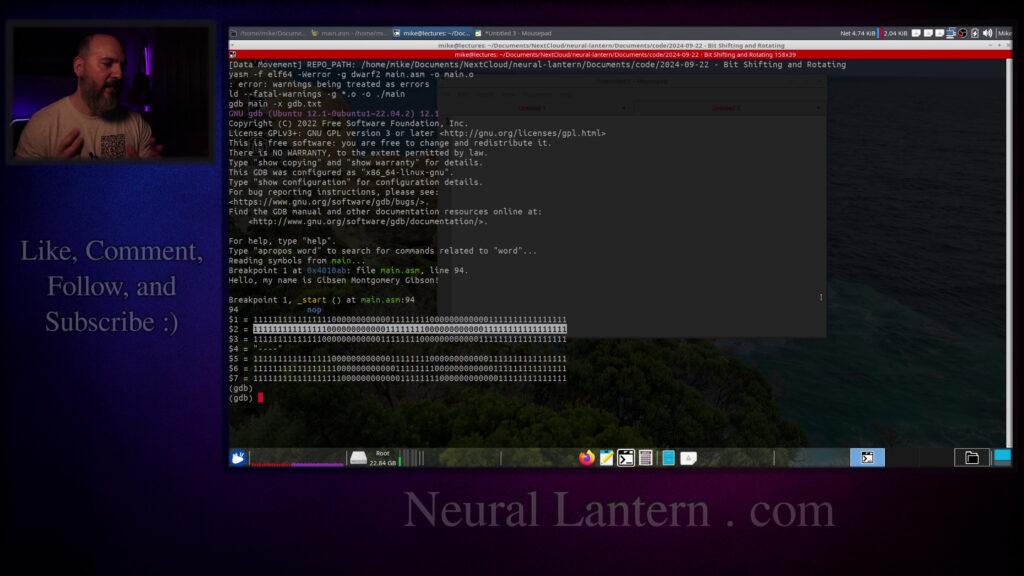

In this hands-on tutorial, we dive into bit manipulation in x86-64 assembly using Yasm on Ubuntu. We cover the basics of logical operations like AND, OR, XOR, and NOT, then move into shifting (logical vs arithmetic), rotating bits, and why signed vs unsigned matters for shifts.
I explain each concept on paper first, then show real code examples running in GDB to prove how the bits change. We look at patterns in registers, see what happens with negative numbers in two’s complement, and even touch on how shifts can multiply or divide by powers of 2.
Perfect if you’re learning low-level programming, reverse engineering, or just curious about how bits work under the hood. No prior assembly knowledge needed, but it’ll help if you’ve seen my other videos.
Like and subscribe for more assembly tutorials!
Thanks for watching!
Find us on other social media here:
- https://www.NeuralLantern.com/social
Please help support us!
- Subscribing + Sharing on Social Media
- Leaving a comment or suggestion
- Subscribing to our Blog
- Watching the main “pinned” video of this channel for offers and extras
Hey everybody.
In this video, we’re going to talk all about manipulating bits in x86-64 Yasm assembly within
Ubuntu.
But if you’re not using Yasm or you’re not on Ubuntu, this video is probably going to
be pretty useful to you anyway, because I’m going to talk about the basic concept of manipulating
bits in various ways.
We’re going to talk about some basic logical operators like ANDing, ORing, XORing, and
XORing, and then we’re going to talk about shifting the bits to the left and the right,
and then we’re going to talk about the difference between shifting without any respect for whether
the number inside of the bits is an actual integer, or whether we just consider them
to just be bits by themselves, or whether we’re actually respecting the bits as numbers,
and also we’re going to look at the rotation instruction.
So first I’m going to explain this, I’m going to write it down in a pad, and then I’m going
show you a program that actually does it just so we can prove that it all works.
Okay, so for starters, let me open up a little notepad here.
What the heck am I even talking about? Let me write this down because I forgot this on my
first take I spent like five minutes, blew right past the explanation of and and or and xor because
I forgot that that was supposed to be part of this video. We’re going to look at and or and xor
at least for now and then we’re going to look at shifting and then we’re going to look at rotating.
at rotating. Okay so first off what is anding? I’ve explained that in another video but long
story short and just requires that two bits that you’re comparing against each other are both a one
in order to receive a one and so any other pair like a zero versus a one or one versus a zero or
two zeros are just going to be a zero. So and means both bits that you’re comparing have to be a one
The OR is pretty easy.
If either of the bits is a 1, then the result is going to be 1.
So if I say 1 versus 1, the result is going to be 1.
If I say 0 versus 1, the result is going to be a 1.
Or if I say 1 versus 0, the result is going to be a 1.
In the only case where you end up with a 0, it’s just going to be 0 versus 0 results in a 0.
To upgrade to exclusive OR, basically exactly 1 bit needs to be a 1.
bit needs to be a one and if two or zero are a one then the result is a zero which means here when
we have the two ones at the top the answer is going to be a zero these are the two stay the
same and this one stays the same so that’s xor again i have another video where i explain this
a little bit better but i’m just doing like a quick overview shifting is pretty interesting
because let me do a pattern let’s say zero one one zero suppose we just have four bits
to the left or to the right. So imagine left, if I shift them to the left, then what I’m really
doing is I’m just taking off that zero on the end and padding on the right with a zero. And then if
I’m shifting to the right, then well, it’s to the right. I’m just going to, you know, take off,
let’s see the zero on the right side and pad with the zero on the left. Be careful though, because
or logical shifting. I haven’t actually shifted with respect to the original number. Think
about this. That number right there on line three, if we just consider that an unsigned
integer or just bits, then what I just did with the shifting is fine. But what if that
was a two’s complement number that can represent a signed integer? If it’s two’s complement
or if it’s just like a signed integer, then the leftmost bit being a zero tells me that
result of my left shift, there’s a one now in that first position, which tells me that’s
probably a negative number.
We could face a similar problem with shifting to the right.
I mean, we didn’t this time.
It just looks like it actually shifted and the answer is going to end up being right.
But what if we shifted something else right?
Let’s see, what am I going to do here?
One, one, zero, zero.
What if I shifted that number one to the right?
The answer would be zero, you know, one, one, zero, right?
you know 110 right but then that’s wrong because the original number was negative because there’s
a one in the first position but the result is a zero so if i’m not careful about what instructions
i’m using and how to respect whether the number i’m shifting is actually considered an integer
assigned integer or if it’s just bits if i don’t respect that then i could end up ruining the
number so keep that in mind we’re going to do several examples of that i’m not going to show
shift by hand I’m just going to show you what the instructions in the assembler
will do so then the other thing that we should talk about is rotating so imagine
that I rotate this number one to the right well nothing really happens
visually but what you’re supposed to do if we rotate to the right you take the
number on the very right side and you just pop it onto the front so it sort of
it doesn’t fall off and get replaced by a zero or get replaced by a one depending
moves to the other side so if I shift this again maybe let’s shift it one more
time to the right I’m gonna take that one and pop it off the right side and
put it on the very front so see do you see how there it’s kind of rotating I do
this one more time actually let me copy paste this I’ll take that number on the
right side pop it off put it back on the front then if I do it again take that
zero pop it off put it back on the front notice how it eventually gets back to
the original pattern and I would have to rotate you know exactly four times to
to get that to happen same same thing applies for rotating to the left i’m not going to show you
because uh it’s it’s the same thing as rotating to the right just in a different direction
one thing that i forgot to say a moment ago when i was talking about shifting is uh think about this
if we shift to the right pretend that uh we don’t really care that much let’s let me put some extra
zeros here so that we don’t have to carry too much we don’t have to care too much about what’s
happening with positive or negative. If you know how to convert to binary, which I’ve explained in
other videos, then you’ll know this number is, let’s see, there’s a one and a two, and then these
positions are four and eight. So this should be a 12, right? If I shift this to the right,
I should be dividing this by two because the base of binary is two. So every time you kind of like
move to the left in terms of what digit you’re looking at, you’re increasing the power of that
every time you move to the right you’re decreasing the power of the digit by two
so that means if I shift the entire thing to the right I should be dividing the whole thing by two
right not just one bit so if I just take a zero off of there and put it on there I’ve now shifted
all the bits shifted all the bits one to the right I should end up with the six let’s just
compute what it is there’s a one there and there’s a two there and there’s a four there what’s four
plus two that’s six so this is actually six in binary or the original number divided by two
because we shifted to the right on the other hand if I take this number one more time and
just kind of shift it to the left I should multiply it by two so that means I should
expect to see a 24 let me just remove one of those zeros and put it on the right side there
this is not a rotation I’m just kind of like filling in zeros I’m keeping it simple with
the shifted number this is a 1, a 2, and a 4 again if you don’t know how to convert
from binary to decimal or back see my other videos so then we basically have
an 8 here and a 16 what’s 8 plus 16 that’s 24 24 is twice of 12 so we have
multiplied by 2 so you could multiply by 4 by shifting twice multiply by 8 by
shifting 3 times you know whatever you want to do but shifting is is like a
is like a shortcut besides just to move the bits it’s also a shortcut to multiply and divide by two
okay so that’s the basic idea let me start working on a little program here for you before I continue
I just want you to know that my program it’s got stuff in it already we’ve got a make file here
if I uh I edit the make file I just have a make file set up to build the program so again this
is specific to just you know bits we’re not going to talk about make files see my other videos if
you want to know how to make your own make file same thing for this gdb.txt file I’ve just put
commands that I’m going to send to gdb my debugger of choice this is not a gdb video I haven’t
actually made my gdb video yet so look out for that in this in the somewhat near future
so we’re just going to focus on the actual program for now anyway so I’ve got a solution
Anyway, so I’ve got a solution already set up here.
Let me start copy pasting some stuff in there.
Going to copy paste my data section.
So first off,
my sample program is just gonna have codes for writing,
you know, with the system call
and exiting with the system call.
And then I’m gonna output to standard output
and I’m gonna do a zero return code.
If you don’t know that,
see my other videos that I’ve already put out.
I’m gonna make a sample string where I just say,
I just say hello my name is Gibson Montgomery Gibson that’s not my name but I love those names
I’m just going to say hello basically when the program starts then I have some bit strings here
that will help me with the you know help me demonstrate some of the bitwise operations
the ending and the oring and the shifting and whatever and then I’m going to put a negative
number here as a variable just to prove to you that sometimes the bitwise or logical shifting
break a number if the number is supposed to actually be assigned integer and and use that
as evidence for why you should use arithmetic shifting so now I’m going to start my program
here let’s see my entry point should start at line 30 I got to be super careful about this
because if I don’t know 26 if I don’t then all of my debug statements are going to have to be
it lined up correctly so i’m basically just going to print the hello message and then maybe you know
what at the very end i’m going to exit from the system with a system call so basically if we run
this program again system calls and everything like that are not part of this video see my other
videos but uh if this works we should see just like a simple message okay so that’s it my name
Conmary Gibson. Okay.
So then the next thing that I’m going to do is I’m going to show you a bitwise
and operation. So I’m going to copy paste that should start on line 42.
And if I get this wrong, the debugging is going to be awful.
I was trying to make this a pure assembly program without a bunch of extra work.
I guess I could have linked GCC so I could just print results to the terminal,
but whatever too late now. So it starts on 42.
and ends on 51 okay so I think that’s good so the instruction for ending doing
a logical and between two registers which are full of bits and then what
will happen is every bit gets anded against its own course or I guess the
corresponding bit in the other other register is just and so what I’m doing
first is I’m gonna set up the registers so I’m gonna move the a sequence which
sequence, which if you look up is just, you know, I put a bunch of bits. So like in hex,
I like to type hex more than binary when I’m just kind of putting stuff in there.
So, you know, each F is basically four ones. So it’s going to be like, I guess, 16 ones,
and then a bunch of zeros, and then, you know, a few ones, and then some zeros and ones.
So I’m just making a little pattern for bits A. Don’t think that they mean anything right now.
And I’m going to make a different pattern with bits B. And when we look into the debugger,
And when we look into the debugger, we should see the before and after patterns so we can kind of see what the AND instruction did.
So I’m going to move bits A and bits B into R10 and R11.
Then I’m going to move, so these are going to be like the original bits that we can inspect later.
this AND instruction against R11 which is the B pattern. So I’m basically taking the A pattern
and I’m ANDing it against the B pattern but I’m also loading up the registers so we can see
the A pattern then the B pattern and then the result of ANDing them together.
Finally on line 50 here I’m using a NOPE which is just a non-operation so that I can easily
break the debugger so we can sort of inspect the program and see what’s going on inside of there.
program and see what’s going on inside of there. You know what, let me, uh, let me open this up
again here so that I can control where I’m breaking. So 48 is where the nope is. That’s
totally wrong. I’ve already ruined my program somehow. It’s going to be 50, I guess. All right,
- And what I’m doing inside of this, and again, this is not a GDB video. I’m just saying,
let’s break at line 50 so I can kind of poke around. And I’m going to comment all these
And I’m going to comment all these things out for now.
That’s going to happen at the very end.
It’s going to be majestic.
How many different things we can look at.
So I’m telling GDB not to execute any of these instructions, except for the, uh,
the break point instructions.
So we can just break on line 50.
Okay.
Hopefully this works.
I’m going to now use make debug, which under the hood is just going to be compiling and
then telling GDB to launch with the name of my program inside of it.
And then to execute those things.
and then to execute those things.
So it hits breakpoint number 50.
There’s a bunch of crap that gets printed.
And I can now inspect my registers.
I’m going to go info R for just info registers.
And let’s see.
So we had R10, 11, and 12.
So if we look at the terminal, you can see that R10, the hex version,
has the original pattern of the A sequence,
and then R11 has the original pattern of the B sequence.
original pattern of the b sequence if we do a logical and and put the result into r12 then
you should see let me just double check that that’s definitely r12 yeah then you should see
the result of ending all of the f’s together remember that an f is just four ones so i’m kind
of simplifying it a little bit you could make yours more complicated with lots of randomness
in your ones and zeros just to prove it to yourself but notice how r12 only has an f
So like FF means F, F0 means 0, F0 means 0, you know, and so forth.
0F means 0.
So only where you see two Fs will you see an F in the final target pattern.
So that’s a logical AND, and that’s how you do it in Yasm Assembly.
You just load up a register with some bits, R12.
We loaded them up with the first pattern.
And then we take the second pattern and say that’s what I want to AND it against.
that’s what I want to end it against. And you can have that in a register or I think an immediate
or a memory location. So we’re just ending these registers together. And you know that they’re
loaded up with patterns A and B. So nothing too hard at this point. Let’s do a, let’s look at
bitwise or this should start on line 52 or I’m screwing myself. 52. Okay. 52. So same thing,
up R10 and R11 with the bit patterns and then we’re going to move the first bit pattern
into R12 so that we can or it against the second pattern and so basically R10 and 11
will have the original bit patterns R12 will have the result of oring them.
Then we’ll do a nope on line 60 so I want to break here on line 60.
Yep I ruined all my line numbers. What did I do wrong? I think I just have it offset by 2 now
two now for some reason so if we just kind of run the program now in the debugger again i’m going to
quit and then yes if we clear and make debug probably clear was unnecessary we’re broken at
line 60 if i say info registers the registers in question are oh shoot um 10 11 and 12 right so
we look at 10 and 11 they have the same pattern as before and 12 has a lot more f’s because if
has a lot more F’s because if either of the patterns had an F,
then the resulting pattern would have an F.
So this is a logical OR.
Same idea as AND in terms of the way you format the instruction and the OPS,
but it ORs instead of ANDs.
Okay, no problem.
Let’s move on.
Next thing I want to show you is the XOR, which is pretty cool.
By the way, so far we’re just operating on bits.
We don’t consider these bits to actually be numbers.
maybe they are but we should probably be careful about that anyway so I’m going to say let’s check
out our bitwise xor which is exclusive or which means exactly one bit in any pair needs to be a
one for the resulting bit to be a one and of course per usual all bits will be checked against each
other in the pair of of bit patterns it’ll be one bit at a time from each pattern that gets checked
Okay, so it starts on 62 and then we got a nope there.
Okay.
So same thing that we did before.
We’re just loading up two registers with the bit patterns and then R12 is going to be the
result of exclusive oring or X oring the two bit patterns.
So that means we’re going to break on line 70.
Now, let me just get rid of my other break point, change that 68 to a 70.
And now I should quit.
bug we’re at 70 good info registers so I think we said it was 10 and 11 had the original bit patterns
and notice the resulting bit pattern it only has an f in a position where there was exactly
one f between the two input patterns so
wait did I just do something wrong here what did I just do wrong
hang on a second I’m seeing something bad x or r12 am I looking at r12
Yeah.
R10 and 11.
Did I just do something wrong?
10 and 11 and then we load 10 up into 12 and then we XOR it by 11 and then it stores it
in 12.
Something’s a little fishy here.
Exactly one.
XOR.
I don’t like that.
Oh, I understand now.
Okay.
So that was a little scary.
This has shifted because the printout is not great.
Because the printout is not great. See how there’s like a blank space here?
That threw me off. So you have to imagine that all of the bit patterns are kind of shifted.
Maybe I should just copy paste this.
I was worried that I suddenly didn’t know how to do an XOR in assembly.
So let me get rid of these integers here.
Notice how there’s just a blank space that shifted everything and threw it off in terms of the display.
So I’m going to do this.
And what should really happen now is that there should be a zero here.
A zero at the front.
a zero at the front now everything would make more sense sometimes the display likes to just
kind of truncate things and just assume that everything will be read correctly but it wasn’t
so notice uh in the first position both of the uh both the input patterns are are an f so the
output pattern will be a zero you can imagine under the hood there was a bunch of ones and
then a bunch of ones and that resulted in a bunch of zeros uh here we’ve got like an f and a zero so
the result is going to be an f and then f and a zero and after zero zero and an f is an f
f um and then where you see zeros that means uh there was not exactly one uh one in each bit
position so for the let’s say the first one that’s a bunch of zeros for both input patterns so that’s
why there’s a zero there then for the next two each of them had all ones or just the two f’s
uh so that’s why x or says it’s a zero and so forth right so like at the end two f’s making
Okay, that was a little scary.
I’m glad I figured that out quickly instead of taking a million years.
Okay.
So now let’s do another example.
We’re done with XOR.
Now let’s look at bitwise knot.
I forgot to explain knot.
I’m not going to redo this video.
But let me just say that a knot is just inverting the bit.
So if we have a zero, it becomes a one.
And if we have a one, it becomes a zero.
If you knot against a register that has lots of bits or a memory location that has lots
of bits, you can do that and just every single bit in the sequence will just be flipped from
a zero to a one or vice versa.
So let’s see, we just did bitwise XOR.
Now we’re going to do a knot starting on line 72, I guess.
And then we’re going to do another nope there.
Okay.
All right.
So now let’s get rid of the break point at the line 70 and put it at line 78 instead.
78.
Oh man, this video is going to take forever.
Okay.
So now let’s check out bitwise knot.
We’re going to have R10.
Oh, I guess I should improve this because what I’m doing is I’m moving everything into
everything into R10 and then I’m just nodding R10 so we can’t really compare R10 against itself.
That’s not fun. Let me instead move R10 into R11 so that I can nod R11 so that we can
see two different registers at least. Okay, so let me just update my solution real fast.
move r11 r10 okay so now it stops at 75 and that one stops at 75 okay cool
now we got our breakpoint should be at line 79 not 78 now we’re ready to run it and see what the
does clear and make debug info registers so we should have r10 r11 again the formatting is a
so I’m just going to copy paste it up here. I’m going to do this, get rid of the numbers,
pad on the left for the missing zeros, and then now you can see clearly that all of the
F’s were flipped to zero. Again, that means, you know, each F had four ones inside of it,
so all those ones were flipped to a zero, so that’s why it’s a zero. Okay, so nodding, pretty easy,
this and show the next example which was gonna be let’s see seven let’s check out bitwise rotation
i’m going to copy paste all the way up to that nope there should start on line 81
i paused before i took a drink of water hopefully i reminded myself later to edit the drink of water
out i don’t know maybe you’ll be wondering why my mustache is wet right now if i did not edit it out
I did not edit it out.
Okay, so let’s check out bitwise rotation.
So I’m gonna set up R10 and 11 and 12 and 13 and 14,
all with the A pattern.
And then I’m gonna start rotating things.
So first I’m gonna rotate to the left R11 and then R12.
I’m gonna rotate by one position on R11
and then two positions on R12.
And then I’m going to rotate
rotate by one position for R13 and then two positions for R14 so we should see
some interesting patterns. The NOPE is now on line 94 so I’m gonna break there
instead whoops so I’m gonna change that and I’m now off by three it’s getting
precarious and then I’m gonna uncomment all of my little print statements to
show you the value of the registers after I rotate it so we should see like
printed in the terminal just to prove to you what’s going to happen okay so man I got to
remember what’s happening now first thing that I did was I printed r10 to show you one type of
rotation and then I printed r10 again to show you another type of rotation so we should see the
original and then the two rotated values and then the original again and then the other two rotated
values so here’s the original we’re printing it in binary with the special print command in gdb
in GDB, which is just like P slash T and then the register. So this is the original pattern
right here. And if you just kind of squint at it for a while, you can realize that the dollar
sign two pattern has been, uh, shifted once to the left. Actually, let me just make sure that
I’m doing a shift and not a rotate. I’m accidentally saying the word, uh, rotate, I think. And, uh,
that’s, oh no, no, it is rotate. Yeah. We’re going to shift later, I guess.
I guess. Okay, so we are definitely rotating. So we should see some wrap around. I guess I used
bad bit patterns for the wrap around. But just imagine that, you know, in this pattern right here,
this one, if we’re rotating to the left, this one fell off and it got placed on the right side of
of the next pattern it’s going to be the same thing basically so but this is rotation so we
wouldn’t be reusing the bits that fell off but anyway you can see that if I rotated to the left
by one position that whole thing is is kind of shifted to the left I shouldn’t use the word shift
and then for the second pattern we did a rotation by two positions so all the bits are just kind of
moved to the left compared to the very first pattern okay so no problem then the next thing
that we’re looking at is just you know rotating to the right and you can tell that everything is
offset by one here and it’s offset by two here so rotating to the left by one position by two
positions rotating to the right by one position or by two positions that’s rotation in a nutshell
okay so then the next thing that we’re going to do we’re on 94 now
um let’s see logical shifting nope nope nope I’m gonna grab some code that will shift both
logically and arithmetically so we can kind of see the difference
okay so show maybe I should change this to show some some shifting
because uh if I just say it’s logical then yeah sure uh the shift function uh the shift
those are logical shifts but then down here when it’s a sal and sar those are arithmetic shifts
I don’t know maybe maybe I can do that maybe I can just
duplicate the comment maybe to make it more more intuitive so show arithmetic shifts
Okay, I think that looks pretty good. Let me paste that into 105 on my solution so I don’t get out of sync here.
So what’s going to happen here? We’re basically going to load up R10 with a negative number.
I’ve chosen the number negative 12 because I kind of feel like it at least shows you a little bit for dividing and stuff like that.
So we’re loading up R10 with a negative number, and then R11 is going to get R10, but then we’re going to shift it left by two positions.
positions so that should be multiplying it by four but this is well a bitwise
shifting so it it’s not going to necessarily respect the fact that the
number is in twos complement so this is not a good idea if you consider r tend
to be a number because sometimes the result might be right and sometimes the
result might be wrong here it says math won’t work in my comment but sometimes
it will accidentally work but you still want to consider it to be non-working
It’s only good for bit shifting.
Then we’re going to put R12, we’re going to give it the same value as R10 and then we’re
just going to shift it to the right by two positions.
This will definitely break because when you shift to the right, the sine bit is going
to get padded with a zero rather than what the actual sine bit was originally.
So that will almost certainly break it almost every time.
Then we’re going to use arithmetic shifts which just respect the fact that the original
number is two’s complement.
two’s complement so you know like we have this negative 12 number it’s going to end up being
bits but the uh the shl and the shr instructions are not going to respect the fact that it’s
negative 12 they’re just going to consider them to be bits but the sal shifting to the left
arithmetically and the sar shifting to the right arithmetically are going to respect that respect
the fact that it’s two’s complement so let’s see we’ve got all this stuff and then we’ve got a
We’ve got all this stuff and then we’ve got a non-operation here.
You know, again, like per usual, when we’re shifting, when we’re rotating, when we’re
oaring, anding, whatever, it’s just the instruction name followed by both the source and the
destination operand.
And then the second operand is only going to be source.
So if we have a shifting left R11, then the result is going to be stored in R11, but it’s
going to take as the source R11 and shift it to the left by two positions.
to the left by two positions and so forth.
Okay.
So we have all of that.
We’re going to nope on line one of what is it?
One, one 14.
So that means I’m going to stop breaking on 94 and I’m going to break on one 14.
I thought it was four lines off and now I’m only two lines off.
I think I just did something else wrong here between my source.
Let’s see.
Is the nope on one 14 up there?
Yeah, it is.
Okay.
Guess I didn’t do that much wrong.
Okay.
Okay, so let’s run this, but this code up here was just going to print bit patterns
related to our rotations.
I don’t really want that anymore.
So I’m going to uncomment all of these other prints that relate to our shifts.
And this is going to be a nightmare to read and interpret, but I’m going to try.
I really should have written a more complicated program that can just print them in the terminal
so I don’t have to like read the debugger.
Whatever, it’s brain exercise.
size. And I think this actually is the end of the program. 119 is the last line. Yeah. Okay.
So we just need to run this and see what happens. So really we’re interested in these, uh, you know,
shifting to the left twice, shifting to the right twice bit wise, and then shifting to the left
twice, arithmetically shifting to the right twice, arithmetically. Okay. So we’ll go back to the
terminal here and quit. And then I’m going to do make debug. And now there’s a bunch of junk.
here’s the original number and then we’re gonna bitwise shift left binary
notice how it just sort of you know it shifted everything to the left and you
know we’re not using we’re not printing hex anymore because I want you to see
the binary and then you know like the patterns are just shifted to to the left
like see here’s the first one if we’re looking at the right side and then here
is the first one if we’re looking at the right side for the shifted version
A similar deal for shift right except we lost a couple of numbers there because of the display
so I’m going to copy paste both of these real fast.
Per usual we lost numbers due to the display so I’m going to say notice how we have two
numbers missing here if I added zeros on the right side that’s going to change the actual
value so I’m going to have to add them to the left and now we can clearly see that the
shifted four positions I think to the left wait did I do that where did I where did I even just
copy paste from original shift left and shift right okay so shift right is what it’s supposed
to be doing let me just double check here shift right is printing r12 and what does r12 have it
shifting right by two. Okay.
Oh, I’m supposed to compare it to the very first one.
Let me just double check that I have this correct now.
Why is it
shifting to the right? Oh gosh, I think I just lost track of myself. Let me just,
give me a second here. Or 14.
I’m forgetting where I copy and paste. Okay. Bitwise shift right is
bitwise shift right is R12, not R14. Oh gosh. Did I do it wrong? Were you cringing at home?
Maybe this will work. And the two, that’s kind of the same thing that I did before. No, no,
it’s different. Okay. So I had it wrong before. Now I finally have it right. So you can see that
So you can see that the bit pattern is shifted twice to the right and then on the left two zeros show up which would have destroyed a number.
Okay.
So we shift it to the right and now we’re ready to look at arithmetic shift to the left and right.
And let’s see do we have enough bits to actually print everything?
This one should look like it’s shifted to the right just because of the way it prints.
So that means this one is totally lined up.
Okay so let me grab the original pattern here.
grab the original pattern here so this is the original pattern and then if I go shift left
in binary I’ll just put an L here and then I’ll put shift right in binary
there we have enough bits I think in both cases so we don’t have to pad
so now if we look at the original pattern and then we shift left arithmetically twice
twice notice how it does kind of look like it survived right like this one moved over to the
left twice because the sine bits are just kind of falling off but there’s enough of them that it’s
not going to change the sine bit thank you two’s complement but when we shift to the right
arithmetically normally we would have padded on the left with zeros remember we had zeros there
on the left before but now that we’re respecting the arithmetic uh the the padding is correct now
is correct now for two’s complement so that’s why there are ones there instead of zeros
and then if you kind of look at it it’s like well we shifted twice to the right let me get
rid of the left because we already understand that now it seems to be that the pattern is uh
every bit is shifted over to the right the correct number of times the zeros dropped off the side
and um the sine bits were padded on the left so everything seems to be correct and then just to
to kind of prove to you that what we’re seeing is real, I just have the same things printed
all over again from scratch in decimal. So originally we had our R10 as negative 12.
And then if we do a bitwise shift to the left, it multiplies it by four. And so we’re accidentally
correct here. Remember, this is a bitwise shift, so it doesn’t respect two’s complement. So just,
we happen to have a starting number that would end up looking correct after we shifted it to the left.
And then when we do a bitwise shift to the right, again, this could be disaster because we’re not
respecting two’s complement or the sine bit. And that’s exactly what happened. You know, definitely
if we’re shifting to the right, that should be 12 divided by four equals three or negative three.
But instead we get this gigantic huge number because the sine bit got killed with the zeros
killed with the zeros that were padded on the left. And then we finally try to shift left
arithmetically. We end up still with negative 48, which is the correct number. If we’re going to
shift left twice, that’s multiplying 12 by 4 and that’s 48 or negative 48. And then when we shift
to the right, that should divide it by 2 twice because we’re shifting to the right by two
positions. So that should be 12 divided by 4, which is negative 3 or sorry, negative 12 divided
which is negative three so everything seems to be working except for a couple of moments of
stumbling on my part which i hope you laughed at um and i think this is the end of the program so
now hopefully you’re an expert in uh ending oring x oring nodding shifting left and right uh bitwise
rotating. We’ve done it all in this one video. How long did this video take? 40 minutes?
Anyway, thank you so much for watching this video. I hope you learned a little bit of stuff
and you had a little bit of fun. I’ll see you in the next video.
Hey everybody, thanks for watching this video again from the bottom of my heart. I really
appreciate it. I do hope you did learn something and have some fun. If you could do me a please,
and follow this channel or these videos or whatever it is you do on the current social
media website that you’re looking at right now. It would really mean the world to me and it’ll
help make more videos and grow this community. So we’ll be able to do more videos, longer videos,
better videos, or just I’ll be able to keep making videos in general. So please do me a kindness
and subscribe. You know, sometimes I’m sleeping in the middle of the night and I just wake up
because I know somebody subscribed or followed. It just wakes me up and I get filled with joy.
just wakes me up and I get filled with joy. That’s exactly what happens every
single time. So you could do it as a nice favor to me or you could you could
troll me if you want to just wake me up in the middle of the night just subscribe
and then I’ll just wake up. I promise that’s what will happen. Also if you look
at the middle of the screen right now you should see a QR code which you can
scan in order to go to the website which I think is also named somewhere at the
bottom of this video and it’ll take you to my main website where you can just
kind of like see all the videos I published and the services and tutorials
the services and tutorials and things that I offer and all that good stuff and
If you have a suggestion for
Clarifications or errata or just future videos that you want to see
Please leave a comment or if you just want to say hey, what’s up? What’s going on?
You know, just send me a comment, whatever. I also wake up for those in the middle of the night
I get I wake up in a cold sweat. I’m like
It would really it really mean the world to me. I would really appreciate it. So
Again, thank you so much for watching this video and enjoy the cool music as I fade into the darkness, which is coming for us all.
Thank you.