

In this in-depth x86-64 assembly tutorial using YASM, we dive deep into implementing complex if-else and if-elseif-else control structures from scratch. Starting with the fundamentals of conditional branching, we build up to full chained if-elseif-else blocks with multiple conditions – exactly how high-level languages handle them under the hood.
You’ll see real working code that:
- Takes user integer input
- Tests against specific values (5, 6, etc.)
- Handles greater-than/less-than comparisons
- Properly branches so only one block executes
- Uses labels, cmp, conditional jumps (je, jl), and unconditional jumps (jmp) correctly
We cover the classic pattern: compare to conditional jump to true block to execute true code to jmp to end to false block falls through or jumps in. Everything is shown step-by-step with live compilation and runtime demos.
Perfect for anyone learning low-level programming, reverse engineering, or wanting to understand how compilers translate if-else chains into machine code. Prerequisites: basic conditional jumps (see my earlier videos).
Code shown works on Linux x86-64 with YASM/NASM syntax. Grab the concepts and apply them anywhere.
Introduction to If-Else in Assembly 00:00:00
Explaining the If-Else Design Pattern 00:00:56
Drawing the Basic If-Else Flow 00:01:01
Comparison and Conditional Jumps 00:02:30
Labels for True and False Blocks 00:03:07
Unconditional Jump to End 00:04:50
Diagram of Execution Flow 00:05:51
Alternative Pattern with Inverted Jump 00:07:00
Recapping the If-Else Pattern 00:08:45
Starting the Code Example 00:09:16
Setting Up Input and Strings 00:09:40
Calling External Functions 00:10:57
Entry Point and Prologue 00:11:40
Asking User for Integer Input 00:13:09
Creating the if_test Function 00:14:56
Preserving Callee-Saved Registers 00:15:51
Printing Begin Message 00:17:03
Implementing Simple If Block 00:18:29
Comparison and je Jump 00:19:18
True Block: Equality Message 00:21:08
Testing Simple If Examples 00:23:48
Transition to If-Else Blocks 00:24:21
Creating if_else_test Function 00:24:47
Setting Up Complex If-Else 00:26:25
First If: Equal to 5 00:27:22
True Block for Equal 5 00:28:33
Else If: Equal to 6 00:30:29
Else If: Less Than 10 00:34:17
Final Else Block 00:37:33
Done Label and Goodbye 00:38:23
Recap of Full Flow 00:39:06
Live Demo of All Branches 00:40:54
Signed vs Unsigned Jumps Note 00:43:38
Recommended Assembly Book 00:44:12
Conditional Jump Families 00:45:05
Closing and Practice Advice 00:46:48
Thanks for watching!
Find us on other social media here:
- https://www.NeuralLantern.com/social
Please help support us!
- Subscribing + Sharing on Social Media
- Leaving a comment or suggestion
- Subscribing to our Blog
- Watching the main “pinned” video of this channel for offers and extras
Hello there.
In this video we’re going to talk about implementing simple if-else blocks in YASM x86-64 assembly.
Although if you’re writing in a different assembly language, this video will probably
still be useful to you because I’m going to explain the design pattern or how we can achieve
that at the assembly level.
So x86-64 YASM assembly, also known as AMD64 YASM assembly.
So if you have not seen my other videos about how to do conditional branching in the first
place, you probably want to go check that first because that knowledge is required for
this video.
There’s also a lot of other stuff that I’m just not going to explain in this video, such
as creating a make file, you know, compiling and linking your executable and so forth.
So see my other videos where all those concepts are explained already.
how to implement a simple if-else block.
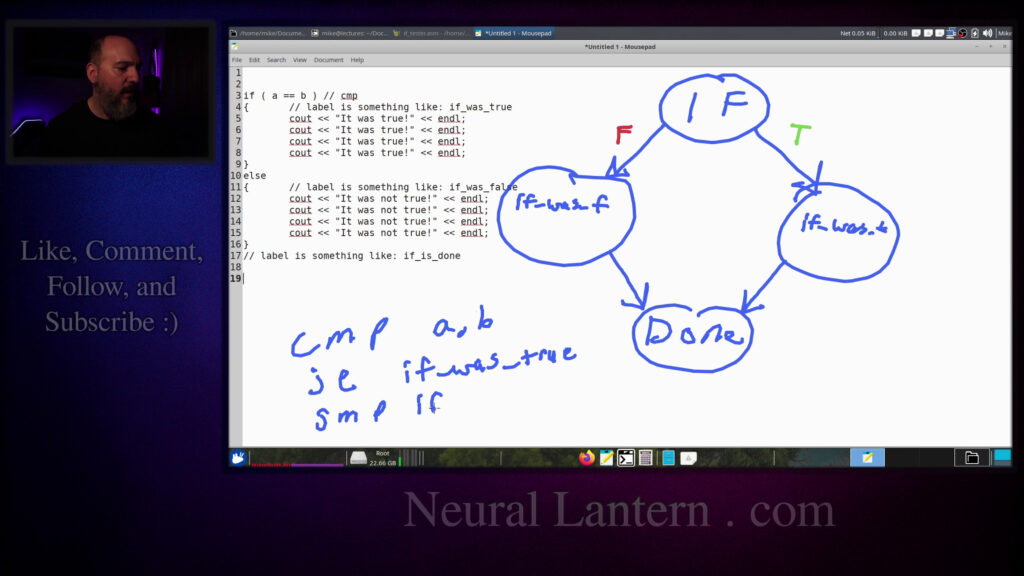
So for starters, maybe let me draw a little bit.
Suppose we had, let me get rid of this thing
and then I’ll just do a regular notepad.
Suppose we had a higher level language,
just so you know what I’m talking about.
Suppose we had a higher level language
and we wanted to say if, you know, some expression is true.
We wanted to say if expression is true,
then print, you know, it was true.
Anybody remember that old movie, Little Nicky?
Somebody got exploded and then the guy next to him goes it’s not true
Okay, it was not true
So this is the basic idea of what we’re going to implement in assembly
I’m going to write a full program for assembly to show you this but um
You know you’re in C++ you’re in C you’re in I don’t know whatever language you’re in and
You obviously know how to use if-else blocks at this point hopefully
And now we’re going to just try to figure out how to implement them in assembly
So it’s important to understand that really under the hood
really under the hood there’s a bunch of stuff happening surprise right okay so
first off we look at this expression which could be I don’t know let’s say
five is greater than ten or a is equal to B or whatever it is that you put in
there you could make a very complicated expression we’re going to use simple
expressions for this video so if we’re comparing a to B we’ll end up using the
compare instruction remember there are two steps to conditional branching and
in YASM we first use the compare instruction against two operands and then that will end up
filling up the rflags register so that we can later conditionally jump based on the results
of the comparison. So we do a comparison and then you can imagine that the beginning of this
you know the the true body notice how it has a scope I’m going to just put this brace on another
line here to indicate that there is a scope from line four to six indicating all this code in here
in here is executed only if the if statement was true and then all of this other stuff is executed
only if the original comparison was false right so you can imagine now label is something like
my if was true so we can make a label for where that body starts and another label for where the
label is something like if was false and then what will happen is we can use a
conditional jump instruction after we do our comparison maybe I should put to
compare right here oh I’m using I’m using assembly style comments I should
be using a C style comments if I’m actually writing C++ here let me just do
that okay so this is the comparison instruction here and then here’s the
here and then here’s the beginning of the body of stuff to execute if it was true you can imagine
that there could be many statements here um if it was true or if it was false
just to prove to you that we can execute like a full body of stuff so we have a label that
designates when that body starts and then we have another label designating when the else body
starts and then we should have a label that uh that designates when the whole thing is over
label is something like if and or if is done or something like that so basically what we want to
do is to implement an if else a simple if else in assembly we’re going to say let’s do a comparison
and then we’ll do a conditional jump where are we going to conditionally jump well if the comparison
was true label. And then what will happen is execution will fall through.
When it reaches the end, we want to have another jump statement that unconditionally jumps
to the end of the if statement. If we didn’t, then whenever the expression was true,
we would end up executing all of the true statements and then it would fall through
to all of the false statements or the not true statements. So we have to have many jumps in here
let’s get into the body and then let’s finish and jump out of the body on the other hand if the
expression was false then our jump instruction is going to jump you know over the true body so
it’s not even going to do that at all it’s going to execute all of the else stuff and then it’s
you know sometimes a good idea if you have another jump here that just jumps to the end but you can
kind of see by the way i’ve written this out that there’s not going to be anything between the end
you know place where we’re finished with everything which means we don’t really
need an unconditional jump at the end of the else body we can just let the
execution fall through so maybe if I can draw a little diagram here I’ll say I
don’t know I’ll do like if put it in a little bubble and we’ll say that if it
was false we jump to one place and if it was true we jump to another place
we jump to another place.
I hope you’ve already started to understand this by now.
So we’ll say if the expression is true, we jump here.
If the expression is false, we jump over here.
And so true would be saying, let’s jump to the if was true.
So we’re going to jump to if was,
I’ll put a T there because I’m running out of space.
If was true.
was I’ll put an F false and then at the end of the true we jump to the done
label so I’m just gonna put done maybe down here
so at the end of the true we just unconditionally jump to the done area
and then at the end of the false we jump unconditionally to the done area as well
here’s something interesting though when we have a comparison instruction and
conditional branch instruction let’s say uh let’s say a equals b we did that comparison and then we
wanted to jump into the true area if a equals b was true so that means we’ll say jump
equal so if a is equal to b after we compare well let’s say a comma b we’re going to use registers
when we come to the code we’ll say compare a and b and then jump if they’re equal to some label
but the conditional branching instructions they only jump to one
potential place or fall through so if the comparison was false meaning if those
two things were not equal then we’re not going to actually be able to jump to a
different label we’re going to simply fall through to the next instruction so
in that case the very next instruction would get executed let’s just put a jump
was
false.
Meaning
we compare A and B
and if the two things are equal
we’ll jump into the true block.
Otherwise we fall through to the next instruction
which
that’s a very poorly written J
but we’re going to unconditionally jump to false.
So if we did not
jump to the true area we fall through to the next
instruction where we will always
jump to false and that implements the diagram
that implements the diagram that you see up above.
I mean, you know, if we have if statement, we compare,
maybe I’ll do, you know, A equals B.
We jumped to true, if was true.
And otherwise we end up falling through
and then jumping to if was false.
And then at the end of both of those,
we have an unconditional jump instruction
that jumps to the done.
So I’ll put JMP down here just to let you know,
you know, at the end of each of these blocks,
that they are jumping out of themselves at the very end to the done area maybe
I’ll put an arrow here so that we know both of these jumps end up jumping to
the done area that’s the basic idea for how to implement an if-else block a very
basic one we’re gonna do more complicated ones later but for now we
kind of have the idea down I think let’s look at some code dang I blew 10 minutes
already on that okay so I’m gonna copy paste some code from my solution here
code for my solution here this again this is not like a beginner’s assembly
video if you need to learn how to write assembly in the first place how to
compile you know link create a make file and so forth you need to see my other
videos first but for now we’re just going to assume that you know how to
make a data section in Yasm and we’re gonna say let’s make a bunch of strings
so first I’m gonna ask the user for an integer and then I’m gonna make a bunch
of decisions like I’m gonna do you know an if-else block to test what kind of
what kind of number they put you know did they make a number that uh
equal one if it was equal to something oh did I ask twice I can’t remember what I’m doing
but basically we’re going to print something if their number was equal to something else
we’re going to print uh something if their number that they inputted was equal to five we’re going
to print something else if their number was equal to six we’re going to print again something else
a bunch of stuff and then wait isn’t this the complicated example oh no i think i am using code
for my more complicated example else less than 10 i don’t know maybe this is the simple one
let’s double check i guess if i put more complicated code in here you’ll probably be happy
but whatever i thought this was going to be a simple example so i’m just defining strings at
codes stuff that is covered in other videos now i’m going to start my text section so my text
section begins with a declaration that i’m going to use two external functions so this video is
not about this library that takes input and sends output i have other videos for that but basically
i’m just using a library that lets you type an integer into the terminal and then it will print
a different number to the terminal for you so you can imagine if you wanted to follow along
imagine if you wanted to follow along with this code at home and you don’t
have this library you can just hard code your numbers just to prove to yourself
that you can get it to work or you can use a different library if you have a
hybrid program and you’re linking against GCC you can just use scanf and
printf pretty much those take a little bit more work to do but you can do it
anyway so our entry point is going to be called if tester it’s a function called
Again, this is a hybrid program and hybrid programs are not covered in this video, but you can imagine that there is a C++ module elsewhere in my source that is just going to call on a function called if tester.
And so that’s why I’m marking this as global so that other modules in my program can call on if tester.
So it’s just a little label that we can jump into or in this case call into.
Let me go down to the bottom of that.
We’ll put a return statement at the very end.
very end so now this is officially a function and notice how i made a note here that says r12 is
the user’s inputted integer so that means i’m going to be using r12 and since r12 is designated
in the abi the application binary interface as callee saved or callee preserved that means i
have to do a push pop pair to preserve it or i’ll get in lots and lots of trouble my program will
prologue which my favorite book also calls the prologue and then I’m going to
say epilogue and so now we have a function that basically doesn’t do
anything but we can at least jump into it let’s see if this compiles as is I
think it probably will yeah so the driver just says hello that’s the C++
program with the actual main function and it calls my if tester function but
nothing happens the if tester function returns control to the driver and then
the driver just says okay i got control back so nothing really happened so now let’s ask the user
for some input so again this is not a video about this library or how to print with this with system
calls see my other videos if you need help on that but basically we’re going to print a message to
the user hey please input an integer and then we’re going to call on a library function that
lets them type in a number and then returns it to us in rax we’re then going to store it
well just basic stuff right so if I run this again it’s going to ask for an
integer please enter an integer if I can type that and then nothing else happens
okay now we can kind of start making more decisions so I’m going to let’s see
if test if test if test okay so what I need to do now is run another function
called if tests several times and I’m going to compare the number that the
times and I’m going to compare the number that the user inputted so remember r12 is the user’s
input so I’m going to load that as the first argument of a function call and then I’m going
to load the number five as the second argument of a function call probably not a great idea to hard
code numbers in your assembly you should probably define them up in the globals or the the data
section at least as just regular defines and not numbers in memory but I’m going to just keep these
So three times we’re gonna call if test and then also another function called CRLF. So first I’m gonna paste in
CRLF
Where the heck is that? Oh, dude?
Again, this is not a video about the basics
So you’re just gonna have to trust me or go watch my other videos if you don’t understand what I’m doing here
But I have a function called
CRLF and its whole job in life is just to print a new line for me just because I like to do it that way
handles the CRLF call. Now let’s make another function called if test.
So I’m going to start that by designating its label right after this block of
code here, maybe before CRLF.
So we have like a basic if test function and here’s my prototype just to remind
myself what I’m going to be doing.
It’s going to take an input and it’s going to take another input for a test
against me. So the first one is like the user’s input.
The second one is the number that I want to test it against.
number that I want to test it against they’re both longs which means they are both integers
which means the incoming arguments are going to be rdi and rsi if you’re respecting the abi
and then some notes to remind myself I’m going to be using r12 and r13 inside of this function so
I’m going to start by putting a return statement there since that is what it takes to make a label
into a return into into a function then I’m going to preserve the callee saved registers again if
don’t know what i’m talking about see my other videos we’re going to push r12 and push r13 so
that they are not ruined for the caller we call this the prolog then at the very bottom of the
function we have the epilog which just restores uh the registers in reverse order you’ve got to
do it in reverse order see my other videos if you don’t understand why okay so that’s basically a
function that can get called it doesn’t do anything let me double check that the program still actually
works. 66 and nothing happens. We just printed CRLF a bunch of times. Okay, so now we’re ready
to continue. So let’s grab the function arguments. Remember we were going to use R12 and R13 for the
user’s input and the number we will test against. Those came into our function with RDI and RSI.
So I’m just going to copy those two incoming arguments into R12 and R13. And you’re supposed
keep the user’s input in RDI then the moment I call any other function or system call I’m just
going to lose that data so I’m going to keep it inside of R12 and R13 so I grab the function
arguments and then I print a begin message just to let the user know that we’re going to start
you know making tests against our number so this is just basically a message saying hey begin the
if test and then print what we’re going to check against so the next thing is
I’m going to let the user know what the second incoming argument was.
If you look at R13 here, that was RSI, which was the second argument.
So the test against me number.
So we’re going to check the user’s input against whatever we called for the second argument.
So I just wanted to print it out.
You know, like we’re testing your number against whatever.
So that means I need to make another call to my little printing library here.
To RDI which is the first argument notice how we already we already destroyed RDI. That’s why I’m keeping the input in our 12 and our 13
And then we’re gonna make that call and we can just assume everything will go according to plan at that point and then
Then we’re gonna print a special message only if something actually happens
So we’re gonna implement the if else block in a moment. Let me just run this real fast
and then it says we’re calling the function three times and we’re saying the basic test has begun
we’ll test against this number five so we’re testing your input against five and then six and
then seven and then we didn’t actually do anything we’re about to okay so then the next thing is we’re
going to print a special message only if the user entered the right number so first off remember we
see if else block and converting it into assembly so i’m sort of placing that in comments for you
so the comparison instruction i i didn’t want to put the r12 equals r13 inside of the same comment
that lines up with the the compare instruction because the compare instruction as i’ve said in
other videos already it doesn’t actually check to see if something’s equal it just makes a bunch of
called r flags with information that we can later use to decide if the two things were equal or not
equal or greater than or less than or whatever so that’s why i chose to put that on on the next line
so at this point we’re saying if those two things were equal and that’s how i implement the expression
in the middle then let’s jump to a special label called if test if was equal so you can come up
with any scheme you want for your labels but for me when i have when i have sub labels inside of a
when i have sub labels inside of a function i like to just suffix the function’s name with an
underscore and then start thinking of sub labels after that so everything’s like kind of clean
there’s less chance of overlap in labels if you have like a giant module with tons of functions
so i’m going to say this is like my main if that i’m checking and uh i’m going to jump to a label
called was equal meaning you know this evaluated to true that means that should be the true part
block let’s see do i still have that code here yeah right so here i’m going to jump to
the true block so you know if was true in the first example that we talked about so i’m going
to say if it’s if those things were equal jump to the code for the true block okay that means i
actually need the true block uh but i guess we’re going to set that up in a second otherwise if that
did not jump away it means that those two things are not equal so i said i should jump to the
I should jump to the else block or the false block.
Wait, do I have else in this example?
Oh, okay, okay.
This first thing that we’re looking at is only if.
So we don’t even have an else block yet.
We’re going to do that as the second example.
So we’re basically going to jump to the done area
if we didn’t jump into the true area.
And then at the end of the true area,
we can either jump to the done area
or we can let the execution fall through.
fall through okay so now that means i need if was equal and if i just copy paste a big giant
block of code and try to explain it to you real fast let’s do this
okay so we were going to jump to if was equal if r12 was equal to r13 and then um
we uh have this you know label here and notice how i’ve kind of like put a brace here indicating
like put a brace here indicating hey this is the beginning of the true block body you should
consider doing this too when you’re first learning and even after you’ve learned because let’s face
it assembly is tough and so in the true area i’m just going to print the equality message i’m going
to say hey your number was equal to you know whatever and then uh i’m going to actually print
the let’s see r13 number so that was uh i think the number to compare against the test against
against me number so that means here in this message we’re going to say hey your number was
equal to the number that we tested against so then otherwise let’s see or sorry after that
we’ll print the suffix of the message um and so you know i just i just like to make pretty
pretty uh printed messages so let’s see where’s the suffix here i can’t even find it um how about
oh i should have put suffix instead of the number two that would have been better so what i wanted
to do is say your input was equal to and then print the number and then after that print an
exclamation just to prove to you how easy it is to to make a pretty message that’s formatted nicely
for the user um or your professor or whoever so uh you know you basically just print a number and
then you or sorry you print the prefix and then you print the number and then you print the suffix
suffix and then that’s the end of the true body and then since we’re done with the true body we
can basically just say all right now we’re done with the if so the next instruction that follows
is the done area again looking back at the example here that would be sort of like here after the
whole entire block was finished we’re ignoring the else in this code but you can imagine we’ll do
that soon so if the user’s number matched something we execute a true body if not we jump to the done
to the done area and if the user’s uh number did not match then we just immediately jump to the
done area so that we don’t do the true area and then we write comments to ourselves to help us
remember oh look here’s like the comparison and then here’s the body of true and then uh the done
area is like we could put another comment if we want we could say like this is done but i kind of
think like i kind of think the label is self-explanatory so let’s see if this worked it’s
was talking too fast we’ll run it and we’ll say 44. okay so nothing matched any of the numbers so
let’s type the number six so that we get a little message on the second one so i’m going to type the
number six and you can see it did not match the number five and it did match the number six so
we got that true block executing when we called on that function where the number to compare to
nothing there. So now we know simple if blocks.
The next thing we’re going to do is if else blocks.
All right.
So let’s see.
Not sure if I’m going to cut the video and split this up into multiple parts.
Probably would have been a smart idea.
Let me know if I ended up doing it.
We’re at about 25 minutes now.
But anyway,
so now we’re going to look at if else blocks.
if else blocks.
So I’m going to start off with another function.
I’m going to call it if else test.
So here’s the tester.
It called on if test.
And then I’m going to, you know, I had the if test function that I did previously.
And so now we’re just going to make an if else test function.
The if else test, it just has one input, one argument for input.
And we’re going to just sort of compare it against different values.
of compare it against different values we’re not going to call this multiple times with different
values to compare against so that means let’s see we only need to use one register so
i’ve designated r12 as the user’s input so that’s where we’re going to store it which means we
should preserve it in the prologue so i’m going to push r12 and then again if you don’t understand
some of the basic stuff that i’m that i’m skipping over see my other videos where i explained
to know to actually have this kind of a program. So I’m going to have a function that enters and
it returns at the end. It uses R12 so we will preserve it with a push pop pair.
And then the first thing that I should do is grab the user’s input from the first argument.
And if you’re respecting the ABI that means it should come from RDI. So I’m going to move RDI
somebody remind me that the first part of the program has to actually call this function or
nothing will happen. So we’re going to say hello. That’s just a simple message that we talked about
before. And then now we’re going to actually implement the if else block. So it’s like a
little bit more complicated than just the simple if block. It’s going to be this whole example that
we talked about before. Let me see. Maybe I should add the calls to this block real fast. So we have
to this block real fast so we have the if tester and then run the complex if else tests
right before r12 okay let me just double check that i’m making a call at the right spot here
so we have r12 and 7 and then epilog okay so now finally in our program we’re going to have a call
to um the if else test function that we’re just making right now
Okay, so we have that.
And let me find that source again real fast.
If else test, we got the prologue.
We take their input and then we say hello.
Okay, so now we need another label that begins the if block.
So what we’re doing is we’re checking to see if the user’s input was equal to five.
And then we’re going to say something if it was.
And otherwise, we’re going to do an else block on that.
block on that so again i like to write my comparison instructions with a blank expression
in terms of the c equivalent comment so notice how the we’re checking to see if r12 is equal to
five i put that on the next block because we’re going to jump to the to the true part of the if
block if it equals five so that’s why i put that there the comparison instruction pretty much just
compares r12 with five sets a bunch of values into the r flags registers so that we can later
so that we can later conditionally jump if we want to.
So basically we’ll jump to the true place if that was true.
And then if not, execution falls through to the next statement,
which will just jump to the else place.
So we need more labels is what I’m saying.
So now we need a body for if the statement was true
or the expression was true,
we want to be able to execute the true portion of the if block.
the if block so that’s this right here so we’re going to jump to if it did equal to five you
could imagine you know making a better label instead of equal five you could say first if
first else if complicated block true scope or true block or something but i just put equal to five
basically saying we’ll execute this code if it was equal to five so again we’re just kind of like
into this label equal five if r12 was indeed equal to five so that means if it was we execute
all this code right here we know we’re finished when we have the very last line saying let’s jump
to finish the the if else block again just just to clarify
we do the comparison first and if the comparison was true then we’ll jump into the true area so
you know we’ll jump into the true area and then all of these uh instructions get executed
instructions get executed but if we don’t have a way to jump out of that block then whoops
all of the else statements are going to get executed too right so we don’t want that
we don’t want to execute both the true and the false statements we want to have a jump instruction
at the very end i’ll put jmp just so that we jump to the to the end of the if else block
you know jump to the place where it’s just all over and finished
Okay, so now I’m going to look at, whoops, turn that off.
So we have equal five.
So we’re going to jump to if else test if done.
Let me just double check to make sure I’m not forgetting anything.
Oh, we need to jump here.
Basically meaning we’re going to jump into the else portion.
So here we covered jumping into the true portion, you know, the regular top block.
Now here we’re going to jump into the else portion.
We need a label and some code for that.
code for that so this is the else six begin i copy that oh man it’s starting to get kind of
hectic in my brain here the copy pasting is worse than actually writing the program
so uh if the comparison was not equal like if r12 was not equal then execution falls through
to line 216 and then we unconditionally jump to the l6 begin area which is like down here
like down here and then we’ll print something else.
We’ll, oh, we’ll, we’ll check again.
So we’re doing like, um, if else, if else.
Okay. So originally when I was talking about the, uh,
if else block, I didn’t do a,
I didn’t do like a very complex if else statement.
We’ll say a is greater than B something like that.
So I’ll just put a more code here just so you know that we can do if else,
if else blocks but just you know again keep in mind that every scope here that you’re going to
try to run based on some condition you just make it its own label and make sure that at the very
end of the scope you jump away so that you reach the very end of all this stuff because just as a
quick review if we are just writing in c or c plus plus only one of these blocks is going to execute
right like if a is equal to b then only that first block will execute the second and third blocks
will not execute it’ll jump after that all the way down to line 21 only if a does not equal b
do we even have the chance of checking to see if a is more than b if it’s false then we’ll have the
chance to check the else and if it’s true we will only execute the code in the line 12 block you
know imagine there are more statements there and when that block is done then we will jump to line
to b and a is not greater than b so just a quick uh you know c plus plus uh you know design pattern
review if else block review so we have like an else if here we’re going to say check if the input
was equal to six so we just do the same thing that we did before we compare r12 the user’s input with
six we jump if they were equal to the else if equals true block and if not execution falls
Less than 10 begin block. So this is going to be like really complicated
How many lines did I actually I think I got excited when I wrote this
Okay, else if equal six true
My challenge to you is to come up with labels that are like way easier than the labels that I came up with
All right, so we’re gonna do this I
Can almost guarantee that when I’m done copy pasting everything something is not going to compile because I forgot a label somewhere
Else if equals six true, okay
equals six true okay so what’s happening here again um uh so at this point you know the first
if uh expression was not true r12 was definitely not equal to five so we jumped down to else if
equal six begin which was here and so then we just make another comparison to see well okay it was
those two things weren’t equal it wasn’t equal to five so let’s check to see if it was equal to six
to yet another scope.
If it was false, we go down to line 237
and jump to yet another scope.
So here is what will get executed
if R12 was indeed equal to six,
and then we’re just basically gonna say it to the user
and then jump to the done label,
meaning like we’re totally done with our if else block.
Notice how the first if here,
when it was totally finished, it jumped to the done area.
this else if block is also jumping down to the if done area.
So eventually we’re going to need that label.
Okay.
So then next we’re going to check to see if the user’s input was equal to a 10.
So like kind of the same thing here.
We’re going to do another copy paste and we’re going to say, all right.
So if the user’s input was not equal to, let’s see,
if it was not equal to five, then we jump down here for our next comparison.
comparison we check to see if it’s equal to six if it was not equal to six then we jump down to
the less 10 begin line which is like all the way down here we do another comparison to see all right
well is it less than 10 you know if it was not equal to five or not equal to six then we check
is it less than 10 if it uh if it is then we uh jump to the else if equal less 10 true block which
I made this way too complicated. I realize that now, but it’s too late. I’m going for it, man.
Anyway, so if that statement is true, if R12 was indeed less than 10, then we jump to this block
and we basically just say that to the user and then we jump to the done. So finally, notice how
this part right here on line 259, it’s basically saying if R12 was not less than 10, then we’ll
then we’ll jump somewhere else notice how it’s just else right so this is like the very the very
bottom so i think the way that i wrote this uh code is uh we have two else ifs right we have like
an if five else if six else if less than 10 so maybe i could do something like this um if r12
r12 I think I said six just now right hopefully I actually did say six
otherwise if r12 is less than 10 then do some stuff otherwise if nothing else
matched then we’ll execute you know this block right here so again remember
every single scope has to have its own label so that you know where to jump and
it’s also a really really smart idea for every single scope to have you know
to have a little jump instruction that jumps past all of the if else if else if else stuff
so we’ll say like you know label you know done so that we can make sure that only one of these
blocks actually executes which is how you’re supposed to imagine c and c plus plus work
um and so it’s just complicated because there’s a lot of stuff to copy paste but you can just
still see you know only one of these blocks ever is supposed to execute so we give the first one
we jump into it if it’s true if it’s not true then we give the second one a chance
we jump into it if it’s true if not we jump to compare the third one if it’s true then we jump
to its scope if not we jump to the else and the else always executes if nothing else above
was true so that’s the basic idea here oh dear i’ve probably lost my place
looks like i just copy pasted less 10 true which was this right here so
so um less than true or less than 10 true okay so we told the user your stuff is less than 10
and then we jumped to the done area so that means we are probably working on the else area okay let
me grab that so now finally we’re going to have the else area which is going to you know finish
this all up that’s going to be after the if done so if nothing else matched then we will end up
nothing else matched then we will end up jumping to the else area and then we’ll basically
just tell the user none of the conditions seemed to have applied and then even at the
end of the else block even though you could probably get away with just letting execution
fall through just to save yourself one instruction you know you could comment that out assuming
you were sure that the very next instruction was the beginning of the done area but otherwise
I’m just going to play it safe and jump directly there then we have to make the actual done
So, just so you know, a label doesn’t have to have any instructions.
We could have something like this, if else test say goodbye.
We could have two labels right next to each other and one doesn’t actually have instructions.
That’s totally fine.
If you jumped to the done area, then execution would just fall through to the next valid
instruction which could go through another label.
So you know, we could have a say goodbye label and an if done label.
if done label, I’m just going to have the goodbye stuff happening inside of the done.
But for clarity’s sake, you might want to keep that label in there that I just deleted.
And all that we need to do at the very end when we’re done with everything is just say goodbye.
So I’m just printing a message.
So just to do a quick recap here, let’s see.
We come in with the user’s input as R12.
We ask, does R12 equal five?
If that’s true, we’ll say that it was equal to 5, and then we’ll go to the done area,
meaning we’ll skip past all the other blocks for the if-else block, or all the other scopes.
But if that did not equal 5, then we’ll fall through to that jump instruction,
which takes us to the next test, which is going to be our else-if equals 6.
So we are checking now to see if R12 is equal to 6.
If that’s true, we jump to this next block.
Why do we need to jump to a block that’s so close?
Well, if we don’t, then we’re going to end up definitely jumping to the next comparison
and you know, that wouldn’t work.
So we’re just kind of jumping over this unconditional jump statement and we’re saying, all right,
your input was definitely equal to six.
And then we’re jumping to the done area just past everything.
But if that wasn’t true, then we hit this unconditional jump that takes us to the next
comparison to see if the user’s input was less than 10.
You know, if that’s true, then we go to the true area to print another message and then
go to the done area.
If it was false, we fall through to the else jump, which will take us to here.
And notice how the else scope doesn’t actually make any comparisons because, you know, when
you have like an if else, sorry, when you have an if else if else if else if, you know,
any number of else if blocks, the else will always be executed if nothing above it actually
did execute.
execute so if you have an else block that means something will execute so we’re not doing any
comparisons we’re just saying you know when that scope is done we’re just going to jump to the done
area so all of these different scopes they’re jumping to the done area when they finish and
the done area is just this label right here where we say goodbye and that’s it let’s see did i copy
paste everything that i was supposed to i think so probably so let’s run the program and see if it
All right, it at least compiled.
So the basic if test, that was the first part of either this video or the previous video,
depending on whether I chose to split this up.
So let me comment out those calls real fast.
So I’m going to just comment out these calls real quick so we can only deal with the complicated
if else block.
So I’m going to enter like a three.
Whoops, let me do it again.
Three.
And so begin the if else test.
test your input was definitely less than 10 and then we end the if-else test so notice how only
one scope executed three was definitely less than 10 what other numbers did we have let me write
them down somewhere so I don’t forget oh they’re written down right here so we entered a three
which was definitely not a five and not a six so that’s why the less than 10 block executed maybe
only the first scope should execute so it says your input was equal to five notice how it didn’t
mention that it was a six or less than ten and then if we do a six it should just tell us that
we have a six it will not mention the five it will not mention the ten so we did we did five
already and then we did six and we did like a two which was less than ten we could also do a one
which was less than ten we can do anything that was less than ten and then the else would be if
And then the else would be if our input is probably like 11 or greater,
meaning it’s not less than 10 and it’s also not five or six.
Just we can see the else block.
So I’m going to do 11, which is the first number that should trigger the else block.
And it says no conditions were satisfied,
which was the message inside of our else block.
Let me just show you that again real fast.
This was the else block.
So message if else else or labeling on my port, I realize that.
But it basically says no conditions were satisfied.
The if else else.
I think that’s basically everything that I wanted to show you.
At this point, you should feel like you’re starting to become an expert at complicated
if else if else blocks, converting those from a higher level language into assembly.
assembly and I honestly recommend that you practice this like crazy while you’re trying
to get more used to it but you know hopefully you have everything you need at this point
keep in mind I’ve said this at the beginning I’ve actually I think I said this in a different video
when we use these branching instructions notice how I have jump equal to where’s that less than
yeah notice how I have a instruction jump less than the the family of conditional branching
conditional branching instructions that compares less than greater than less than or equal to
greater than or equal to the ones that I’m using here apply to signed integers and they won’t
necessarily work with unsigned integers and they won’t work with floats if you compare floats later
so just keep that in mind let me pull up my favorite book again real fast
where what the heck is that book oh dude where’s my document viewer document viewer can I get
document viewer can I get there there we go so I guess I didn’t introduce this
book at the beginning of this video but I probably should have this is my
favorite assembly book you can turn yourself into an expert with this book
by just on its own it’s open source and free the author gives this away he’s a
genius the person who wrote this book is a dr. Ed Jorgensen he’s a professor he
wrote this for his own classes and again it’s like a free open source book you
download a copy from his website if you look this up and and convert yourself
into an expert so let me collapse everything here and then I’ll go to
instruction set overview control instructions conditional control
instructions and I just want you to see real fast just as a recap I talked about
this in a previous video but when it comes to comparing things and checking
operands because if you want to see if two operands are equal you just check to see if
all of their bits are equal you don’t even really care whether they’re both integers or not
on the other hand notice how there is like a family here jump less than jump less than equal
to jump greater than jump greater than equal to that those instructions apply only if your
if they are unsigned or if you’re using floats for your comparisons you have to use this other family
of jump conditional branching instructions called jump below jump below equal jump above jump above
equal and i’m sure you can infer that jump below is the same thing as jump less than right jump
less than or equal to is the same thing as jump below or equal to it’s just that you need to use
a different instruction uh if you’re using signed integers or floats versus sorry sorry
a versus sorry sorry you need to use different instructions if you’re using signed integers
versus unsigned integers or floats so keep that in mind the code demo that i just showed you it’s
for signed integers if you were going to use unsigned integers or floats you would this
program wouldn’t work for you you’d need to replace my my branching instructions with the
the unsigned versions which i mean they work the same thing you’re still going to do a comparison
it still works. Anyway, so after having shown you that and making sure that everything actually
did work, I think we’ve talked about everything that we need to for this video. So yeah, I hope
you feel like an expert practice this on your own, you know, write your own programs just to make
sure you know how to convert a higher level language block into an assembly block. And you
should be on your way. Thank you for watching this video. I hope you learned a little bit of
bit of stuff and had a little bit of fun tell your friends and i’ll see you in the next video
hey everybody thanks for watching this video again from the bottom of my heart i really
appreciate it i do hope you did learn something and have some fun uh if you could do me a please
a small little favor could you please subscribe and follow this channel or these videos or whatever
it is you do on the current social media website that you’re looking at right now
It would really mean the world to me and it’ll help make more videos and grow this community.
So we’ll be able to do more videos, longer videos, better videos, or just I’ll be able to keep making videos in general.
So please do me a kindness and subscribe.
You know, sometimes I’m sleeping in the middle of the night and I just wake up because I know somebody subscribed or followed.
It just wakes me up and I get filled with joy.
That’s exactly what happens every single time.
So you could do it as a nice favor to me or you could troll me if you want to just wake me up in the middle of the night.
just wake me up in the middle of the night just subscribe and then I’ll just wake up I promise
that’s what will happen also uh if you look at the middle of the screen right now you should see a
QR code which you can scan in order to go to the website which I think is also named somewhere at
the bottom of this video and it’ll take you to my main website where you can just kind of like see
all the videos I published and the services and tutorials and things that I offer and all that
for clarifications or errata or just future videos that you want to see please leave a comment or if
you just want to say hey what’s up what’s going on you know just send me a comment whatever I
also wake up for those in the middle of the night I get I wake up in a cold sweat and I’m like
it would really it really mean the world to me I would really appreciate it so again thank you so
much for watching this video and enjoy the cool music as as I fade into the darkness which is
the darkness which is coming for us all.
Thank you.