
In this beginner-to-intermediate assembly language tutorial, we dive deep into unconditional jump instructions (JMP) in x86-64 assembly using Yasm syntax.
We cover:
- What unconditional jumps really are (basically a “go to” for assembly)
- How labels work and how to create them
- Why JMP has unlimited range (unlike conditional jumps)
- Practical demo showing how to skip code sections using jumps
- Comparison between jumping over code vs letting it execute
- Quick look at why this matters before learning conditional branching
We also reference the excellent free open-source textbook by Professor Ed Jorgensen (May 2024 version) which is highly recommended for anyone serious about learning x86-64 assembly.
Whether you’re preparing for university courses, reverse engineering, operating systems development, or just love low-level programming, this video will give you a clear understanding of how unconditional control flow works in modern x86-64 assembly.
Next video will cover conditional jumps (je, jne, jg, jl, etc.) and their limitations.
Enjoy the video and happy coding at the machine level!
Introduction to Jump Instructions 00:00:00
Recommended Free Assembly Textbook 00:00:23
What Unconditional Jumps Actually Do 00:01:27
Labels Explained with Examples 00:02:40
Unlimited Jump Range Advantage 00:04:43
Overview of the Demonstration Program 00:06:56
Building and Running the Jump Test 00:09:21
Live Jump Test Demonstration 00:10:53
Effect of Removing the Jump Instruction 00:13:50
Jumping in Different Directions Example 00:14:58
Summary and Next Video Teaser 00:17:28
Closing Remarks and Call to Action 00:17:44
Thanks for watching!
Find us on other social media here:
- https://www.NeuralLantern.com/social
Please help support us!
- Subscribing + Sharing on Social Media
- Leaving a comment or suggestion
- Subscribing to our Blog
- Watching the main “pinned” video of this channel for offers and extras
Hello there.
In this video, we’re going to be talking about jump instructions in assembly.
This video is going to be about x86-64 Yasm assembly,
but I think probably anyone who’s interested in jump instructions
will benefit from this video because the concept is usually the same
throughout any system that you might use.
So for starters, I want to direct your attention to a textbook
that I think is wonderful.
This is an open source free textbook that will help you become an expert in assembly.
It’s not mine, I didn’t write it.
The author is Professor Ed Jorgensen, PhD.
He releases this textbook for free.
It’s under a copyleft license so you can literally just go to his website and download it and
send it to your friends and everything and it’s wonderful.
This book will take you from zero to hero when it comes to Yasm Assembly.
It’s wonderful and amazing.
This is the book and I just want to show you the section on jump instructions real fast
and then I’ll talk about them a little bit and then I’ll show you a sample program that
uses jump instructions.
So this version of the book that I’m working with right now is May 2024 version 1.1.56.
I’m going to go down to let’s see section 7 instruction set overview.
Inside of there there’s another subsection called where the heck is it control instructions
instructions 7.7 within that there’s a another subsection called 7.7.2 that’s
why I look this other not one of the many reasons that I love this book it
has so many subsections there’s just so many yummy subsections to organize
everything in a way that you can find it all so fast and okay so we’re looking
at unconditional control instructions in other words a jump instruction if
you’re an old-school programmer especially if you use some sort of like
if you use some sort of like a basic language or a language with go-to’s you might recognize jumps
as just being a go-to meaning we’re not actually going to call a function and then return from it
which is what the modern programs tend to do we’re just going to say let’s write a jump instruction
and we will literally just change execution to to jump to some other location just kind of go there
forever maybe we come back but if we do it’s going to be because there was a different jump instruction
instruction that told us to jump back.
So we’re not calling and returning.
We’re just going somewhere and that’s it.
Obviously it’s a little bit more convenient to be able to call functions,
but that’s sort of like an abstraction that has to be implemented after we
understand how to jump. So anyway, the jump instruction is pretty simple.
You just put JMP in Yasm anyway, and then follow it with a label.
So, you know, just as a quick little recap here, what’s a label?
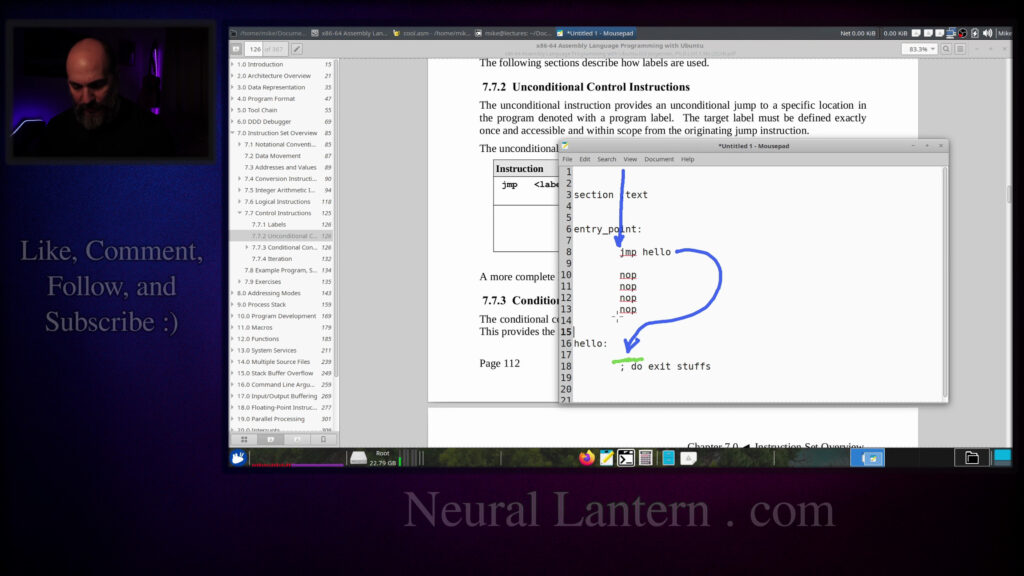
imagine we have an assembly program here and maybe here’s our text section and we put some
instructions maybe there’s like an entry point right here I’ll say a global entry point and
literally just taking the word entry point and putting a colon after it now makes that a label
so if there are any instructions underneath I’m gonna put a bunch of nopes then if someone somewhere
to say jump entry point they should be able to go right here to instruction 8 and then start
executing downward. I guess maybe I didn’t need to put the global keyword global just means let’s
make this label available to other modules within the same program so if you have a multi-source
program or a hybrid program with multiple different languages then you know you should do this but if
it’s just a pure assembly program and there’s only one source code filed you don’t need to mark a
Just as a quick example here, entry points, I’ll just put hello as a label and I’ll say like do exit stuff.
So imagine on line 16, you add some instructions just to kind of exit.
If I wanted to skip all these nope instructions for some reason, I could just do this.
I could say jump hello.
And what would happen is execution.
Oh, I can use my pen.
Execution would just sort of, you know, it would come into the text section.
you know, it’d come into the text section.
It would go down through the label and it would execute this first jump
instruction and then execution would jump over the nopes into the hello label.
And then, you know, if there was other stuff here, then it would get executed.
So by jumping over the nopes,
I’m essentially saying that the nopes should not actually end up being
executed. They’ll be there in the program, but they won’t actually execute.
So that’s the basics of a jump instruction. Okay.
So what else do I need to tell you real fast?
What else do I need to tell you real fast?
Oh, one thing that’s really good about jump instructions is they have unlimited jump range.
So you can jump from a place at the very, very beginning of your assembly program and
jump to a place that is at the very, very, very end of your assembly program.
There’s not going to be a limitation on how far you can jump.
I mean, in theory, there’s a limit, but practically speaking, there’s not a limit.
Why would you care that there’s not a limit?
not a limit well because in a future video that i’m going to release we’re going to talk about
conditional branching which is sort of a jump that only jumps if a certain condition is true
and those have limited ranges where they can jump so there’s going to be a bunch of different
instructions but one of the conditional branching instructions is jne and another one is jge and
there’s another one that’s je basically you know jump if something is equal jump if something is
can only jump about 128 bytes away.
So after your assembler assembles and compiles
down to object code,
and then after your linker links your final executable,
wherever it is that the instructions happen to end up
inside of your program,
the conditional jumps,
the conditional branching instructions,
they can’t jump more than 128 bytes away
to some other instruction.
So keep that in mind.
Even if later on you graduate
to making decisions in your program,
like I’m going to do in the next video,
in your program like i’m going to do in the next video you can only jump so far and if you have to
jump too far you actually might not be able to jump at all unless you jump a very short jump
to a regular jump instruction and then that jump instruction jumps very very far away that’s kind
of the workaround for it i’m not going to talk about that in this video though this is not a
video for uh conditional branching i just wanted you to be aware of one of the benefits of regular
Okay, so we’re looking at the book here.
There’s not really a whole lot to the jump instruction, just jump and then a label.
We talked about its benefit over conditional branch instructions,
but we also talked about its, I guess, its shortcoming,
meaning it can’t actually make a decision.
It will always jump to a label no matter what.
There’s no condition.
So there’s the book there, and now I’m going to make a sample program
and show you how to run it.
I’m just going to run it.
I’m just gonna run it I’m show you what it does in order to implement conditional branches so for
starters I want you to know that there’s a make file that I’ve generated under the hood and we’re
not going to be talking about that in this video this is also a hybrid program so there’s a C++
entry point a driver module under the hood of this we’re not going to talk about that if you
want to know how to make hybrid programs you want to generate make files you want to learn the basics
videos for now we’re only going to be talking about jump instructions so I’m
going to skip a lot of information okay so for starters I’m going to make a
little data section here and again this is explained in other videos but for now
we’ll just trust that we can make a data section that contains strings C strings
and other values so pretty much I’m just going to make a string called begin jump
test just to announce to the user that we’re we’re going to start doing this
We’re going to start doing this and then I’m going to make a string called this message
should not appear.
So in the code, I’m going to try to print that message, but then I’m going to jump over
the call to print it just to prove to you that there are instructions that would print
that message, but we’re jumping over them with the jump instruction.
And then there’s like an exit message.
And then there’s a CRLF, which is just a carriage return line feed.
Again, all of this stuff is in other videos already.
So we’re going to use system call one to print.
We’re going to print a file descriptor one, which is just standard output for your program.
Then we’re going to start the text section where the actual code lives.
So this text section is here and it’s supposed to be at line 37 already.
I think I missed a bunch of lines.
Oh no, I think I missed some comments.
Anyway, so we have a text section here and an entry point and I’m calling it cool.
calling it cool and I am marking it as global because in this particular program that I’m
building it’s a hybrid program there’s going to be a C++ module that will call on our cool
function so cool has to be global and then I’m just going to call on a method called jump test
I don’t know I have the words load there I’m just going to get rid of that real fast locally and in
my solution up above and so we’re going to call a function called jump test and then when we’re
finished we’re going to return to the caller which is going to be the driver and that’ll
pretty much be it.
So if I comment this out real fast, let’s see,
this might actually work.
Let’s see if I can get it to run in the terminal.
But there’s a bunch more code that we have to add, so I’m not really sure.
So let’s do clear and make run.
And it seems to not have a shared object directory.
Let me pause the video while I copy paste one of my stupid libraries into the
program. You don’t need this library.
It just helps me print things.
okay so now I have copy pasted my shared object which allows me to do extra printing stuffs
just for just to make this demo easier for me but you don’t need to know it or you don’t need to have
it to to learn jump instructions anyway so I’m going to do that again and now it actually prints
something okay so hello from the main CPP driver and then it says the driver has regained control
make a call to jump test here and then let’s start the actual jump test function. So I’m going to do
well I guess this thing is kind of short I could copy paste the whole thing all at once.
So let’s do yeah let’s just jump let’s just call the whole thing. Okay I’m going to copy paste the
whole thing then I’ll explain it a little bit to you. So there is a function that I have in here
It’s just a convenience function that I made so I can print a carriage return line feed.
The real interesting thing here is the jump test function.
So we were just making a call to jump test.
Now we’re making the actual jump test function.
It’s got a signature of just void with no arguments.
So it’s not super interesting from the caller’s perspective, but it does some stuff.
So for starters, it has an intro message.
So this will print, you know, hello, welcome to the jump test.
jump test. In fact, if I do a return call here,
it should actually just print that and do nothing else. Right. Okay.
Notice how it printed, begin the jump test.
And then right after that,
there’s a jump instruction just proving to you that we can jump over other
instructions. So look at this,
this piece of code should never actually be called because we’re going to jump
over it. What it is, is it’s printing that jump shouldn’t happen message.
at the top here jumps shouldn’t happen so it’s trying to print out this message should not appear
but we’re going to jump over that by using this jump instruction here on line 66.
Again note that the jump instruction is just jmp followed by a label the label specified has to be
where you want to jump it’s never going to return from that place unless you specifically jump back
somehow later on like i guess if we wanted to we could put a label on line 67 call it the return
call it the return point and then jump back from it after the jump point in fact maybe that would
be kind of interesting to do at the end of this video but otherwise we’re gonna you know just
let’s see we’re gonna end up jumping over so let me reduce the front size just for a second here
so imagine execution uh comes into this program you know we’re executing uh instructions we’re
calling crlf we’re just executing executing as soon as we hit this jump instruction then execution
then execution jumps over into the label that I specified.
So this whole code section here just never even gets called.
So that’s why we will not see that message.
And then at the very end, all I’m doing is I’m just properly,
you know, I’m printing the exit message.
So I’m just printing another string saying the exit or the jump test is done.
I return to the caller execution goes all the way back up to just you know right here right after
call jump test was executed and then the cool function will return to the caller and that’s
just a c++ main function that does nothing so at this point we should see the whole entire point of
the program and then I’ll start tweaking it so you can kind of see the difference with the jump
instruction uh there and not there so let’s run one more time and notice how it says begin the
says begin the jump test and then end jump test and then it goes back to the driver that is
regain control it never says this message should not be printed so this whole section was just
skipped let’s comment out line 66 so that we don’t actually jump over that code and then now you’ll
see that that message does get printed so notice how it says this message should not appear okay
and then run the program one more time.
Now that message does not appear.
Pretty cool.
Now let’s do that double jumping thing just to show you.
I mean, this is not something that you actually want to do.
You probably want to write functions and function calls,
but if you wanted to, you could do something like this.
Here’s the exiting.
And maybe right after this, let’s make another label.
Let’s do, oh gosh, what am I going to do?
what am I going to do? Because if I jump after the exiting label and I jump back up to some label
up here, it’s just going to be an infinite loop. So maybe, um, I don’t know, let’s make a, I mean,
if I make another label down at the bottom, you’ll kind of think it’s a function just without
a return statement. So let’s actually jump within the same function. Let’s do, um,
over the never area.
So I’m going to say jump test and I’m going to write never.
So now we have a label that tells us where the never printed message actually starts.
So if we jump over it to the exiting, then we’re good.
But then if I up here, if I say jump instruction that subverts
never message so I’m just I’m just leaving a comment not code I could then
say let’s jump to jump test never and what will happen now is we’ll still see
the never message because what will happen is execution comes down you know
through here all these instructions are executing and then we see a jump that
tells us to go to the the never label so we actually jump over this exiting jump
over this exiting jump or this like the skipping jump,
the jump that skips the message.
And then we actually do print the never message
and we just keep going down and down and down
until we’re finished with that.
And we end up just sort of exiting normally.
So that means the only code that doesn’t get executed
in this case is the one right here
that skips over the never message.
Hopefully that makes sense.
Let’s run the program just to prove it real fast.
So I’m going to do this again.
And now you see the message should not appear.
This message should not appear.
You see that message.
So again, if we comment out that jump that subverts the skip, then execution will fall
through and we’ll end up executing line 69, the skipping instruction.
again now that message does not appear.
We could jump back and forth if we wanted to.
I don’t know.
Should I do a back and forth?
I don’t really want to.
I think at this point you understand we can jump anywhere we want, right?
I could take a bunch of time in this video to rewrite this program and have it say,
let’s jump downward and then let’s jump upward again and let’s let it fall through
and then let’s jump over something and whatever.
let’s jump over something and whatever. I mean, just wherever you want to jump,
just make a label and then jump to it. Then you have to figure out what your execution path is
actually going to be. And maybe that’ll be complicated, but I hope I’ve made my point by
now. Anyway, so that’s the basics of just jumping around. It’s not super useful. Conditional
branching is a lot better. So see my next video. And I thank you for watching this and I hope you
learned a little bit and had a little fun. See you soon.
See you soon.
longer videos, better videos, or just I’ll be able to keep making videos in general.
So please do me a kindness and subscribe. You know sometimes I’m sleeping in the
middle of the night and I just wake up because I know somebody subscribed or
followed. It just wakes me up and I get filled with joy. That’s exactly what
happens every single time. So you could do it as a nice favor to me or you could
you could troll me if you want to just wake me up in the middle of the night.
Just subscribe and then I’ll just wake up. I promise that’s what will happen.
Also, if you look at the middle of the screen right now, you should see a QR code which you can scan in order to go to the website
which I think is also named somewhere at the bottom of this video and
It’ll take you to my main website where you can just kind of like see all the videos
I published and the services and tutorials and things that I offer and all that good stuff and
If you have a suggestion for
Clarifications or errata or just future videos that you want to see
please leave a comment or if you just want to say, Hey, what’s up, what’s going on?
You know, just send me a comment, whatever. I also wake up for those in the middle of the night.
I get, I wake up in a cold sweat and I’m like, it would really, it really mean the world to me.
I would really appreciate it. So again, thank you so much for watching this video and, um,
enjoy the cool music as, as I fade into the darkness, which is coming for us all.
Thank you.