
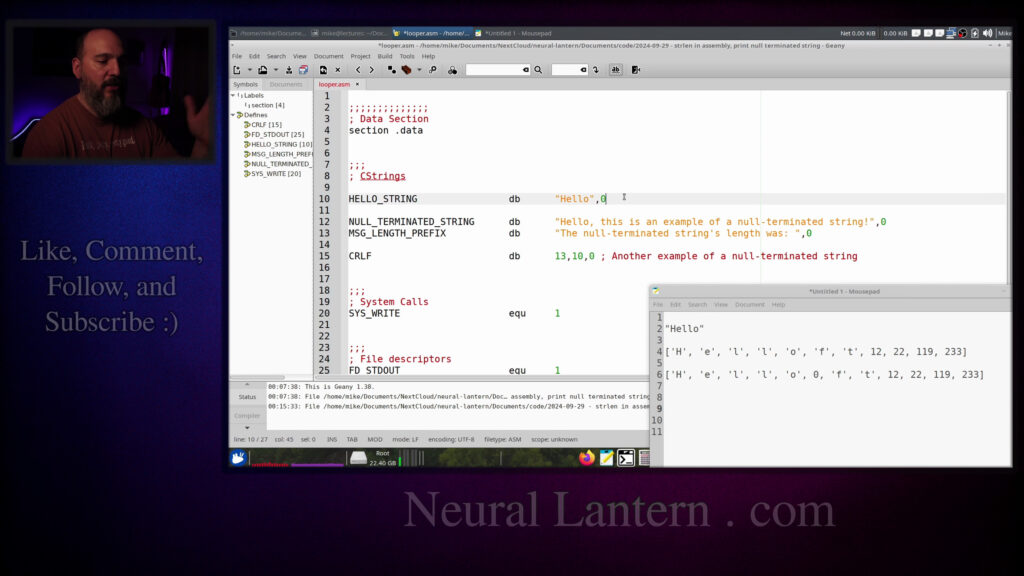

Learn how to write your own strlen function in x86-64 assembly (YASM) that finds the length of a null-terminated string using a simple while loop.
We preserve the proper registers, follow the ABI, compute the length safely, and then use that length to print the full string efficiently with a single sys_write call.
Great for anyone studying low-level programming, operating systems, or wanting to understand C strings at the assembly level.
00:00:00 Introduction to implementing string length in assembly
00:00:25 What are null-terminated strings and why they exist
00:01:59 Pre-computing length vs using null terminators
00:02:53 How the null byte (0) actually works in memory
00:04:14 Naive approach: printing one character at a time
00:05:20 Goal: efficient printing using computed length
00:06:00 Program structure overview – two main functions
00:06:32 Data section: defining null-terminated strings
00:08:19 Additional strings for output (prefix, CRLF)
00:09:15 Text section start and global looper function
00:10:44 Preserving callee-saved registers (ABI prologue)
00:11:28 Calling print_null_terminated_string
00:12:43 Simple crlf printing helper function
00:13:10 print_null_terminated_string function signature
00:14:31 Prologue for print_null_terminated_string
00:15:44 Saving arguments and calling strlen
00:17:12 Using sys_write with computed length
00:18:19 string_length (strlen) function begins
00:19:20 Prologue and fake return value testing
00:20:44 Planning the while loop in C-like pseudocode
00:21:33 While loop initialization (pointer and counter)
00:24:23 Loop top: check for null terminator
00:26:23 Loop body: increment pointer and counter
00:27:37 Done label and return length in RAX
00:28:29 First successful run – full string printed
00:29:30 Adding direct strlen call and length printing
00:31:02 Final run showing both string and its length (54)
00:31:53 Summary – benefits of computed length printing
00:32:59 Improving loop structure (better jump pattern)
00:34:07 Final improved loop verification
00:35:03 Closing thoughts and thanks
00:35:27 Outro, call to subscribe, website mention
=-=-=-=-=-=-=-=-=
Thanks for watching!
Find us on other social media here:
- https://www.NeuralLantern.com/social
- Twitter / X: https://x.com/NeuralLantern
- Rumble: https://rumble.com/c/c-3696939
- BitChute: https://www.bitchute.com/channel/pg1Pvv5dN4Gt
- Daily Motion: https://www.dailymotion.com/neurallantern
- Minds: https://www.minds.com/neurallantern/
- Odysee: https://odysee.com/@NeuralLantern:5
Please show your support!
- Buy me a coffee: https://ko-fi.com/neurallantern
- Subscribe + Sharing on Social Media
- Leave a comment or suggestion
- Subscribe to Blog: https://www.NeuralLantern.com
- Watching the main “pinned” video of this channel for offers and extras
Hey there, in this video, I’m going to show you how to implement the function string length.
So you can find the length of a null terminated string in a Yasm x86-64 assembly program.
Although if you’re using a different assembly language or different architecture, this video
will probably still be useful to you because the concepts are going to be the same.
So what am I talking about?
I’m not going to be around here with this.
So in a previous video, I discussed null terminated strings.
I should also point out that a lot of basic knowledge is going to be skipped in this video
because I’ve explained it in other videos.
For example, if you don’t know how to compile, link, assemble, write a basic assembly program,
write a make file and so forth, then you should see my other videos first.
I’ve also already published a video about null terminated strings, but I’ll just do
it again here since that’s in the title of the video.
of the video so imagine you have a string and it’s hello right so under the hood uh the string is
probably a collection of characters on some level so we’ll just say this is h e uh l
l o right um when you’re printing
it’s unlikely that your entire memory stick is just done like it just you’re at the very end of your memory by the time that O hits
So that means you need some way of understanding when the string ends because if the memory is not over at that point
There could probably be some junk data at the end of it
You know like a bunch of other random letters or you can even imagine these as just you know
One byte that’s not one byte one byte numbers that just go on and on and on forever for the entirety of your RAM stick
of your RAM stick and you have to know how do we actually stop at the O. One thing that you can do
is just pre-compute the length of the string so we do that in assembly a lot before we know how
to scan for null terminators. We’ll say all right well that string is just five long so I’ll tell
the system I want you to print five characters starting at that memory location wherever the H is
and then the system knows okay I’ll just you know print the H-E-L-L-O and just stop after that.
null terminated strings are a lot more convenient because you don’t have to pre-compute the strings.
I mean, maybe your user entered a string.
Maybe you have a lot of strings or they change quite often.
Maybe you have like a multinational program that has tons of translations,
or I think multilingual is probably the better word for that.
But it can be a pain in the butt to constantly compute the length of strings in advance.
So with a null terminated string, you basically just say,
that I want to print and I’m just going to stick actually the number zero at the end of the string.
I’ll leave the junk data there just to let you know that there is some stuff happening in memory.
Notice how this zero, it is not actually the character that looks like a zero to a human.
That’s actually a totally different code than just zero. So you can imagine just an actual zero here.
You know, each of these characters that a human would look at has a number underneath it.
You know, this H is not really an H.
It’s just some number between 0 and 255 if we’re talking about ASCII.
The E is a different number and so forth.
So if we just put the literal number 0 in our data,
or if you want to quote this inside of a single quote,
you can do, I think, slash 0 just to let the compiler know
that you intend to have the number 0 there
instead of something that looks like the number 0, you know, the character.
you know the character but anyways the point is we just have to stick a zero at the end
of the string we call it a null terminator because zero is also you know an alias for null
whenever you have a null pointer or you assign null to a memory location or a pointer or something
you know it’s zero basically under the hood so a zero will terminate it’ll be like a token to let
us know that the string is finished and so since zero is also considered null we’ll say it’s a
we’ll say it’s a null terminator.
It’s a basic idea for null terminators.
Now the question is, how do we actually know when to stop?
Well, the first thing that you could do if you’re trying to write a program that is highly inefficient,
which I’ve definitely done before, is you could just print one character at a time.
You use a for loop.
You start at the very beginning of your string, you know, a pointer,
whatever the user gave you as like this is the first character.
We’ll just print that letter, and then we’ll go on to the next letter.
the next letter and before we print it actually before we print the first letter even before we
print this letter we’ll uh we’ll say is this like a regular character or is this a null terminator
is this a zero if it’s not a zero we print that character if it is a zero we terminate the loop
and then we go through every character one by one just you know checking and printing checking and
printing checking and printing unfortunately that’s kind of inefficient because every time
you call a print you know you’re you’re calling on a function you’re asking the system to do some
for you and it would be a lot better if we could just flush the whole string at
the same time but but know how long the string was that would increase our
efficiency so the program that we’re going to write together is basically
going to use our knowledge of a while loop which I’ve explained in other
videos already so see those other videos if you don’t know how to do while loops
in Yasm we’re going to use our knowledge of a while loop to sort of scan the
string real fast just you know kind of scan it and figure out how far into the
far into the string until we see a null terminator and use that to determine what is the length of
the string. At that point, we can use a system call in YASM, in assembly, to just say, I want you to
print this sequence of characters and here’s the length and then let the system worry about
efficiency. So with that said, let’s look at some code. Okay, it’s just going to be a simple while
loop. What we’re going to need to do is break this up into two parts. The first part is going to be
the first part is going to be a function called string length which you’ve probably already seen
in c if you program in c or c plus plus the second function is going to be called print null terminated
string which will just ask string length what the length of the string is first and then actually
print it with the system call so let me uh i guess let me start off with my data section here
to print I’m gonna copy paste that for my solution again this is not a not an
assembly basics video so if you don’t understand what I’m doing you should
watch my other videos first I’m assuming you know how to make a data section by
now we’ll put some C strings I’m just gonna make one null terminated string
actually I guess I’m making two but the focus of this program is just the first
one I’m calling it null terminated string and in assembly it’s pretty easy
you just make it a you know a character array just like a sequence of bytes with
a sequence of bytes with this DB meaning data bytes.
And I can just put a quoted string like this.
No problem.
As many characters as I want.
I can start injecting specific ASCII values if I wanted to
or byte values if I wanted to just by putting a comma
and then a number.
So I could do something like this.
I could do like, you know, 47, you know, 49, you know, 50, whatever.
If I knew the ASCII codes for the characters,
fortunately, I don’t need to.
normally into the double quoted area but then i need to be able to put a null terminator at the
end of my string because it’s not going to happen automatically so then i am going to do comma zero
and you’ll end up with something like this like if i guess if we look at the previous example real
fast i’ll call this a hello string just so that you see some similarity from what we just looked
a notepad thing would just be typing the word hello and then putting comma zero.
So it is now a null terminated string and it looks just like this inside of system memory.
Well, not just like that.
There would be numbers where the letters are, but you know, that’s basically what we have created.
And then of course there’s junk data afterwards, but we don’t really care about that.
You know, we’re just going to ignore it with the null terminator.
So I’m going to erase that since we’re not just going to print the word hello.
We have a null terminated string here and then after we print the null terminated string
I’m just going to print out what was the length of the string.
So this is a prefix string where it’s just, you know, it’s a prettier program.
The program is going to say the null terminated string’s length was something.
And then we’re going to use the null terminated string printer to print that also.
Convenient, right?
And then I’m going to actually print the number.
Then we have this down here, crlf, which is just printing a new line in the terminal.
That’s character code 13 and then 10 and then a null terminator so that we can use the null terminated string printer again.
And then we’re going to use system call code 1 to print a standard output right here.
If you don’t understand that, then see my other videos.
But let’s move on to the text section where all our instructions will go.
Okay, so now the instructions begin in our text section right here.
section.text and I’m using an external symbol this video is not about this
library here but basically I have a library that will help me print integers
you don’t need to worry about that you could imagine well I guess in your
example when you’re practicing if you don’t have this library you could just
not print the length of the string and just use it only and it all should still
work or you could hard code the thing that you’re printing if you really
wanted to. Okay, so I’m just going to continue on here. Now let’s do our entry point. So again,
this is not a video about hybrid programs. Just assume that there is another module in my program.
It’s a C++ module. It’s got the main function, you know, for the entry point for a hybrid program,
and it’ll just call on my looper function. So that’s why I’m marking a looper as global.
So my other module can call it. And well, it is a function that needs to return. So I’m going to
to return so i’m going to put ret at the end of it and you can see here i left myself a note saying
i’m going to use r12 to remember the length of the string so that i can print it back to the user
so that means i have to preserve r12 for the caller because the abi or the application binary
interface says that r12 is a callie saved register and if you don’t respect the abi
the abi is not going to respect you your program is going to end up crashing eventually
So I’m just going to do a push pop pair to preserve R12.
Oops, prologue and call that epilogue.
Okay. So we got a push pop pair. We got a return statement.
This program should probably do nothing so far. So let’s run it and see,
just make sure that it at least compiles.
So I’m going to say clear and make run running the program.
Hello from the driver. You don’t know that the driver has that.
that the driver has that. This is not a driver video. And then the driver regains control because
nothing happened inside of the assembly module. We just basically looper got called and then we
preserved R12 and then restored it and then we did nothing. Okay, so now let’s make a call to
print null terminated string. We have to make another function for this, but right now this is
just the call. So the name of the function that we’re going to write is called print null terminated
it it will call on the string length function to figure out how long the string is then it will use
a simple system call to print the whole string giving the length to the system call it also takes
two arguments the first argument is a pointer to the null terminated string so that’s just that
symbol we defined up above remember when you define variables up in the data section then
these symbols tend to be pointers so that symbol is a pointer to the h basically or just the memory
that h is sitting in ram then the second argument that it wants is uh is where we’re going to print
it so we’re just going to print it to standard output um which is just file descriptor number one
so again if you don’t understand arguments or you know file descriptors or function calls
see my other videos because i’ve explained those already anyway so we’re going to call
print null terminated string then we’re going to call on crlf which will just print a new line
So now maybe we should implement, well, let’s copy paste crlf so that I can implement the
other function a little bit more slowly.
What does crlf do?
It literally just asks the print null terminated string function to just print a crlf for us.
So it’s very, very simple.
Here’s the signature.
Nothing much to it.
Okay.
Now, a little bit more complicated is the print null terminated string function.
So in our looper, we’re going to print the null terminated string.
We have to have a function that actually does that.
So that’s going to be this one right here.
Here’s the signature that I’ve chosen for my print null terminated string function.
Basically, I want to receive a character pointer to the first character in the string that we’re going to print.
And then a file handle designating where we’re going to print it.
The reason I want to receive the file handle is so I could print a standard output or standard error.
or standard error, or I could print to a file,
like whatever I want to do.
You don’t have to have that in there, but it’s nice.
Anyway, so we have this function set up.
Notice how my notes that I left for myself
is that I’m gonna use R12
to remember the incoming C string pointer argument,
and I’m gonna use R13 to remember the file handle.
Remember, it’s probably not a good idea
to just let the incoming arguments
stay in their original registers,
original registers because those registers tend to get overwritten as you do system calls or
calls to any other function. So I’m just going to grab them real fast into R12 and R13. And then R14
is the string’s length, which I’m going to compute with a call to the function called string length.
So just three things to remember. And that’s it. So that means I’m going to have to preserve those
Okay, so we’re going to do a prologue to preserve those registers.
And then at the very end, we’re going to do an epilogue where we restore those registers.
Oh, I think I already overwrote my return statement from the previous function.
I think I did that in the last video and I was a little confused as to what was wrong.
So make sure you don’t accidentally overwrite or push down your return instructions.
Let me just double check here.
Looper’s got return.
Print and alternated string has got a return.
string has got a return.
CRLF has a return.
What the heck did I do?
Oh, I think I copy pasted in a bizarre place.
That’s probably what happened because the epilog for for print null terminated
string is like down in CRLF already.
That’s not good.
Okay, that would have been a crashing program.
Although sometimes if you omit the return statements, execution will just fall
through down to the next label and maybe your program will survive accidentally.
accidentally but for now it’s just crlf is supposed to be very simple it doesn’t preserve
any registers so we’ve got a prologue and an epilogue here notice how the push and pops are
in reverse order you want to know more about that see my other videos but now that we are preserving
the appropriate registers we can actually grab our incoming arguments so first thing i’m going to do
is i’m going to say r12 is going to be the first argument that i received and then r13 is going to
okay no problem then let’s rely on the string length function to compute the actual length of
the string i didn’t feel like having print null terminated string compute the length of the
string it’s a good idea especially in assembly or any language when you have multiple distinct
jobs happening within the same function you probably want to break that function up into
multiple functions just to reduce you know strain on your brain right cognitive load
So I’m going to use this function strlen string length to compute the length of the string.
It’s only going to take one argument and it’s going to take the pointer to the null terminated
string which is now in R12. It’s going to take that as its first argument so that’s why I’m loading
that up into RDI. When string length returns it’s going to give me the length of the string in the
RAX register which is the usual return register for integer or pointer return types. So I’m just
So I’m just going to save that in R14.
And that’s the usage of all those registers R12, 13, and 14.
We still have to implement string length.
Don’t worry.
Although if you were linking a hybrid program, you could probably just call
STRLEN in the C libraries and be fine.
But this is an assembly video.
We want to do everything in assembly if we can, or at least more of it.
So then finally, when we know what the strings length is, we can just use a
system call to actually print the string we’re going to say load up call code one to say you
know mr. system I want you to print a string and then r13 is going to be the file handle so we’re
going to basically say wherever the caller of print null terminated string said to print which
is probably going to be standard output we’ll just tell the system we want to print to the same place
and then r12 is a pointer to the c string so we just give that to the system call as well
system call wants to know how long the string is that’s r14 now now that we have used strlen
to determine the length of the string so not really that complicated of a function we just
kind of like grab some arguments preserve those registers and we ask another function to compute
the length of the string and then we actually just print it once we have the length this is still not
getting to the point where we’re going to use our while loop knowledge to compute the length so i
That’s probably all I need right now.
And I think we’re ready to use or to start the string length function.
Okay, so now let’s make another function called string length.
Hopefully I’ll paste in the right spot this time.
You’re cringing at home.
That just tells me that you care.
So the string length function, at least the version that I’m making right now,
just is going to take one argument.
It’s going to be a character pointer to the string that you want to compute.
It will expect that the string has a null terminator at the end.
the end if you accidentally didn’t put a null terminator at the end of the string then this
function definitely won’t work it’ll probably give you some huge number because it’ll go through ram
until it accidentally finds a zero um and then it’s going to return to you as its return value
and uh assigned a 64-bit integer actually this should be unsigned but i’m just putting long for
now um to indicate the length of the string okay inside the notes we’re going to use r12 and r13
So that means I should probably preserve those registers first before I do anything else.
So in the prolog, we’re going to push R12 and R13 so that we don’t break this program
for others.
And then we’re going to do an epilog.
Whoops.
Then we’re going to do an epilog to restore the registers.
And this is a function.
So it’s got to return to the caller.
If I didn’t put a return statement here, then execution is going to just go all the way
down to CRLF.
And this will be an infinite loop.
and this will be an infinite loop because crlf will end up calling null terminated string,
which we’ll then call string length, which will then fall through to crlf,
so the whole program won’t even work if we don’t have return.
And, you know, you don’t want to omit return statements anyways,
because that’s always a bad idea.
So now string length will just not do anything right now.
Maybe we could return a fake value for a second before we start implementing the loop.
the number five into RAX so that string length will always trick the caller into thinking that
the length of the string is five let’s see if that actually works we should get a portion
of the null terminated string unless I screwed something up
hello from the main driver notice how it just says hello here that’s kind of confusing let’s
let’s hard code the five to like a nine we should see more of that null terminated string
I sound when I wake up sometimes hello okay so let’s finish the str len function so again you
should know how while loops work if you don’t see my other videos but we’re going to use a while
loop to count the length of the string so we’re going to start with a little portion up here
think the string is and a running pointer so rdi is already supposed to come in as a pointer to the
string that we’re measuring so i’m going to save um the pointer into r12 so that we can have a
pointer that points to a character we’re going to use this as a running pointer so it’s going to like
sweep through the whole entire string until it hits a null terminator and then r13 is going to
keep track of uh how big we think the string is so when we first start we’re just looking at the
first start we’re just looking at the first letter and then we think the string has zero length.
So that’s the initialization part which will not be repeated as we continue looping. Now we’re
going to implement the top of the loop. I don’t know should I should I write this out as c code
for you? I don’t know if I should maybe let me do it. I didn’t prepare this so if it’s slow sorry
Maybe this is like a long strln, something like that.
And then we’ll do if my code is wrong or doesn’t compile, I’m so sorry.
I did not, I did not prepare this.
We’ll say character pointer s and then we’ll say, uh, maybe we can actually just leave
s alone because it’s coming in as an argument and in C plus plus you can just continue to
use that symbol.
It’s not going to get destroyed.
So imagine we’ve saved it already into R 12 and then we just keep using it.
using it so we’ll say while a let’s say a dereferencing of s is not equal to zero meaning
if we look at the value that the pointer is currently pointing to if we assume it’s just
pointing to one byte is we’ll keep going as long as that value is not a zero so that means
if the user called this function and gave us a pointer that was already looking at a zero
we would just return whoops we would just return that the length was zero so
that means I should probably keep track of the length here size type actually
long just to just to match the return signature long we’ll put size equals zero
and then at the very end we’ll just return the size and so again if the user
gave us a pointer that pointed to a zero already nothing would happen inside the
while loop we’d break through it right away and we would just return the number
the number zero that makes sense so then as long as it is not pointing at a zero
we’ll just increase what we think the size is and then we will increase the
pointer we can use s plus plus in C++ that’s just pointer arithmetic that’s
just going to tell the pointer to advance you know one memory location
further or whatever the data type is but in this case the data type is a
character so it really is going to be one memory location one byte so we’re
going to sweep through the string until we see a zero and then we stop and every time we see a
character that’s not a zero we increase our our measured length of the string by one and then
advance the pointer. So I haven’t tested this I don’t know if there’s an error in it but I hope
you get the basic idea of what we’re going to do. So that means up here you know this is the
initialization part that we were just talking about so we just set the running pointer to look
okay so then after we do that we are going to make the top of the while loop
so at the top of the while loop where we evaluate you know like right here this
is the top of the while loop it has to have its own label just like we explained
in the other videos and it is basically where we decide if we’re going to keep
looping or not are we going to jump into the body the loop or are we going to do
a long jump after the body to say that we’re done so the top of the loop is a
label. We compare the value that R12 is currently pointing at. We say that we only want to look at
one byte. We dereference R12 because remember R12 is supposed to be a pointer. You put the
brackets around it, it’s going to go to the memory location and then check what the value is that
the pointer is pointing to. That’s what dereferencing is, right? So we’re just going to
compare the byte that we’re looking at with a zero and we’ll say if it is equal to a zero,
jump to the done this is actually kind of a poor design pattern on my part usually we should jump
if it’s not equal into the body meaning we’ll always take a short jump into the body and then
execution will fall through on the next line to a long jump which has the ability to jump further
out of the body i’ve said in other videos that the conditional branch instructions they can only jump
about 128 bytes so if your if your loop body is too big then they won’t work but it’ll work for
But it’ll work for this example.
I don’t know, maybe if I have the gumption, I will fix up the loop for you if you want
me to after I copy paste my existing solution.
So for now we’re going to say, all right, I’m not going to do it.
I’m not going to do that.
Maybe in another video, if somebody requested, I might post another video in like five years.
Anyway, so we’re going to jump if it is a null terminator to the done label.
Otherwise we will fall through to the loop’s body where we’re just literally going to increase the pointer and also increase our idea of how big the string is.
So remember R12 is the pointer.
Integer arithmetic doesn’t, sorry, pointer arithmetic doesn’t really work here, but it accidentally works here because we’re looking at a byte array.
So if we just increase by one memory location, it will literally just increase by one memory location and we’ll be fine.
Just keep in mind that if you were sweeping through an array of, you know, quad words or some larger data type,
then just a simple ink wouldn’t actually work.
You’d have to increase by the appropriate number of bytes.
But hey, the number of bytes in one item is just one byte, so it’s easy.
So we’re making the pointer go forward by one on line 134 and then in line 135.
line 135 we’re increasing our idea of how big the string is and then we will unconditionally jump
to the top of our loop and so if you just kind of look at this what did i do i pasted that twice
oh god okay sorry guess i lost track of what i was doing so then we will unconditionally jump
to the top of the loop so basically you can imagine this loop is gonna it’s just gonna
continue forever just moving the pointer and increasing the counter and moving the pointer
finally when it sees a zero a null terminator then it actually breaks to
the done label and the done label is just doesn’t really do much it’s just a
label to get us out of the loop so the top of the loop says if we are done then
just jump to the done area notice how that skips over the the top jump and then
of course under that is going to be the epilog and then we can we can take the
we can take the return value and set that up now because at this point R13 should contain
the actual length of the string. So if we move that into RAX respecting the ABI for return values,
then the caller should be able to get the string length just at that point by itself.
So let’s see, that might actually be the whole entire program already. Let me
double check here. All right, let’s run it and see if it actually works.
and then do a make run.
What’s up with those asterisks?
Did I put that in there?
Oh, I wonder.
Okay.
So the driver comes in,
it calls on our function,
and the whole null terminated string gets printed out.
It says, hello, this is an example
of our null terminated string.
Notice how it printed the full length of the string,
not any less,
and it also didn’t print more than the length of the string,
i.e. junk data,
because it knew exactly how long the string was.
was and this is way better than printing one character at a time in terms of efficiency we
just pre-compute the length and then print exactly that length and then we’re done i think there is
one more thing i wanted to do here let me see up at the top yeah okay let me go back up to the top
of the program here so in the looper function we called on print null terminated string and we
didn’t do anything else so what i would like to do is just make an explicit call to string length
explicit call to string length inside of the lubr function just to get the length of the
null terminated string so we can just print it to the caller or print it to the user
and then I’m going to use my special library function here actually just just for your
information notice how I’m calling string length just like the the print null terminated string
function did and I’m just giving it as an argument a pointer to that null terminated string so then
So now I can just print r12
Well not yet, I’m gonna print a prefix if you look at the prefix here, it’s just
The null terminated strings length was and then I’ll print a number after that
You do it this way, you know your program is more pretty it’s more
It’s more nice to the user and so forth so I’m going to do this
we’re printing a nice prefix, a hard-coded string to the user to let them know that I’m about to
show them the length of the string. And then I use my external function that just prints a number to
the user. Again, this video is not about this library. You can use some other library if you
want to print something, or you can omit that part if you don’t have one set up yet. But
so I’m going to tell, I’m going to do first argument is R12, which was the length of the
I’m going to call this function and say I would like you to print r12 which is the length of the string so
After that we’ll print a new line to make things a little bit tidier and then I think this program is actually finished
Run it again now it says here’s the null terminated string and then on the next line it just says
The null terminated strings length was that was the prefix and then when I called my library
the number it says 54. so i don’t know was it 54? let’s just double check to make sure that it
actually was 54. 54 should not include the null terminator so i’m going to go 1 2 3 4 5 6 7 8 9 10
1 2 3 4 5 6 7 9 20 1 2 3 5 6 7 9 30 1 2 3 5 6 7 9 9 30 1 2 3 5 6 7 9 9 50 51 52 53 54 was it 54? i can’t even remember anymore.
So we have basically proved that this works.
We have leveraged our knowledge of while loops to implement a string length function, which
will let us have a printing function that is very smart.
So we don’t have to hard code string lengths up at the top anymore.
As long as we’re working with null terminated strings, everything will just work out now
with less variables or less defines.
Okay.
Let’s see.
I think that’s pretty much everything that I wanted to talk to you about.
I don’t know. Could I do,
could I do this easy, easily?
Loop top.
Okay. Yeah. I think I could probably do this reasonably.
So at this point,
you are satisfied that you understand how to implement this and you’re happy just cut the
video the rest of this video is going to be me sort of like improvising trying to figure out if
i can rearrange the logic in a fast enough time for a video uh just to show you that you know you
should you should probably write your loops a little bit better than i did so here we go but
this is this is just redundant stuff so we have our loop here and we have our initialization
The loop top, it should compare R12 to 0 and it should break the loop if it is a 0.
So that means I’m going to comment out this.
And I’m going to do jump not equal to 0 to the body.
And I just need to make a label for the body here.
So I’m going to say str lane loop bottom.
So there’s a label, which is the body.
Maybe I’ll do a comment here just to remind us that this is actually the body.
I guess I’ll do another comment right here.
So that’s the loop’s body.
So I’m going to say if R12 is not a null terminator, jump into the loop’s body.
Otherwise, we fall through to the next instruction,
and that will just be an unconditional jump to the done area.
Okay, and then when we’re inside the loop’s body, we’ll jump back up to the top.
I don’t know why I thought this was going to be hard.
Let me run this to make sure I didn’t break the program.
Yeah, it still works.
Okay.
I guess I overestimated the difficulty there.
The point being, the body is a lot closer to the top of the loop.
So that should be the thing that does a conditional branch.
You should conditionally branch to the body because it’s a shorter jump and therefore
much less likely to be out of bounds of that 128 conditional jump bite restriction.
And then when we fall through to the next line, because we did not do that jump,
because we did not do that jump then we’ll do an unconditional jump to the done area and you know
our loop is small so it didn’t really matter the first time we did this but um again imagine your
loop is huge that you definitely want an unconditional jump that goes to the done area
at that point and that’s also what we’re doing an unconditional jump to the top here when we get to
the end of the body so when you’re jumping large uh you know spans you want to use unconditional
Alright, so I guess that’s it.
I’m going to erase maybe this comment.
Well, I’ll leave that in there just for posterity.
And now I will officially say that I hope you had a good time watching this video.
I hope you learned a little bit of stuff and I hope you had a little bit of fun.
I will see you in the next video.
I’m going to go play some video games.
Maybe I’m going to eat some soup first.
Hey everybody.
Hey everybody, thanks for watching this video again from the bottom of my heart. I really
appreciate it. I do hope you did learn something and have some fun. If you could do me a please,
a small little favor, could you please subscribe and follow this channel or these videos or
whatever it is you do on the current social media website that you’re looking at right now.
It would really mean the world to me and it’ll help make more videos and grow this community.
So we’ll be able to do more videos, longer videos, better videos, or just I’ll be able to keep making
to keep making videos in general. So please do me a kindness and subscribe. You know, sometimes
I’m sleeping in the middle of the night and I just wake up because I know somebody subscribed
or followed. It just wakes me up and I get filled with joy. That’s exactly what happens every single
time. So you could do it as a nice favor to me or you could troll me if you want to just wake me up
in the middle of the night, just subscribe and then I’ll just wake up. I promise that’s what
will happen. Also, if you look at the middle of the screen right now, you should see a QR code,
you should see a QR code which you can scan in order to go to the website which I think is also
named somewhere at the bottom of this video and it’ll take you to my main website where you can
just kind of like see all the videos I published and the services and tutorials and things that I
offer and all that good stuff and if you have a suggestion for clarifications or errata or just
future videos that you want to see please leave a comment or if you just want to say hey what’s up
what’s going on? You know, just send me a comment, whatever. I also wake up for those in the middle
of the night. I get, I wake up in a cold sweat and I’m like, it would really, it would really mean
the world to me. I would really appreciate it. So again, thank you so much for watching this video
and enjoy the cool music as, as I fade into the darkness, which is coming for us all.
Thank you.