

Ever wonder how your program remembers where to return after calling a function? That’s the call stack’s job.
In this clear, whiteboard-style explanation we cover:
- What the call stack actually is
- How call frames are built and what they contain
- Return addresses, function arguments, local variables
- Why recursion works (until you overflow the stack)
- Stack vs heap memory differences
- Why too much recursion = crash
Great for beginners to intermediate programmers who want to understand what’s happening under the hood. References Ed Jorgensen’s excellent (and free) x86-64 assembly book.
00:00 Introduction to the Call Stack
00:16 Prerequisites – Understanding Basic Stacks
00:41 Simple Example Program with Function Calls
01:24 Function Call Chain and Recursion Example
02:20 Visualizing the Call Sequence
03:06 Local Variables and Return Values
03:55 Quick Recap – How Generic Stacks Work
04:34 Stacks Can Hold Any Data Type
05:36 Introducing the Call Frame Concept
06:22 What Belongs Inside a Call Frame
07:00 Return Address Explained
07:44 How the CALL Instruction Works
08:32 Function Arguments on the Stack
09:57 Extra Arguments Beyond Registers
10:19 Preserving Registers (Callee-Saved)
11:12 Local Variables on the Stack
11:40 Multiple Call Frames Example
12:54 Tracing Function Calls Step by Step
13:21 Starting with Main’s Call Frame
15:00 Pushing Frames for Nested Calls
16:30 Returning – Popping Frames
18:10 Why the Stack is Perfect for Returns
19:45 Recursion and Multiple Instances
21:30 Stack Grows Downward in Memory
23:10 Stack vs Heap Memory Comparison
25:12 Local Variables vs Dynamically Allocated Memory
26:16 Pointers on Stack Pointing to Heap
27:32 Automatic Cleanup of Stack Variables
28:00 Memory Leaks with Heap Allocations
28:56 Recommended Reading – Ed Jorgensen Book
29:56 Call Frame Layout in x86-64 Assembly
31:16 Process Memory Layout Overview
32:22 Stack Grows Down, Heap Grows Up
33:52 Stack Overflow from Deep Recursion
35:09 Summary – Why the Call Stack Matters
35:28 Closing Remarks and Call to Subscribe
=-=-=-=-=-=-=-=-=
Thanks for watching!
Find us on other social media here:
- https://www.NeuralLantern.com/social
- Twitter / X: https://x.com/NeuralLantern
- Rumble: https://rumble.com/c/c-3696939
- BitChute: https://www.bitchute.com/channel/pg1Pvv5dN4Gt
- Daily Motion: https://www.dailymotion.com/neurallantern
- Minds: https://www.minds.com/neurallantern/
- Odysee: https://odysee.com/@NeuralLantern:5
Please show your support!
- Buy me a coffee: https://ko-fi.com/neurallantern
- Subscribe + Sharing on Social Media
- Leave a comment or suggestion
- Subscribe to the Blog: https://www.NeuralLantern.com
- Watch the main “pinned” video of this channel for offers and extras
Hello there. In this video we’re going to talk about the call stack. What is the call stack?
It’s an important data structure inside of your computer that helps your computer call
functions inside of code. It’s pretty cool.
So first off, before you watch this video, you should probably already understand
how a stack works, what a stack is in terms of its interface and how to manipulate it
See my previous video if you don’t understand how to use stacks yet. In this video, I’m just going to talk about the call stack, which is just a special use of the generic stack abstract data type data structure.
Okay, so let’s see. First off, let’s suppose for the sake of argument that I have, you know, a function called main. This is not a C++ video or a coding video, but the call stack is related to coding.
mean when I write down some code. This is just a simple C++ program. You can imagine that
up above main, actually I don’t want to use prototypes, but I’m going to put the other
functions below. Please forgive me. You can imagine that main calls on the function f,
so I’m just going to do a function called f here. And so execution, when it gets to that part of
the program on line three, execution is going to jump down to line nine to just execute the f
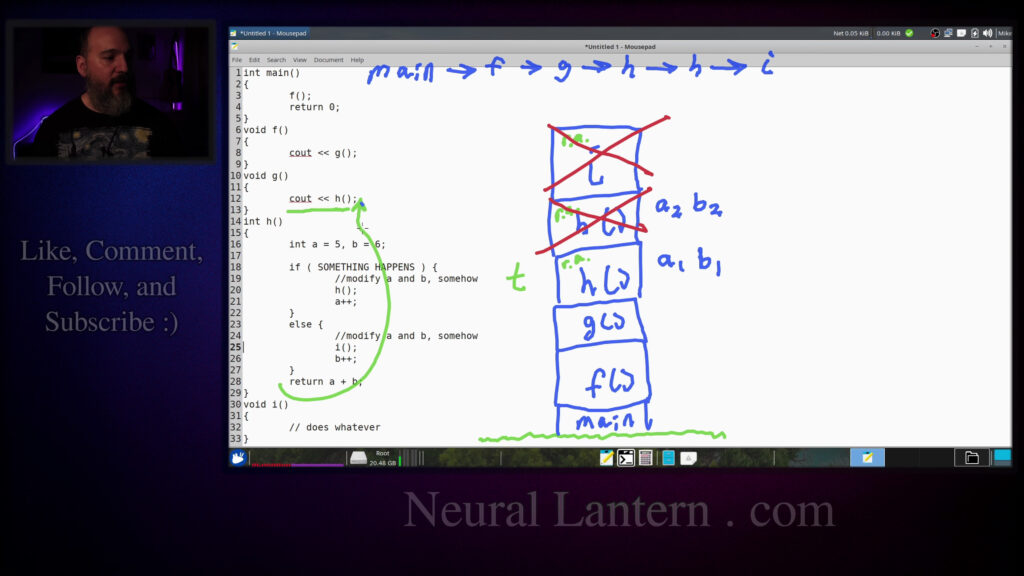
And then maybe F calls G and then G it calls H and maybe H sometimes calls itself.
Maybe we’ll say that it’s a recursive function.
We’ll say if, you know, something happens, then we will return a call or we’ll just call H.
So it calls itself sometimes.
Otherwise, we will have it to call on the I function.
then you know execution just kind of returns to the caller which would be G in
this case and then we have the I function that just you know does whatever
right so the code here doesn’t really matter what I’m really trying to show
you is that one function calls another calls another and we can sort of allow
this to happen under the hood with a call stack so I’m just gonna draw this
and G calls on H and H we’ll say that we’ll say for the sake of argument one time H calls on H
just so it’s easier to draw later and then H eventually calls I for some other reason
maybe the deeper H calls I and then eventually this starts to return right so if you’re a
programmer you kind of take this situation for for granted you think like well I just kind of
call a function and then and then when the function’s done I just return to the place
everything is fine. If we had, let’s say, local variables in here, they would be preserved. Let’s
say, I don’t know, maybe h is like a number or something like that. Or how about let’s do g as
a number. We’ll say g returns some kind of a number. And then maybe in the f function, when
we call g, we’ll just print whatever g returned. So g calls h, and then we’ll just say like return
h and then we’ll just say like return whatever just trying to show you that we might have
a local variable so that means um in the g function maybe you’ll have a integer a is equal
to five and integer b is equal to six i’m just making up stuff here and then when we return
our data we might say you know return a plus b for whatever reason this is a nonsense program again
don’t take it too seriously but i’m just trying to show you that we have functions that can call
we have functions that can call each other sometimes call themselves and maybe they have
local variables on top of that so if you understand what is a stack then you understand that a stack
can hold many different types of data just as a quick recap here um you know a regular
generic data structure stack or an abstract data type stack we could say that the stack hold held
integers so if i wanted to put like an eight on there and then put like a five on there it would
it would just kind of stack up as we’re adding data.
And then when eventually we decided to remove data from the stack,
we’d pop it by just removing the thing from the top.
But because stacks are supposed to be abstract data types that hold any type of data,
we’re not limited to putting integers inside of the stack.
So we could invent a totally new data structure
and put instances of that data structure inside of the stack.
For example, if you had a custom class that you wrote yourself
and you just called it my class,
my class let’s see uh let me do class my class and i’ll just put braces here again this is not
a c++ video but you know you can imagine that you sort of made a blueprint for a new type of object
and you called it my class and then later on you’re like let’s make instances of my class
let’s make an instance called mc1 and mc2 and mc3 and so forth right so in the stack you could just
instances of my class i’m just going to put mc1 here if we created mc1 and then pushed it onto
the stack and then we can have mc2 and created an instance of that and just kind of pushed it
on the stack so we can do whatever we want we can put any type of data on the stack m
and this is not exactly the process stack so far i’m just telling you what a stack
in general can do so now instead of imagining that we have a custom class called my class
made a new class called call frame I’ll say we have like an instance let’s say
like a blueprint for a class we’ll call it a call frame I’m a penmanship it’s
because this thing this pen and I push it down and it always like keeps drawing
after I start lifting it up I don’t know what I’m doing wrong I’ve been trying
this for like 50 videos and it’s always bad and wrong so imagine you have a
class called call frame and inside of it you can just put some sort of data in
some sort of data inside the call frame.
You can imagine defining what an object might look like and then creating instances and
filling it up with data and then every instance just like we did with my class we could just
put that onto a stack right?
So now let’s try to understand what might be inside a data structure called a call frame
because when we have a stack under the hood in our machine that holds instances of call
frames then we actually have a process stack or a call stack which allows us to implement
which allows us to implement these function calls.
So let’s see, the first thing that we might imagine,
I’m gonna maybe just do like a little box here,
just to let you know that we’re deciding
what will go inside of a call frame.
So this is one call frame.
So you can imagine that the F function here,
in order for the F function to exist,
the particular call to exist,
what you know what it has what it is to be alive you know it needs its return
address I’m gonna put RA here for its return address what is a return address
well you know when we were inside of the main function let me draw the execution
path real fast when we were inside of the main function then execution was
going from top to bottom when we hit this F function call execution actually
jumped to the first line of the F function under the hood in assembly
there’s a jump instruction that allows you to just kind of jump to a totally
just kind of jump to a totally different memory location and start executing
instructions over there somewhere. In assembly also we have a call
instruction which means I would like to jump to another location but also I want
to remember where I just came from so that it’s easy for me to return later.
Okay so we’ll call that the return address. The return address in this case
would be let’s just call it line 4 meaning when function f returns then the
is this return zero in well I mean this is C++ we don’t it’s not really instructions it’s more
like statements but you can just imagine that F gets called and when it returns then the next
statement is return zero right so if we say that the memory location of wherever line four starts
is the return address of F then you can imagine that in order for F’s you know call instance to
exist it has to remember its return address so therefore we would put the return address inside
call frame. So the return address goes in there and function arguments sometimes go in there. If
you know assembly, and that’s kind of what we’re talking about right now in this video, then
you’ll know that function arguments, at least the integer arguments usually come in certain
registers like RDI and RSI, or if you’re, whoops, or if you’re passing float arguments,
and XMM1 and so forth right so you just kind of like load up registers with
arguments but if you have more arguments than you have registers you know
there’s only so many registers you can actually use to pass arguments into a
function that you’re calling so what if you run out of float registers you run
out of the general purpose registers but you want to have more arguments than
that for example if you look at the ABI then the integer arguments there’s only
integer arguments there’s only six registers that we can use to pass integer or pointer arguments
so if you wanted to have seven arguments or more then you know you should be able to do that but
there has to be a different way to accomplish that so the seventh and beyond arguments will
actually uh show up in the call frame oh I guess ra should probably be blue because the the call
frame I’m just you know making that green I’ll say return address so the seventh and uh the
the seventh and beyond arguments args we’ll just say so the call frame contains the return address
and any argument that’s that’s like the seventh argument and beyond and if you don’t have seven
arguments then there’s not going to be that’s not going to be in the in the call frame it’ll just be
blank at that point sometimes when people are messing around with the stack pointer they will
Basically, anytime you push a register in order to preserve it,
then it will end up on the call frame, at least at the assembly level.
So suppose you’re going to use the base pointer register.
You probably want to preserve the base pointer before you start using it.
So we would push it onto the stack and it would become part of the call frame.
Any registers that are designated as callee saved
would also be pushed into the call frame like R12.
Oh my God.
R13.
my penmanship there’s like it’s the ones the ones are always l’s okay and so forth right so
anything that’s designated as a callee saved register that you intend to use would end up
getting pushed onto the stack at the assembly level and thus it would end up in the call frame
but you know if you aren’t going to use any callee preserved registers then you don’t need to
preserve them and therefore they would not show up in the call frame and let’s see and local
local variables in assembly, you just basically end up pushing them to the stack.
So I’m going to put local variables here.
And in a second, I’ll show you how that kind of works in higher level languages like on
C++.
That’s why I wrote this down right here, line 12.
We’re making local variables.
And let’s see what else.
I should emphasize that local variables are very different from heap variables.
some point let’s say that when when g was called let’s say execution came in here
into main and then execution jumped into the f function so it jumped in there and then f wanted
to call on g in order to get some information right so we have a call frame just for g and we
have a call frame just for f and we have a call frame just for main and so we have like three
items on our stack at least just to get to that point of the program and every call frame you
you know, basically has this sort of information inside of it.
The return address, so the function knows where to jump back to
when it’s time to return from the function.
Seventh and beyond arguments, if any exist.
The base pointer, if you happen to modify that at the assembly level.
And then same thing for Kali saved registers.
And then local variables, which you could probably imagine more clearly.
So now I’m just going to erase this call frame thing here.
Oh God, this eraser needs to be improved.
god this eraser needs to be improved oh my gosh maybe i should make that bigger i need like a
little shortcut to make it bigger for a second because i don’t really want to draw that thing
on top again that’s just annoying i don’t want to do it i won’t do it i won’t do it okay so uh
imagine now that we are trying to sort of trace what’s happening in our uh call graph you know
in our in our program while we’re calling functions so first imagine we have an empty
have an empty stack and again if you don’t understand stacks you better go see my other video
imagine we have an empty stack the stack is not ever really going to be empty when you launch
your program it’s going to be uh there’s going to be stuff on it already but let’s just pretend that
we haven’t put anything on the stack at this point so there would be a you know a call frame just for
the main function i’m just going to write main here to say that this is the call frame for main
so it contains all the information that main needs and um if you have a main function in the first
first place then you’re probably linking against the GCC libraries which means
a main definitely has to return somewhere inside of the GCC library so
this kind of makes sense for our program so it’s a call frame for main
and then when main calls on F then another call frame gets created for F
and then when F calls on G another call frame gets created for G I don’t know if
I need to put these parentheses but I guess I’ve already started to do that
h and then h sometimes calls itself so I’m gonna put another call frame for h
up here oh my god h’s look like just crazy okay that’s been uh every time I
lift up the pen h calls itself sometimes we’ll just say that it calls itself
once in this case and then h calls i and then that’s let’s just say that’s the
end of our little call graph when i is finished doing whatever it’s gonna do
to do then it’ll just return to the caller right so notice how every single time we made a function
call we added a call frame for that particular instance of a call and we called it a call frame
something else that i should point out is that i have been describing to you a call frame as if it’s
a a data structure with sort of like a fixed amount of data inside of it and you would sort of
blob that whole block of data on at the same time that’s not really how it works in assembly in
you kind of just push, you know, one tiny piece of data at a time.
But in the abstract, you imagine that there’s a call frame.
Just keep that in mind.
Anyway, so in the F function, you know, we’ve been making these calls F and then G and then H and then H and then I.
Eventually, when we got to the, let’s say, what did I do wrong?
Oh, I did something wrong.
I put the local variables in the wrong function.
Hang on a second.
I want them to be, I mean, it would be okay to have them inside of the G function, but I really want them.
but I really want them, I really want them to be inside the H function for a certain reason.
So I’m just going to cut and paste here.
And I’m going to do like local variables inside of the H function and not in the G function.
And then G should maybe return an integer result.
And then this return statement shouldn’t even be in G.
It’s just going to be inside of H.
the a and the b variables at some point before returning them modify a and b somehow maybe I can
even put that comment inside of both of the blocks of the if so like so maybe if something happens
we’ll modify them in one way and if it doesn’t happen we’ll modify them in some other way
and then at the very end we return them just to kind of feel like we have more of an excuse
to have return variables in the first place and then when h returns something now we have an excuse to kind of print out whatever h is
doing okay and the reason I moved all that inside of h and not in g is because I just want you to know that
There are two instances of the h, you know call instance on the call stack which means the local variables
They’re not linked. They’re two distinct copies of each local variable inside of the stack think of it this way
When we call our h the first time,
we have an integer a and an integer b.
You could imagine that there’s an integer a
and an integer b sitting inside of the call frame somewhere,
you know, being pushed onto the call stack.
And, but the other called h also has a variable a
and a variable b,
but because those are local variables,
changing one doesn’t actually modify the other copy
that is in the other call frame.
So you could imagine this as A sub one and B sub one,
and then A sub two and B sub two.
This is kind of important later on when you realize
that your operating system is capable of launching multiple threads for your program
and local variables won’t potentially become race conditions,
which is just like for a totally different video.
But for now, just to understand these are totally separate instances.
If I change A sub two, it’s not changing A sub one and vice versa.
And same thing for B.
vice versa and same thing for B so anyway we we make all these calls and
somewhere along the way you know we’re creating a bunch of data and a bunch of
call frames eventually when we are done with the I function when I wants to
return here we don’t have an explicit return statement but if you if you know
C++ or higher level languages if there’s no return statement in most of
the language in most of these languages for a void function it just returns when
when it reaches the end of the function we don’t really need to say return because it doesn’t
return anything it just ends so when i is ready to return what happens is we look inside of its
call frame and we look for the return address which is inside of its call frame the return
address specifies exactly where we’re supposed to return for example maybe we’re supposed to return
right here maybe we’re supposed to return right here maybe to make things a little bit more
so maybe if we called h then we increased a and if not then we increased b something like that
so that means the the call frame for the first h function let’s suppose let’s see if it called
if it called itself then that means this block right here is the first part of the if block so
the return address for h return address would actually be pointing to
would actually be pointing to the next line right so when h called on h
it would look at line 21 or whatever the address was for that instruction
to begin at you know increasing a and it would just say that’s the return address so that
whenever h returns from itself it ends up executing a plus plus and then the same thing for i so
i has a return address so when we’re inside of the i function it’s got its own call frame and it
knows where it’s supposed to return which in this case would be that instruction right there or that
statement right there so whatever is the first instruction that implements that higher level
language statement that’s going to be the return address inside the the i call frame so we look
inside of the call frame for the return address we know where to return it’s going to return to h at
at this point in time.
And once we’re done with that,
then we just deallocate the call frame.
In assembly language,
all we’re really doing is moving the stack pointer
and just sort of ignoring the call frame
from that point forward and we’ll call it junk data.
So the data is kind of actually still there,
but we’re just not using it.
And then later, if we wanna start adding more stuff
on top of the stack,
then it will just override that junk data.
But for now, just imagine that it’s gone.
Anyway, so then we returned from I back to H
from I back to H and so that’s line 26 right here imagine we perform this
instruction the B++ and then execution falls through down to the very end the
return statement so then same thing happens this version or I guess this
version of H had its own no hang on a second we returned from I yeah yeah this
to h so that means execution will will basically jump from here to right here so it kind of jumps
you know back to that next line like we talked about before when it returns based off the return
address then again you can imagine that that call frame is deallocated or just ignored as junk data
and the top of the stack is kind of like moving and then when that call on h uh finishes so you
executed and then execution falls through down to the return statement then again h has its own
return address in its in its call frame or that instance of h has its own call frame then it knows
where to return and this time it knows to return to whoever called h in the very first place so
it’s going to be um i guess it’s going to be like when it returns it’s going to go back to g
h on g but I guess you could imagine under the hood you know instead of like
another statement you can imagine more stuff is happening right like when we
called h and then we returned then we had an expression that evaluated to
something because h returned to value and then we would send that to the stream
operator so in assembly there are many instructions happening after the call to
h but you could just imagine at this point you know it’s just gonna finish up
that that existing statement and then move down to finish and return so then
so then again you know we we just returned from h to g so we de-allocated that call frame the top
of the stack is now somewhere around there in that call frame when g finishes and it returns
same thing it’s got a return address so it knows where to return and then top of the stack kind of
goes down there and g knows to jump to whoever called it because of the return address so it’s
going to be at this point in time again there’s more statements that happen after the return
see out in a stream operator uh you know but uh you know basically when f is done then again it’s
going to use the return address and know where to jump back to which is just going to be this next
line right here so when f was called originally it like ended up calling h and then h uh you know
called itself and h called itself and then it called i and then we returned from i and then we
returned from h and returned from h twice and then eventually we returned to g and then we returned
and all of its calls were finished then execution returned just a line for and
that’s that’s basically saying like oh what happens when F is done let’s look
at its return address hop that off the call stack and then the top of the stack
is basically just sitting inside of the main function so yeah this is how we
implement function calls in the machine you know there’s there’s really no so if
you know, from a certain point of view, there’s no such thing as functions inside the machine.
In assembly language, we certainly see that we have a label and then we have like a return
instruction and we have a call instruction, but you know, there’s no like function. It’s all just
ones and zeros all over the place, right? So the idea of labels and functions and things,
that’s kind of an abstraction just for the human being with feelings to make it a little bit easier
stack we have a stack and we stack things on top of the stack and the things that we stack are
called call frames call frames are kind of flexible because sometimes there’s more data
sometimes there’s less data depending on what the function itself is doing but it allows us to have
a function call itself many times it allows us to have many different instances of function calls
exist at the same time even if we’re only looking at the very top of the call stack in terms of
conflict with each other.
And then, you know, like we have a trail of breadcrumbs when we start returning and
returning and returning, the stack makes it really, really easy.
And so, you know, in the abstract, we can basically say that there are functions in
our machines because this implementation helps make it happen.
One last thing that I wanted to say before I go here is just keep in mind that these
local variables, they’re on the stack, but dynamically allocated memory is not on the
stack.
stack. Let me just show you what I’m talking about right here. You probably understand the
heap already at this point. If you’re watching this video, then you know a little bit about
dynamic memory allocation. So I’m just going to do, let’s say we have like an F function void F.
And inside of the F function, we have let’s say a integer pointer P, and we will allocate P to a new
So just so you know, the variables A and B and also P, they’re considered local variables
because I just declared them.
I declared a pointer on line four.
I declared two integers on line seven.
Maybe I should put those like at the top, I guess.
Okay, so lines four and five, they declare local variables.
The pointer is a special type of variable, right?
That just points to a memory location.
So the thing that it points to might not be a local variable, but the pointer itself is
a local variable.
The pointer itself is a local variable.
So these three variables on lines four and five, A and B and P, those are on the stack.
Any local variable gets put on the stack.
And then when you allocate a new integer with dynamic memory, maybe you could imagine if
you’re a C programmer, this would be a call to malloc rather than new.
Then what’s happening under the hood is that the system goes and tries to find some free
memory in a different area of your process called the heap, not the stack.
heap not the stack it tries to find some free memory in the heap it once it finds some then it
designates that as you know being in use and then it returns to you the memory location of that new
allocation so in this case we’re allocating a new integer so that’s going to be 32 bits of data or
four bytes and uh so it just you know it just finds four bytes somewhere in the heap and it finds the
memory location of the very first byte and it returns that to the caller and so p its value is
is now going to be the memory location of the new integer that you allocated.
But P itself is on the stack.
So P is kind of weird, right?
Like P exists on the stack, but it points to something in the heap.
Keep in mind the difference.
And then if we just let this function go to the very end
without cleaning up that memory, we would have a memory leak.
I should probably just do like a dedicated video on pointers
for people who are interested in pointers in higher level languages later.
But keep in mind that when the function ends
and you pop the call frame off the call stack,
then that automatically cleans up all the local variables.
So A and B and P itself will be deallocated
and not become memory leaks.
However, the thing that P pointed to,
that will be a memory leak.
I guess that’s a topic that’s too advanced
for this stack video,
but I just want you to know the difference
between something that exists on the stack
and something that exists on the heap.
Okay, so then I think the last thing
that I need to show you here
here is uh let me uh shoot let’s see shambler okay so here’s uh uh my favorite book i love to
i love to pump up this book it’s awesome the author is like a brilliant man very kind man
he offers this book for free it’s got a copy left license you can literally just download it for
and it’s legal because this is an open book basically it’s called x86 64 assembly language
programming with ubuntu by the brilliant dr ed jorgensen phd or professor ed jorgensen
this is the latest version that i’m working with right now i think it’s the latest version i don’t
know he updates this thing all the time it’s always getting better but um if we look at this
book uh you can get a copy of it on your own or you can just watch this video i’m going to go to
12.8.3 so 12 section 12 12.8 12.8.3 called the call frame and here you can kind of see a
description of some of the stuff that I talked about in terms of what sort of data you would
expect to see in the call frame but if you just kind of look down a little bit you can see that
we are sort of pushing some preserved registers
sort of like save the stack pointer as the RBP register.
But before we do that, we wanna push the RBP register.
And then notice out here,
it shows that there’s a return address
and the RIP register.
That’s actually the instruction pointer register.
The stack pointer is RSP.
And then other arguments that go into it.
So just keep in mind that we have a little layout here
a little layout here and then somewhere else there was something I wanted to show you here
no no no no no no no no no no no no no no no no no no okay I guess I’m gonna
oh I guess I was just supposed to show you the call frame anyway okay so I guess that’s pretty
much it I just wanted to show you some extra stuff just so you understand this is the basic
Oh, okay, I found it.
I spent a second scrolling through the book to find the other diagram that I really wanted
to show you.
So same book, X-8664 Assembly with Ubuntu by Ed Jorgensen, Professor Ed Jorgensen, PhD.
And if you look at section 9.3, there’s another picture here that’s kind of useful.
And it basically shows, you know, the general idea of how information is laid out inside
information is laid out inside of your process so when you launch a process in
order to execute your program then it’s kind of laid out like this there’s like
a little reserved area and then there is the text section for assembly you know
that’s where you have all your instructions and then there’s the data
section and then there’s uninitialized data which is the BSS section if we’re
talking about Yasm assembly and then notice how in this big blob of an area
and the stack kind of sharing an area inside of available memory it’s important to understand that
the stack when you actually add things onto the process stack like call like call frame data
you’re actually decreasing memory location so the stack grows downward in memory so I think I’m going
to put this in another video but basically right now I just want to show you if we have memory
location let me let’s pretend that we have like a stack here and there’s like a couple of frames
there’s like a couple of frames you know sitting on top of it suppose you had I don’t know memory
location OX you know 99 or something suppose for the sake of argument we’re only pushing one byte
at a time so it’s easier for me to write then that means you know the next thing that shows up
you know a little higher on the stack you would intuitively think that the memory location is
I guess I increased that 9 to a but it actually goes down in memory so I mean
look at this diagram right here the stack goes down in memory so every time
you push to the stack you’re pushing to a lower and lower and lower memory
location so right here I’m just gonna write down OX 9 8 and it just keeps
going down and down and down let’s see 1 2 3 4 5 right and the heap is is
upward in memory so the heap when you call new allocations like if you say new or malloc or you
know some kind of dynamic memory then its memory locations grow up and the stack grows down and if
they ever actually meet then you’ve ran out of memory just keep that in mind but um you know
in modern systems the heap can kind of grow almost endlessly i’m sure i’m sure you’ve all
been running programs in the past and noticed that the program was consuming gigabytes of data right
gigabytes of data right but it’s not like you had gigabytes of data allocated to that process
when you first opened it up like if you have a browser with like 100 million tabs open
i know some of you people do that then when you first open your browser it doesn’t really use
that much memory but then as you start opening more tabs maybe some pages are doing some weird
stuff and you get memory leaks then the heap starts to grow and grow and grow and then you’ll
notice the process takes way more than did in the beginning so the heap can kind of grow in an
of course that is limited to your physical system ram and eventually in the far off future will be
limited by whatever 64 bits can get us i don’t think we’re ever going to reach that in my lifetime
but you know i’ve been wrong many times before however the stack it grows downward in memory
and it’s kind of limited you can actually overflow your stack pretty easily so when the stack grows
downward too much then you just you have a stack overflow and the program crashes but when the heap
But when the heap grows, then it can just be resized again and again and again.
Or that little block can kind of expand again and again and again.
If you don’t believe me, try writing a program with a recursive loop that just goes on forever.
So imagine, actually, I don’t know, don’t do this on your boss’s computer because maybe
it’ll crash things.
Do it on your own personal computer.
like a function f and uh you know you’ll probably want to call f inside of main or something so i’ll
just say like int main and we’ll just call f right away and then return zero when you’re inside of f
you just call f right so this is like a horrible program if you ran this very quickly you’d crash
the program because every single time you call f you’re adding another call frame on top of the
stack your call stack is going to just be filled with f call frames and then you know it runs out
you know, it runs out of available memory locations to use, and then you’re just done.
It just crashes the whole program.
So let’s see.
I think hopefully now you feel like you’re an expert on the process stack and call frames.
Thank you for watching this video.
And I hope you learned a little bit and had some fun.
I guess I’ll see you in the next video.
hey everybody thanks for watching this video again from the bottom of my heart I really
appreciate it I do hope you did learn something and have some fun if you could do me a please a
small little favor could you please subscribe and follow this channel or these videos or whatever it
is you do on the current social media website that you’re looking at right now it would really mean
the world to me and it’ll help make more videos and grow this community so we’ll be able to do
better videos or just I’ll be able to keep making videos in general so please
do do me a kindness and and subscribe you know sometimes I’m sleeping in the
middle of the night and I just wake up because I know somebody subscribed or
followed it just wakes me up and I get filled with joy that’s exactly what
happens every single time so you could do it as a nice favor to me or you could
you control me if you want to just wake me up in the middle of the night just
subscribe and then I’ll just wake up I promise that’s what will happen also if
if you look at the middle of the screen right now, you should see a QR code, which you can scan
in order to go to the website, which I think is also named somewhere at the bottom of this video.
And it’ll take you to my main website where you can just kind of like see
all the videos I published and the services and tutorials and things that I offer and all that
good stuff. And if you have a suggestion for clarifications or errata or just future videos
Or if you just want to say, hey, what’s up? What’s going on? You know, just send me a comment, whatever.
I also wake up for those in the middle of the night. I get, I wake up in a cold sweat and I’m like,
it would really, it really mean the world to me. I would really appreciate it. So again,
thank you so much for watching this video and enjoy the cool music as, as I fade into the
darkness, which is coming for us all.
Thank you.