
Quick but deep look at local variables on the stack in x86-64 assembly (YASM). We cover allocation with sub rsp, accessing via offsets, why the stack must be 16-byte aligned when calling libc functions like printf, and two practical ways to fix alignment crashes. Includes live segfault debugging and a full working example with a local array.
Great for anyone studying systems programming, computer architecture, or just trying to figure out why their assembly program randomly crashes on a library call.
Like + subscribe if you want more clear, practical assembly tutorials!
00:00 Introduction to Local Variables on the Stack
00:28 C++ Example of Function and Local Variables
01:06 Incoming Arguments in RDI vs Stack Variables
03:24 Pointers as Local Variables on Stack
04:34 Why the Stack – Recursion and Multiple Calls
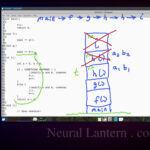
05:18 Visualizing Multiple Stack Frames
09:24 How Function Returns Adjust RSP
10:35 Stack Grows Downward in Memory
11:33 Program Setup – Hybrid C++/Assembly
12:46 Assembly Module Overview
14:00 Function Prologue – Register Push & Alignment
15:30 Allocating Stack Space for Local Array
17:45 Initializing Array in Loop
20:10 Printing Loop with printf
49:48 First Run – Segfault Observed
51:00 16-Byte Stack Alignment Requirement
51:55 Fix 1 – Extra Push/Pop in Prologue/Epilogue
53:15 Fix 2 – Push/Pop Around Each printf Call
55:04 Testing Different Array Sizes
56:52 Debugging Alignment Behavior
58:54 Summary – Creating Any Local Data on Stack
59:59 Closing Remarks & Subscribe Call
=-=-=-=-=-=-=-=-=
Thanks for watching!
Find us on other social media here:
- https://www.NeuralLantern.com/social
- Twitter / X: https://x.com/NeuralLantern
- Rumble: https://rumble.com/c/c-3696939
- BitChute: https://www.bitchute.com/channel/pg1Pvv5dN4Gt
- Daily Motion: https://www.dailymotion.com/neurallantern
- Minds: https://www.minds.com/neurallantern/
- Odysee: https://odysee.com/@NeuralLantern:5
Please show your support!
- Buy me a coffee: https://ko-fi.com/neurallantern
- Subscribe + Sharing on Social Media
- Leave a comment or suggestion
- Subscribe to the Blog: https://www.NeuralLantern.com
- Watch the main “pinned” video of this channel for offers and extras
Hi there! Today I’d like to talk to you about local variables on the stack
in an x8664 assembly program written in YASM.
If you don’t understand assembly or local variables or other things like that you might
want to see my other videos but I’m just going to give you a quick example. So what am I talking
about with local variables on the stack? For starters forget what you’re seeing here for a
blank code page and pretend that we’re coding in c plus plus just for a moment this is an assembly
video but pretend this is c plus plus so suppose you have c plus plus you have a main function here
and at the end of it you know this is your entry point for your program we return zero and maybe
above it there’s a function called f i’m putting it above because i don’t want to use prototypes
in this video but you should probably use prototypes um maybe main calls on f and so then
what happens? I don’t know. Maybe we have some arguments. We’ll call this integer argument A
that comes in. If you’ve watched my other videos, hopefully you have by now,
you’ll know that A comes into the function as RDI because that’s the first integer argument
register. But then when we start creating local variables, we’ll say integer B equals, let’s say,
a five and then integer C is equal to an eight for whatever reason. Maybe there will be an array.
So I’ll call this a int array, I guess.
We’ll say that we have 100 integers in our array.
We could also have a pointer, int pointer p,
and then allocate it to some kind of new memory just to prove a point.
And then, you know, later in your function,
you’re probably going to want to do something with your data.
So I don’t know, maybe a, how about like b is plus equal to a,
of C++ and then oh C++ C is plus equal to B for some reason I’m just making random nonsense up
honestly I’m just showing you that we use our variables and then maybe you want to build an
array so we just declared the array up here on line six but maybe you want to actually do something
with it you want to fill it with data maybe so I’ll do size type I is zero keep going until I
is less than as long as I is less than 100 I plus plus and now I’m going through every single index
array maybe I’ll say the array at index i is equal to c and then we’ll just say c is plus equal to b
and then we’ll do b plus plus just to have something in there okay so let me explain the
parts of your program real fast if you haven’t watched my other videos please do because this
should help a little bit anyway so a is an incoming argument like I said before that’s
usually coming to you in the RDI register because it’s the first integer argument so we don’t need
to worry too much about that we know that a is actually just a register in your CPU and b that’s
created on the stack and c is created on the stack also and the array is created on the stack by the
way I could name the array anything if I wanted to like just v I’m using the name array because
Notice also that we have a pointer here. I just wanted to make a point that the pointers we make in our function are considered local variables.
And that means they do sit on the stack because what I’m trying to say is that local variables that are not arguments, they sit on the stack.
But the memory we allocated and then gave to the pointer, that’s sitting in the heap somewhere.
So when you use the new operator or the malloc operator, or you’re just like making dynamic memory,
that dynamic memory sits in the heap, but the pointer itself, since we just declared it here,
that sits on the stack. That means later on when your function ends, the p pointer itself will get
cleaned up automatically and itself won’t be leaked memory. But if you forget to clean up your memory
here, like I did, you’ll have a memory leak. But I’m going to talk about memory leaks probably in
some other videos somewhere else at another time. Anyway, so then we have our local variables here.
remember B and C and array are all on the stack and well we just have our
for loop here where we just kind of start modifying data so why would we use
the stack let me just do a quick tutorial this is not a stack video I’m
gonna make a stack video in the future but I’ll just do like a quick little
rundown of what is the stack and why is it really good for function calls
consider that sometimes F might want to call itself maybe it’s a recursive
be like a long chain of function calls like f calls g and g calls h and h calls you know whatever
and it just goes on and on and on as long as it’s not infinite recursion like all the functions are
calling themselves in one circle that never ends you should be allowed to do that we should be
allowed to have a function f that sometimes calls itself or other functions or maybe it’s called
multiple times within our giant call stack our call graph and this will work because these
you know a b and c and array are sitting on the stack and the stack allows you to have sort of
different instances of variables so for example and this is just a quick thing i’m not this is
not supposed to be a full stack tutorial here but um you know if we have like the function f
and let’s say we call it at some point maybe uh maybe main calls f uh and then let’s let’s pretend
f and then f calls h and then maybe h calls f and um did i write an h there no i think that’s
supposed to be a parenthesis i’m sorry i have bad penmanship oh god it’s even worse hang on let me
let me do another h here i’ll just do it i’ll just do a g about that f g and then uh
F again. Let’s just pretend that we can have a call graph where F is sometimes called by something
and sometimes called something else or maybe sometimes F is called by a different thing. So
like I guess this was supposed to be the G function. So maybe that’s why down here was the H.
Should I delete this video? I don’t know. You know what? I’m going to start. I’m going to delete this
and then G calls H and then H calls F and then F calls I I guess and then
eventually these functions start returning right oops how come my greens
not working green there we go too late now so we can have like a really
complicated call graph and F might appear in there multiple times and the
Each call to F along the call graph should have its own copy, unique copy of local variables.
So the B for this first F call, let me just do an arrow here, will have a B.
And you can imagine it as B subscript 1.
And down here when F executes, you can imagine that it’s got its own copy of B.
So we can imagine this as B subscript 2.
So these are two totally different Bs.
If you tried to use global variables for this, it would be really, really, really hard to get the code to work.
get the code to work and it would be really, really hard to debug.
So that’s kind of why we have local variables.
The stack allows us to do this.
So what is the stack itself?
Again, this is not a full tutorial on the stack,
but I just want you to kind of see what’s happening.
Imagine a data structure that kind of grows upward.
I’ll say that here’s the floor at the bottom.
And when you put an item onto the stack,
the items kind of stack on top of each other.
So imagine that this is the call to F.
is the call to f and embedded within this little stack frame area we’ll call it a stack frame but
actually the stack continues to grow as you create and destroy local variables within a function call
we’ll just imagine that there’s i don’t know a mini stack sitting inside of the stack that
contains all the local variables i’ll just put i’m not going to put a because a is an argument so
it’s sitting in a register but we could do dude i got to learn how to how to draw with this tablet
We got to do B and C and the array.
I’ll put AR for array.
Sitting in, you know, their own little spots on the stack within the major portion of the stack that is designated for that first F call.
And then, you know, maybe F calls G and some other stuff happens.
I’ll just pretend that a bunch of other stuff happened.
And then eventually F is called again.
But there’s a different, this is a different instance of the call to F.
it’s got its own little area that is separate from the the previous call to f and again we’ll
also have variables that we can create locally that are supposed to be separate from the original
variables oh god that’s awful and ugly i need to maybe decrease the size of my eraser or something
but imagine this is uh you know these are two separate copies so that’s like what i said before
when we have like a b1 and a b2 basically they’re not going to be called b1 and b2 but they’re just
They’re not going to be called B1 and B2, but they’re just two separate instances.
And I just want you to know.
So then when we start returning from functions, like when this F eventually returns, and by
the way, I know that what I’m drawing on the right doesn’t match the code because this
is not a function that calls itself, but just suppose that your code is a lot more complicated
than what I drew up.
When it eventually returns, all that happens is those items on the stack just sort of get
not necessarily deallocated, but ignored.
We’ll just say that they’re gone.
They’re still sitting as junk data in system RAM somewhere.
And in assembly talk, we know that we have a stack pointer called RSP.
We have a register called RSP that just sort of points to the location in the
stack that is considered the top of the stack, like the most recent piece of data
that we have available.
So all the other data is actually still kind of above, but we’re not pointing to it
anymore, so we consider that it doesn’t exist.
So then when G eventually returns, you know, we just change the stack pointer,
Rsp, to point to that other piece of data.
The G data frame and the other F data frame are still sitting above somewhere in memory,
but we just ignore them, right?
So that’s how the stack works.
And that’s how we have local function call copies of all of our local variables.
Something to note.
Something to note, this is not a stack video, but you know, just something to note that
even though I draw the stack visually as growing vertically up, when you actually manipulate
the stack in assembly or just like in any language, the stack grows downward in terms
of memory locations.
So you can imagine, I’m trying so hard not to make this like a huge stack video.
Imagine this is a memory location 80, we’ll say.
You would think that memory location 81 would be the next item of the stack, or I guess
the stack or i guess if you if you’re considering the fact that the items on the stack are quad words
we would say it goes up to 88 but that’s not true it goes down to 72 so the memory location goes down
even though we imagine the stack growing uh upward vertically just so you know that’s the kind of
thing we’re going to do so what i’m going to do is just show you an assembly program where we can
create local variables and i’m just going to show you how to create an array because this array is
just like a bunch of integers and you can imagine it would be really easy to create only one integer
by just imagining an example where the array is a size of one so keep that in mind and i’m not going
to show you malloc or anything like that we’re just going to look at the local variables okay
so for starters i have a make file here that’s just going to compile a hybrid program if you don’t
know make files or you don’t know hybrid programs that’s okay just see my other videos i’ve explained
The first source code file here is just driver.cpp.
Again, this is a hybrid program,
so I’m going to mix my C++ modules with my assembly modules,
which is pretty cool.
The whole point of the driver is just to contain the entry point, you know, main.
And I’m just going to print a hello message.
And then I’m going to call the real function that I’m interested in,
which I’ve named local underscore varrs.
And that’s going to be all the assembly stuff that we talked about.
block so that C++ can call an assembly module that’s explained in other videos. And then
here’s the real heart of what we got to do. Let’s write up an assembly module
that can do local variables. Okay. So again, if you don’t know assembly, that’s okay,
but you need to watch my other videos before you can understand this one. So I’m going to just
copy paste some starter code here. This is Yasm assembly in x86-64. So I’ve got a data section up
So I’ve got a data section up top and I’m just going to define some messages.
So, you know, I’ve got like an intro message that just says, hello, I’m so and so.
And that’s not my name, but I like those kinds of names.
And then over here, I’m going to do some printf formatted strings.
That’s why I’m using a hybrid program for this video.
I don’t want to import my own personal library.
I want you to be able to do this at home with just the GCC libraries.
link a hybrid library you know linking against gcc instead of linking against ld again if you don’t
know that stuff check my other videos then we’re allowed to call c functions in this case we’re
going to call printf and we’re just going to give it the string percent lu meaning i would like you
to print just you know an unsigned long integer so i’m going to give it a value at some point on the
stack representing a local variable and then i want it to print as just like a long like a string
along like a string that a human can read then after that this is the carriage return line feed
the crlf printf won’t flush its output unless that is sitting at the very end of the string so
i’m just going to use printf to also print my new lines and then i’m going to null terminate the
string so that printf doesn’t freak out and try to print a bunch of stuff after the crlf and uh
oh i this was from another video let me get rid of that we don’t really need crlf in this video
CRLF in this video because we’re just putting it directly inside of the printf string we’re not
making our own function to do that so then I’m going to make some defines I’m going to define
that we’re going to have 50 integers so I’m calling this define 50 I’m calling it num integers
and I’m saying that it has a value of 50 so I want to make an array that has 50 integers I don’t
know maybe if you want to imagine 100 you know like the example that I just showed I’m going to
going to define what is the integer size so i’m going to use quad words which are 64 bit integers
so i’m just going to say that there are eight bytes per integer that will help me multiply later
and then i’m going to decide to fill up the array on the stack with just some numbers just to prove
that i can just to prove that we can like uh you know manipulate and and fetch the values
of all this stuff going on in the stack and i’m going to say that the starting value is seven so
with this we should expect to see like an array of numbers that starts with seven and it just
kind of increases somehow then i’m going to do some system call codes we talked about that in
a different video and then some file descriptors i don’t think we actually need anything but standard
output but i put it in there anyway then the next thing we’re going to add is the text section
let me just do copy paste on my solution here so here’s the text section section text
section text in Yasm and I’m going to let my module know that I want to be able to call printf
which is a function sitting in the GCC libraries when I link against a GCC I have the ability to
do that that way I don’t have to come up with like a complicated printing method or use one
of my own shared libraries or something so we can just ask printf to do everything so now here’s the
entry point for the module it’s just a function called local VAERS I mark it as global so it’s
it’s accessible to outside modules ie or eg driver dot cpp and then so here’s the label saying the
function starts and here’s the return statement saying that we’re done with the function i’m not
going to manipulate any registers inside of the function so i don’t really need to do any push pop
to preserve them first thing i’m going to do is call a welcome let me comment this part out by
the way i’m going to call a welcome a function and the whole job of the welcome function is just to
is just to, you know, print a welcome message to the user.
So nothing that I haven’t talked about before in other videos.
So it’s just we’re using a system call to print a string.
Okay, so with that in mind, let me open this up here and see if this is going to work.
I just want to basically print the welcome message at this point.
Clear and make run.
And again, if you don’t know make files or anything like that, see my other videos.
So this is the driver, I think, that prints.
think that Prince maybe I should change the driver’s message to make it more
clear hello about this is the driver and my name is whatever I’m gonna do it again
and now it says hello this is the driver okay so that’s the CPP module and then
here is the assembly module and then finally the driver gets control back and
then the program exits so nothing really happened so now let’s upgrade the
So now let’s upgrade the assembly module a little bit.
Next thing I want to add is the actual demo function, which is going to be absolutely huge.
So first I’m going to start off with, how about just the signature here?
Let’s go right after the welcome module.
And I’m just going to copy paste the signature, put a return at the end of it.
So we’ll consider this a function that can be called.
instruction on line 47 of the entry point and then now we have a demo
function that is being called but it does nothing for starters you know I in
my comments I like to put the signature of the function and I like to remind
myself of how I’m using my registers hopefully I’m not using the same
register in two different ways but you know sometimes it happens if it does and
I’m able to break my function up into multiple parts I’ll probably do it
you know with modular thinking modular programming but in this case I’m just
using these registers it’s fine to use them they are all designated per the ABI
as callee saved so that means the callee which is the demo function is
responsible for preserving them so if you don’t remember that or if you don’t
know about that see my other videos this is not an ABI video so I’m just going to
push all of them to make sure that they’re preserved I’m gonna call this
call this the prolog then at the end of my function i’m going to call this the epilog where
i just restore them in reverse order because that’s the way the stack returns data to you
the stack returns data to you in reverse order so i have to pop in the reverse register order to
un-reverse the reversal if that makes sense pop r13 pop r12 okay so i think 15 14 13 okay
so i got that next thing we’ll do is um let’s remember where the stack pointer started because
started because we have our register here that we’re going to mess with let me just type rsp
real fast so this is the stack pointer register rsp this helps all programs know where where
they’re looking at in the stack all of your functions have to be really really careful about
messing with the stack pointer if you do it wrong you will crash the entire program because not only
will your local function not really know where its local variables end and begin it probably also
It’s return address when you try to return from the function because that is also sitting on the stack
And even if you were lucky enough to be able to jump back correctly to whoever called you
If you messed up the stack pointer then you’ve also messed it up for any caller of you and any of their callers
So the whole program is ruined. So we’ll start off by trying to remember where the stack pointer was
We’ll move
The stack pointer into the base pointer
didn’t do here that I that I want to do we should since we’re messing with the
base pointer and other programs sorry other functions or modules might also
rely on the base pointer and it’s considered callie saved we probably also
want to preserve that too so I’m going to do push RBP to basically say I would
like to restore I would like to preserve the base pointer so I don’t mess it up
for my callers so that means I have to restore it with the pop so RBP the base
The base pointer isn’t necessarily a pointer to the stack, but it’s often used as kind of like a bookmark.
So we have RBP at the front and the back there.
Let’s see.
Next thing I want to add is, so now that we’ve restored it, we’re allowed to just overwrite it because, you know, we’re kind of like keeping its value at the top.
Then we’re restoring its value at the bottom.
And that means we can actually mess it up in the middle if we want to, and it’ll be fine.
let me show you real fast what happens what happens is nothing the program is
still okay because we we restored it so now we’re using the base pointer to
remember where the stack was now we’ve got to sort of calculate how much room
we want to make on the stack let me show you what I’m talking about here
remember all of our local variables are going to be on the stack and before we
drew this thing where it was like well we’ve got like a stack sitting here and
let’s just pretend that there’s some kind of data sitting on the stack data
data data right if the stack pointer dude green green there we go oh I erased my
green RSP if the stack pointer is currently pointing to this frame then
in order for us to make room on the stack to hold our array well if the
whole array is going to be sitting on the stack that just basically means
have five integers suppose five suppose that we want to make five integers on the stack that just
means we need to do five extra slots let me draw it in red here well let’s see can we get a green
no how about a yellow my green is just having a hard time we can do it in red even though this is
not a bad thing to do so i’ll just draw like five extra frames on top of on top of the stack here
imagine these are all 64-bit integers and so they take eight bytes on the stack even though in our
previous example we were using just regular ints which are 32 we’ll just say we’re going to make
five 64-bit integers because that’s easier so they’re quad words so every frame is actually
eight bytes and not just four bytes and it’s definitely not one byte so we make five of those
how do we make five slots it’s pretty easy we we literally just move the stack pointer let’s see
we just move the stack pointer to or the you know the rsp register to just say let’s let’s point you
know further out and how do we get that number we’re just going to multiply the size of one
integer so you know the size of one integer here we know it’s going to be eight bytes we just
multiply that by the number of integers that we want you know that’s going to be 40 so we’ll just
increase uh sorry decrease the stack pointers value by 40 because remember again when the
vertically, it’s actually growing downward in memory. So we’re going to decrease by 40 there,
at least in this drawing example. And that gives us a bunch of junk data, you know, because there
is always going to be some kind of a value sitting at every memory location in your computer.
It’s impossible that there is literally nothing at some memory location,
unless you’re trying to go beyond your RAM stick. But then the system will still acknowledge that,
you know, you’ve done that and it won’t just give you back nothing if you try to read
nothing if you try to read.
So there’s going to be junk data sitting on there and then we’ll loop
through all those slots on the stack and we’ll just modify the data one by one
so that we can control what it is instead of just printing whatever junk data we end
up with.
So really, we’re just moving the stack pointer, just making room and then just
remembering where our array is.
We could put, you know, another frame on top if we wanted to make just like one
integer as a local variable.
You just got to remember where it is.
You know, what is it?
What is its offset?
is it what is its offset okay so i’m going to erase this because we’re going to do a lot more than
than five uh integers on the stack but i just want you to understand what we’re doing before we do it
okay so the next thing i’m going to grab is a move instruction and i’m going to put it right here so
to move the stack pointer rsp so the first thing i’m going to do is i’m going to use a temporary
register we don’t need to preserve this in the push and pop because it’s marked as temp so we’re
not responsible for preserving it and so i’m going to say r10 is just going to be the number of
integers that we want to create if you recall at the top of our program here num integers is just
50 okay so then the next thing that i’m going to grab is well i’m not going to grab it i’m going
it I’m going to straight multiply by integer size so again if you look at integer size that’s going
to be eight because we’re using quad words for our integers so we’re really just going to take
50 times 8 whatever number that is is that 400 tell me in the comments if that’s a right or wrong
and so uh you may or may not know if you don’t see more videos see more textbooks you may or may not
instruction just multiplies two numbers.
If you use the three operand format,
then the last two operands get multiplied
and the results stored in the first operand.
But if we use the two operand format like I’ve done here,
then both of those operands get multiplied
and then the result gets stored in the first operand.
So basically at this point,
R10 should hold the number of memory locations
that we should move the stack pointer
in order to make room for all those integers
like I showed you a second ago.
showed you a second ago. So then we’re going to move the stack pointer.
And maybe I’ll leave a little comment here. Remember, the stack grows downward
in memory. And so all I’m doing is subtracting the stack pointer. Remember the stack pointer
register, it just holds a number, which is a memory location. So if you subtract some numbers
from it, you’re really having it go downward in memory. And that’s what we want to do
memory and that’s what we want to do to you know grow the stack for a local variable so I’m going
to say well I should also say that we’re using the two operand version so just like I’m all if we
had the three operand version then the last two operands would have one subtracted from the other
and the result will be stored in the first one but since I’m using the two operand version
basically it’s taking RSP minus R10 and then storing it in RSP so this this instruction just
this instruction just says let’s move the stack pointer downward in memory
enough times that we have room for all of our integers okay no problem next thing that we’re
going to do is um we’re going to move r12 we’re going to move into r12 the current value of rsp
word in memory right less okay so the first integer you know it’s up to you
how you style this because once we do the subtraction then RSP is actually
going to be pointing towards an integer you could consider that to be the first
integer or the last integer because all we have is an array of integers so you
you know rsp wherever it’s sitting when we’re finished we could say that’s pointing to the
first integer or we could say it’s pointing to the last integer but um if we decide to say that it is
pointing to the let’s see yeah if we’re deciding that it points to the first integer let me just do
a little comment here first integer it just makes it a little bit easier for me to write our loop
You could start by pointing to the one that RSP is pointing to,
or you could start by pointing to the other one that was like the first one that you added onto the stack.
You could call either one of those the first integer, as long as you remember where you started.
So you can increase or decrease the memory location to get to the next integer.
So I’m just going to do it in this style.
But keep in mind, as long as the only thing that you modify and read is within that range, it’s okay.
So let’s remember where is RSP.
So that’s like the top of the stack.
We’re going to say R12 holds the stack pointer so that we can use R12 as sort of a running
pointer.
I think that’s the way I’m going to use it.
Let me just double check my solution.
Yeah.
Okay.
a calculation where we remember where the last integer is so we know where the first integer
we’re just going to call this the first integer i’ll put it in quotes just to remind you that
this is just the style i happen to be using so here we’re going to say that the first integer
is wherever rsp is pointing and then in r13 we’re going to remember where the other side of the
array is in this case we’re calling it the last integer and pretty much it’s just r12 which is
And then we add to it a memory location.
So remember we said before that the stack grows downward in memory.
So if we consider the top of the stack to be the first integer,
then that means previous items, maybe I should draw this,
are going to be increased memory locations.
So that’s kind of like the backwards of what you imagine a stack is doing,
but it’s kind of the way that I like it sometimes.
So imagine just in a very simple stack,
let’s pretend that the stack has one byte values,
one byte of values, which it doesn’t, but let’s pretend if you, if you do it,
I got to learn how to draw. I can’t get that five right. Okay. I’m defeated. So let’s pretend
that that address on the thing sitting at the bottom of the stack is five. So then that means
the next address would be four, right? But if we decided, let’s say that the, well, let’s do like
like a few more just to make it a little bit more interesting.
Let’s do a total of five.
So we’ll say four, three, two, one.
Maybe I should just add some numbers in front of those values.
So it doesn’t feel like we’re hitting zero.
But so just pretend we have a memory location of 15.
That’s not going to be the case in real life.
Pretend that we have one byte integers on the stack, which is not going to be the case.
We’re going to have quad words.
But you can see the memory locations go downward, right?
to the stack pointer is pointing to the topmost location we have to remember that anything up here
might exist in system ram but it’s not considered valid data because we didn’t
you know make it part of the stack by by growing the stack pointer so that means uh these
these items well maybe i’ll do a check instead of an x because x looks bad i’ll do a check
check and a check and a check and a check these items are okay to use so if I have
RSP or in this case we just remembered where RSP was by storing r12 if we have
that memory location 11 and we want to get an additional integer like somewhere
else like the next integer well that would be you know this one down here we
wouldn’t go in the other direction we wouldn’t go you know up we would just go
know up we would just go down in the stack but down visually is actually growing upwards in memory
because remember when we grow upwards visually we’re growing downward in memory so and you can
see here too if we’re if we’re increasing 11 to 12 that means we’re adding memory locations to get
to the next uh integer that we have in the stack so that’s why here my green is just like frustrating
fix this yeah so that’s why here we’re adding a little formula instead of subtracting because
the rsp started there we’re saying that the top of the stack is the first integer
just so we can add in a more convenient nice way so what are we adding to it we’re just adding to it
the number of integers minus one and then so that’s that’s the number of slots that
size. So if you imagine, you know, if we had 10 integers, then, you know, 10 minus one is nine
slots. So if you imagine that zero is the first integer, let’s say the memory location again,
then that means one, two, three, four, five, six, seven, eight, nine, 10 minus one is nine. So if we
added the number of integers minus one from the start, which we’ll consider zero here, that means
directly so that’s just like a little math because sometimes when you when you
think of adding two numbers together or taking the difference or including the
first number or not including the first number it’s a little confusing right so
keep in mind for this particular calculation we are adding to it the
number of integers minus one so that will be sitting on the last integer
rather than going past it so start with the first integers memory location and
the number of integers minus one or size minus one times the integer size,
because remember, every integer is going to be eight bytes.
And that will give us the memory location of the last integer in R13.
And then I’ve said this in other videos,
but basically you’re only allowed to make these sorts of calculations in Yasm
when you have the calculation inside of brackets,
but brackets will automatically dereference the value on the inside.
It’ll consider it as a pointer that needs to be dereferenced,
but we don’t want to dereference anything.
anything we don’t want to go to a memory location and take a value the memory location is the value
so these dereferencing brackets which are required for the formula are kind of bad so that’s why we
use the lea instruction instead of the move instruction if i put move there it would
definitely dereference the memory location and give me a value in r13 so r13 wouldn’t actually
be a pointer it would just be the value of the junk data of the last integer keep that in mind
keep that in mind okay so uh where’s RSP so we got that so now let’s do a loop
I’m gonna start off with a label called demo loop init so for me personally when
I’m looping you know I like to make my labels inside of my loops start with a
prefix that matches the function so it’s like demo and then everything else is
gonna be demo underscore something so uh init loop init I’m gonna make a loop
to make a loop where i initialize the values of the array so i’m calling this loop the init loop
and then the last part is just like this is the initialization part of the loop this is where we
sort of like set up the initial values to loop so we have r12 and 13 that point to the first
and last integers now we’re going to set up r14 and 15 where r14 is the running pointer i think
before i might have accidentally said that r13 is the running pointer it just points to the last
it just points to the last integer but if you look back up at my comments r14 is the running pointer
to the current integer what is a running pointer it’s just a pointer that runs it’s just a pointer
that just keeps increasing so we can look at different data values so i’m going to start it
by looking at the first integer so now r14 is pointing to the first integer and then r15 is
going to be the value that i want to put into that position in the array so like the first integer
integer I want to put some kind of a starting value into it you can put the
number zero or whatever you want I just wanted to have a start value so that it
sort of looks more like I’m putting data and less like I have a loop counter so
remember the integer start value up here is just seven so I’m just going to start
at the number seven and now I’m done initializing my loop then the next thing
I’m going to add is the top of my loop so you can imagine this as the top of a
top of a while loop where you start comparing some sort of an expression maybe i’ll say uh
you know expr to say that we’re comparing some sort of an expression
and if that expression evaluates to true the loop continues if it evaluates to false
then the loop does not continue let’s see so i’m going to compare r14 with r13 inside of the
and 13 remember R14 is the running pointer and R13 is the last integer so basically I’m trying to
figure out am I looking at or like let’s compare the running pointer with the pointer of the last
integer then I’m going to say if the running pointer has a greater memory location than than
the last integer that means I’ve gone beyond the last integer and again the way I arranged the first
last integers just makes it easier for me to think of them as having increasing
memory locations so I’m going to jump if the running pointer has already
surpassed the last integer by saying let’s jump if it’s greater than so you
can imagine maybe in the expression here I should probably say while not
r14 is greater than r13 not a great expression but it’ll do so that’s what
up there at the top let me just put that into my notes too so that my notes match
the video okay so we are comparing and then we’re jumping to the end of the
loop if we end up you know going beyond the last integer so that labels not
created yet I’ll create that in a moment but pretty much that’s a label that’s
just going to be below the loop just to say like we’re finished with the loop
the loop body I like to put comments here to help myself remember oh this is
the part of the while loop that I’m currently inside of just makes things a
little bit easier to understand you know you put a block comment up top of every
label or every you know chunk of instructions just to let you know the
general idea and then you know sometimes you put comments also on the right side
to help you remember what each instruction is actually doing so then
what am I going to do here remember R14 is the running pointer if I D ref R14
ref r14 that means i want to move an actual value into that memory location rather than changing the
memory location that r14 points to so r15 is going to be the uh the integer that we want to
write into the array so all i’m doing here is i’m saying let’s take that value seven which is what
it starts as and just move it in to you know the ram stick at that memory location so i’m setting
seven right now then I’m going to increase our 15 so that means every time
we iterate the loop we should see that the value increases so the first integer
should be seven the second one should be eight next one should be nine and so
forth so just a simple loop where I’m just writing data into my array so now
that we’ve ended the loop body let’s write the bottom of the loop which is
just going to increase the running pointer and jump back up to the top and
And this is not necessarily the only style for translating while loops.
I’m just doing it.
And, you know, I’m going to make another video in the future where we talk about, you know, for loops and while loops and all that stuff.
But this video is just really about local variables on the stack.
So I’m not going to go over all the different ways you can do it.
Anyway, so R14 is the running pointer.
So I’m going to just make the running pointer jump to the next integer.
And we can do that by increasing its memory location by the size of one integer.
Again, this is another benefit of the first and last pointers that I chose at the beginning.
I can just increase to go to the next integer.
So we’re going to increase by 8 bytes to just go to the next integer.
If you increase by 1 byte, you’ll probably have a huge corrupted mess because you’re
messing with 8 byte integers but you’re only increasing by 1 byte.
And then after we increase, we’re just going to jump to the top of the loop.
So notice how I have a jump statement here.
It’s going to go just to loop top.
loop top. So now this part is here is basically just going to execute over and over and over again
until we finally scan through all of the integers in our array. So that’s the bottom of the loop.
And then I’ll make the label for the loop being done. It’s not really going to do anything
except just be done. And do you, you know, I don’t know, depending on your style, maybe you can let
drop through if the loop’s done rather than always jumping to the top but i’m just going to say when
we’re done we jump to the loop done label and therefore there’s no more looping of that
initialization loop okay so we got that done let me just run the program real fast to make sure
that i haven’t screwed it up we actually should not see anything right now oh what did i do
must have done something naughty maybe if i finish
uh this program then everything will be okay oh my gosh what did i even do
well i’ve got a working solution in the other window so hopefully when i paste all the extra
steps everything will be fine you never know subtract the stack pointer oh did i forget to
oh did i forget to restore something at the very end print body move the base pointer into the
RSP stack pointer oh yeah okay that’s definitely what you got that’s why I
crashed okay so um remember I said you got to be very careful about the stack
this is a great lesson so I did preserve the base pointer but I didn’t actually
preserve the stack pointer notice how right here I subtracted from the stack
pointer but I did not restore the stack pointer anywhere so that means I
corrupted the stack for anyone that called me and also for my return address
address. So I’m kind of trying to copy paste my instructions from top to bottom, but I think I’m
just going to copy paste something else to make sure that we can actually run this. So I’m going
to copy paste into the epilog a restoration of the stack pointer. And that’s why we saved the
stack pointer in the base pointer, just to remember where it was when we originally started our
function. So now on line 128, it should be restored and the program should work. Let me just double
yeah it worked okay nothing happened that we can see but it did write values
into the array now let’s do another loop where we just print the array so let’s
see loop in it done looping it bottom and looping it done okay so now there’s
like gonna be another loop here we’re gonna call this the print loop and so
the print loop is gonna be kind of the same pattern we’re just gonna loop
going to loop through all the integers in the array but instead of modifying them we’re just
going to print them so now you know the first thing we’ll do is we’ll set r12 we’ll store that
inside of r14 in order to start the loop at the first integer what was r14 again that was the
running pointer remember let’s see where is that yeah it was the running pointer so now we’re
resetting the r14 running pointer to the very beginning of the array and we know where the
thing we’ll do is we will set up the top of the loop and the body so I’m just
going to copy paste again this stuff right here
right there okay so the top of the loop we’re asking ourselves you know we’re
gonna compare I’m not gonna put all the extra while stuff that I put in the
previous loop because hopefully by now you understand loops a little bit better
and if we’re beyond the last integer because the running point of r14 is beyond the memory
location of r13 that means we’re totally done so we should jump if it’s greater than
now i feel bad let’s uh let’s put a comment in here on the top let’s go uh
basically that you know if uh keep going as long as r14 is not greater than r13 so if it is
in the body and in the body all i’m going to do is use r14 the running pointer to print uh you know
whatever value is sitting in that particular integer so how do we do that i’m just going to
use the printf statement or sorry the printf function which is provided by the c libraries
that’s why we’re doing you know a modular or a hybrid program with multiple modules and c linking
very quickly there is a function called printf which I can call it it takes multiple arguments
but the first two arguments that I can give it are the string that represents the formatting
that I want to print like I could do like a regular string message I could do tokens
to format some data inside of them and then the second argument is going to be the piece of data
that I actually want to use let me see if I can just type that up for you real fast
So, you know, the printf instruction, or sorry, this is not an instruction.
This is a function in C.
We would typically, you know, give it some kind of string.
The string should be null terminated, and it should have a new line at the very end of it
to make sure that printf actually flushes.
It won’t flush if you don’t have a new line, so the program will look really weird.
But I guess it’s more performant if you have a way to delay the flushing,
flushing and you know that you can flush it later at the very end but for now i’m just going to
flush every time and then every argument after that is some sort of you know data that we can
print so imagine we have a long and we’ll call it a and we’ll say that it has like some giant value
so that means we would give that long as the next argument the rsi argument and then for the string
what I’m using right here %lu so you can imagine instead of this string it is this
string right here whoops too many too many quotes it’s just this string right
here and then instead of a 10 13 that’s the same thing as just doing an or if
you want to be you know more of a windows windows person slash r slash n
it’s all good and the zero is not needed because the string if you put a string
literal it’s automatically going to be null terminated which means there’s just
null terminated which means there’s just a zero at the end of the string in memory so this is
basically what I’m doing I’m making a an integer in the case of the assembly program it’s going to
grab an integer from that position in the array that we’re looking at and it’s going to give it
as an argument and then the first argument is going to say let’s just print this as a unsigned
long so that’s why I have that string here let me search for it and go down a little bit again so
I’m saying first argument is this the format that I want to be printed second argument is the actual
is the actual value and then I’m gonna make a call to printf why do I have this
weird push and pop pair sitting around printf so this is not a video about
stack alignment in GCC but basically the GCC libraries expect that your stack is
aligned to I think 16 bytes but since we use 8 byte integers every single time we
address to the stack which is eight bytes and then every time we do one single push or pop
we’re modifying the alignment of the stack by eight bytes so if you think about it when we’re
programming in assembly for the most part the stack is going in and out of alignment because
every time we modify it by eight bytes it it might line up with a 16 byte alignment or it might not
it’s just kind of like oscillating right so when I first wrote this solution I wasn’t doing the
what happened oh actually maybe i guess i don’t need to jump to the top right now i don’t need
to finish the loop let’s see if this prints just one number well let me let me let me see if this
prints one number certainly and if it’s an okay assembly program just to print one number is it
going to work okay we got to do the done symbol okay so i’ll show you in a minute why we need
that for stack alignment but i guess i’ll just finish the loop so demo print loop done so we
just did print loop top and that means we need the bottom and the done so i’m just going to copy paste
into program here i’ll just say nada because we’re not really doing anything and then at the bottom
you know that’s the epilogue that’s separate from the the other label so basically now let me finish
know we already know the loops but I’ll just I’ll just say it at the bottom of
the loop we do the same thing that we did with the initialization loop we just
increase the running pointer you know we move it along to the next integer and
then we jump to the top of the loop that’s it and then the done label we
don’t really do anything we’re just letting execution drop through down to
that point so that the loop doesn’t continue so now we should be able to run
the program don’t get excited oh actually you know what get excited I
was gonna say don’t get excited because it was gonna totally work now but now
because it was going to totally work now,
but now I think we can just say that it’s going to crash.
So if I run it, notice how there’s a segpult.
So the GCC libraries, many functions expect your stack
to be aligned to 16 bytes.
So if you see mysterious crashes
and you are absolutely sure that you’re not ruining
the stack pointer or ruining something else,
you’re doing everything correctly,
but the program still crashes, it might be stack alignment.
So one way to get around stack alignment
is just to move the stack pointer.
move the stack pointer like at the top here we could have said oh we’ve got one two three four
five we’ve got five pushes and then here we’re moving the stack by I don’t know how many other
addresses the stack might be out of alignment somehow so we could add an extra push up here
and then add a corresponding pop down at the bottom like we could easily do this let me just
show you real fast we could push r15 twice for no reason I acknowledge and then at the bottom
and then at the bottom we pop R15 twice,
that would change the alignment because that’s one more 8 byte push.
But in my case, and actually that would be a little bit smarter
because if you have our loop where it’s constantly calling on printf,
this is a lot of hits to memory, right?
This is like 100 hits to memory because every single time we do a push-pop pair
around a call to printf, we’re like touching memory.
Whereas if I did it at the beginning and the end,
Maybe I should just do it this way.
I want to do it both ways so you understand, but it’s more efficient, I think, if we do
it this way.
Anyway, so we’ll do pop twice at the bottom and then push twice at the top.
And so then we don’t really need to surround it with a push-pop pair.
I think I haven’t tested this.
We’ll hope now that the stack is in alignment at all times in our functions so that it doesn’t
crash.
Yeah, so now see how the program works.
So I’m going to do it the other way now, which is the less efficient way, because here
now which is the less efficient way because here we just have one extra push
pop pair but if we do it the other way it’ll still work but we’ll be hitting
memory much more often so I’m just gonna do it this way just to show you you can
surround any call because sometimes in your programs you might have the stack
like you know modified throughout the function many different times so it
wouldn’t make too much sense for you to add an extra push pop pair in the prologue
and epilogue because that might not solve it for all of your calls to all of
to all of your seed library functions.
So in that case,
where you can’t really predict the stack well enough,
you can just surround your call with a push-pop pair.
It hits memory more, but it’ll work.
So this is basically, you can imagine,
by the time we get to line 139,
the stack is out of alignment.
So I just do a push that puts it into alignment.
And then after the call comes back,
I just pop it so it’s back out of alignment again,
but I don’t have extra erroneous data sitting on the stack.
Because if I only had push and not pop,
then it’s going to push it more and more out of alignment.
It’s going to push it in and out and in and out,
but it’s going to add a bunch of junk data to the stack
that I’ll never recover from.
Or actually, I guess I will recover at the very end
when I restore the stack pointer, but it’s pointless.
It’s going to consume too much memory.
What if I was writing like a billion
or like a million items on the stack, right?
a billion iterations of the loop would probably be a bad idea to start adding onto the stack
we’ll probably end up stack overflowing probably with far less than a billion items so anyway i’m
going to surround the call with the push pop pair and then at the bottom we just do the same thing
you know increase the integer and then go to the top and so now we you know you already can see it
it starts off printing well it starts off initializing the array but then the thing that we
can see starts off printing the first integer and then the next iteration of the loop prints the
second integer and the third and the fourth and so forth until we get all the way down just to
prove to you maybe we can increase it by two instead of one each time I’ll just modify that
Oh no, that’s the print loop. Let’s do the init loop.
Init loop bottom.
Oh, right there, when we’re in the body.
So I’m just going to increase R15 twice.
Just to show you, you know, we can kind of control what’s going inside of the local array.
So see how it goes from 7 to 9 to 11 instead of 7, 8, 9.
So I’m going to take that out and then just show you that we can control
how many integers we have in our local array with just the number of integers.
just the number of integers so I’m going to change the 50 to a 5 and run it again and you can see
what the dang did I do number of integers is 5 and then it was 50 did I put the stack out of
alignment no I I have a push put pair there number 50 is not hard-coded anywhere anywhere
there. Oh, I have a bug that I can debug. That’s nice. I guess the bug debugging is not for this
video. I wonder if some other value would work for that. There’s a number of things that could
be the problem. It could be like stack alignment somehow. It could also be, let’s see, am I making
any calls here inside of my function demo? I’m saying sub and LEA and then start and then jump
and start and then jump and increase and jump and then RDI.
Not really doing anything else.
So I don’t think it’s stack alignment.
I must have miscalculated somewhere somehow for changing that.
All right.
Well, if I figured it out, then I will release another video.
But basically, this is the idea.
100 works, 50 works.
What about 99?
Would that work?
Save faults on 99.
faults on 99 and then 98. 98 works so like every two seems to work but that is
two quad words or 16 oh right so like a hundred integers if we assume that
that’s in alignment then 99 would be eight bytes less that we’re moving the
98, notice how it is okay.
And then 97, it’s going to segfault again.
Watch.
This is a great stack alignment video, I guess.
96, it won’t segfault.
So it’s going in and out of alignment.
I think I figured it out.
So if we use the number 100, it’s in alignment.
Sorry, it’s out of alignment.
If we use the number 100, the program works because the number 100 throws it out of alignment.
number 100 throws it out of alignment but then we have this push pop pair here around the call to
printf which puts it back in alignment so if I change the number of integers I’m actually
changing the number of memory locations that I modify the stack pointer so I have to do it by
twos if I wanted to do 99 here then that means the stack is in alignment by the time I call
by the time I’m getting ready to call printf which means the push pop pair around it throws
push pop pair around it throws the stack out of alignment so just watch here I’ll
prove it okay so it’s sake false I comment that out now it won’t throw it
out of alignment okay should have known that before I recorded the video it’s
fun to guess sometimes though you know I get a little nervous oh no my program
broke on camera can I debug it live well I guess I can but kind of slowly
anyway so we I think we’ve gone over every single part that I wanted to show you
we know how to create a local array on the stack and and therefore you also know how to create like
any other data type on the stack if you want you want to create a long a 64-bit integer
just move it by eight bytes instead of moving it by eight times however many integers we were doing
in this video you want to I don’t know put a character on the stack you can do that if you
Just, you know, move it by one memory location instead of eight memory locations.
So, you know, one byte instead of eight bytes.
You want to store a short, you know, a two byte integer?
Well, just move it by two bytes instead of eight bytes, right?
So you can do this as many times as you want.
You want to have several local variables?
Just move it one time for every local variable.
Same thing for accessing.
You just have to remember where everything is.
offset of the of the first variable local variable and then the offset of the second
local variable you can store those in globals or store those in registers if you can you just
got to remember somehow where everything starts but it’s all sitting on the stack if it’s a local
variable okay I guess that’s everything that I really have to say I hope you enjoyed this video
I hope you learned a little bit of stuff and had a little bit of fun I’ll see you in the next video
have a good one
you
Hey everybody, thanks for watching this video again from the bottom of my heart. I really appreciate it
I do hope you did learn something and have some fun
If you could do me a please a small little favor
Could you please subscribe and follow this channel or these videos or whatever it is?
You do on the current social media website that you’re looking at right now
It would really mean the world to me and it’ll help make more videos and grow this community
more videos, longer videos, better videos, or just I’ll be able to keep making videos in general.
So please do me a kindness and subscribe. You know, sometimes I’m sleeping in the middle of
the night and I just wake up because I know somebody subscribed or followed. It just wakes
me up and I get filled with joy. That’s exactly what happens every single time. So you could do
it as a nice favor to me or you could troll me if you want to just wake me up in the middle of
the night, just subscribe and then I’ll just wake up. I promise that’s what will happen.
Also, if you look at the middle of the screen right now, you should see a QR code which you can scan in order to go to the website
which I think is also named somewhere at the bottom of this video and
It’ll take you to my main website where you can just kind of like see all the videos
I published and the services and tutorials and things that I offer and all that good stuff and
If you have a suggestion for
Please leave a comment or if you just want to say hey, what’s up? What’s going on?
You know just send me a comment whatever I also wake up for those in the middle of the night
I get I wake up in a cold sweat. I’m like
It would really it really mean the world to me. I would really appreciate it. So again, thank you so much for watching this video and
Enjoy the cool music as I fade into the darkness, which is coming for us all
Thank you.