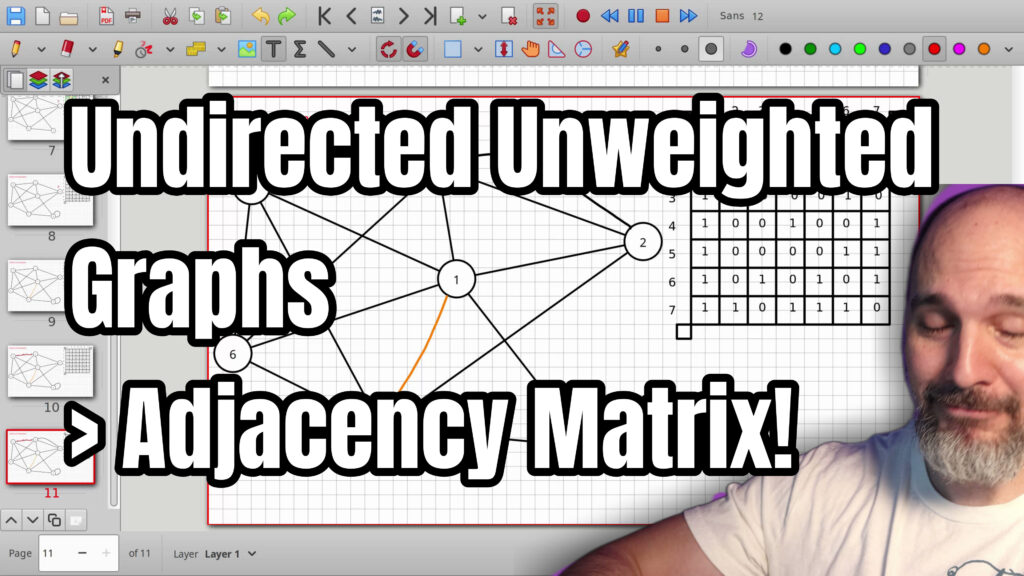

Learn how to store an undirected unweighted graph inside a computer using an adjacency matrix. In this video we build a matrix of ones and zeros where each cell shows whether an edge exists between two nodes. Rows represent the starting node and columns represent the ending node. Because the graph is undirected the matrix ends up as a mirror image across the diagonal. We also cover how to add or remove edges by simply changing a cell value, how self-loops appear on the diagonal, and why this representation lets you check any connection in constant time. The computer only needs the connection data, not the physical layout of the nodes. Perfect if you are learning graph theory, data structures, or preparing for algorithm interviews.
0:00 Introduction to Adjacency Matrix
1:16 Arrays as Two Dimensional Matrices
2:20 Ones and Zeros Represent Edges
3:44 Filling the Matrix for Node One
6:20 Completing the Remaining Nodes
10:38 Finished Matrix and Practice Advice
11:02 Computer Stores Only Connections
11:40 Mirror Property of Undirected Graphs
14:17 Adding and Removing Edges
17:31 Parallel Edges Are Not Supported
18:50 Conclusion and Future Topics
=-=-=-=-=-=-=-=-=
Thanks for watching!
Find us on other social media here:
- https://www.NeuralLantern.com/social
- Twitter / X: https://x.com/NeuralLantern
- Rumble: https://rumble.com/c/c-3696939
- BitChute: https://www.bitchute.com/channel/pg1Pvv5dN4Gt
- Daily Motion: https://www.dailymotion.com/neurallantern
- Minds: https://www.minds.com/neurallantern/
- Odysee: https://odysee.com/@NeuralLantern:5
Please show your support!
- Buy me a coffee: https://ko-fi.com/neurallantern
- Subscribe + Sharing on Social Media
- Leave a comment or suggestion
- Subscribe to the Blog: https://www.NeuralLantern.com
- Watch the main “pinned” video of this channel for offers and extras
Hey there! Let’s talk about representing an undirected,
unweighted graph in your machine using an adjacency matrix.
All right everybody, so I hope you’ve been watching my previous videos.
I just did some videos on edge list representation. Before that,
I talked about like the basics of graphs and like terminology and stuff like that.
You don’t need
terminology and stuff like that. You don’t need to watch the edge list videos if you’re not
interested in representing using an edge list, but you should probably at least watch the graphing
video basics if you haven’t. Okay, so what are we looking at right here? I’ve just made a graph.
I made a random graph and I kind of like, you know, wired up a bunch of edges to make it kind
of complicated. I then spent a whole bunch of time making this very beautiful two-dimensional
Matrix, just for you. I’m sorry you couldn’t watch me
you i’m sorry you couldn’t watch me write it you know i sometimes i’ll i’ll have people say that
they like when i yell at myself while i’m drawing something sorry it took too long but anyway what
we’re going to do is take these concepts and put them together and we’ll we’ll say this is how we
can represent the graph inside of the machine so what am i even talking about uh well the first
thing is imagine an array in your machine right an array of integers like an array of uh i don’t know
doubles you know an array of whatever so i’m gonna say like 5.4 and like you know 7.7 and
8 and you know like whatever so i’m just like making an array of numbers probably a lot of
you like this notation but inside your machine an array uh that is one-dimensional could be
interpreted as a two-dimensional array so this matrix up here on the top right of the screen
that’s really a one-dimensional ray array inside of the computer it’s just that we choose to treat
it as a two-dimensional array.
a two-dimensional array and um it’s important to understand that you can jump to any cell
in constant time uh just like you can with a one-dimensional array because getting to a certain
cell is really just a simple mathematical formula i think i’m going to do time complexities of this
in a different video so for now i’m just going to say here’s how we represent the diagram first off
let me label this so i don’t forget uh this is definitely where the heck is that how come that’s
That’s not working, okay.
Oh, this is definitely.
okay uh this is definitely an undirected unweighted graph
trying to type with the pen in my hand i have to change my brain okay
so this is an undirected and also unweighted graph
so for the purposes of this particular graph if it’s unweighted that means in the cells um we’re
just we’re not going to put weight because there’s no weight in the graph i mean you could if you
Wanted to.
the graph i mean you could if you wanted to just say that every edge was a weight of one if it was
unweighted but i’m gonna say let’s forget about you know what is the actual value of an edge
because we don’t really have that in this graph and we’ll just say that if an edge exists then uh
we’ll put a we’ll put a one there and if an edge does not exist we’ll put a zero in there
at the corresponding cell we’ll talk about what cells mean you know what edges in a second
The other thing is because it’s undirected, it doesn’t actually matter.
It doesn’t actually matter whether we’re describing a start node or an end node with an edge because it goes in both directions.
So actually what’s going to happen is this graph is going to be a mirror.
I’ll show it to you in a second, but for now we’ll just say it’s not going to matter what the direction is.
I like to do starting nodes as the rows, even though I just said that doesn’t matter.
It’s just the way that I like to do things because it makes it easier to remember how to do this when you start to add direction to the graph.
the graph so one by one i’m going to look at every single node and i’m going to chart what exactly is
going on with that node in the two-dimensional matrix so i’m going to start uh i guess i’m going
to go numerically because that’s kind of easier i’m going to start with the node index 1. so i’m
going to go here at row 1 because i’m going to say that’s my start node and um where does the
one node connect to it connects to node number two so um let’s see actually i think i’m going
I’m going to say that.
actually, I think I’m going to say that it is not self-connected. I mean, if you consider your
graph to have by default every node is connected to itself, you could put a one there across that
little diagonal line that you see. But I’m going to put a zero saying that these nodes are not
connected to themselves, unless we do a little loop from a node to itself. Maybe I should add
that later. So node number one is connected to node number two. I’m going to write a one there
to say that there is a connection.
What do I mean by that?
What do I mean by that? Just to clarify, this, let’s see, the one two edge, that edge that I
just highlighted in pink, that corresponds to this cell. So the start node, I’m going to do
that in maybe orange. The start node is the row number. And maybe I’ll do like, I don’t know,
light blue or something, baby blue for the destination node. And that’s going to be the
column number. So basically just like the row
so basically just like the row number is where the node where you start what node you start at
the column is what node you end at um and then if you see a zero or a one in that particular cell
at that particular row and column it’ll tell you whether there’s an edge there or not
so i’m going to duplicate this real fast so i can erase the markings i just made
and i’m going to say oops whoa whoa what’s happening here i want to get dude
dude are you kidding me can i just erase it like that yeah okay i keep thinking these are lines i
actually made a diagram in a different program so these are not even lines i can’t even erase this
it sucks so um we did the uh the two node so i’m just going to quickly say the one is connected
also to the three yes or no yes that’s a one uh then the one node is connected to the four
uh yes i’m going to put a one the one node is connected to the
the one node is connected to the five yes so i’m going to put a one a lot of connections this is
pretty good uh and then also to the six and not to the seven so if it’s not connected to the seven
i’m going to put a zero there okay we do the same thing for the two node so i’m going to start at
the two node actually let me duplicate this start at the two node and i’m going to say
we’re now looking at the two node oh my gosh
okay I’m gonna put a question mark I guess we’re looking at the two node and
well is the two node connected to the one node yes we just saw that was true
is the two node connected to itself we said in this particular graph there are
no self connections by default because I want to be able to draw them if that
ends up being true is the two connected to the three I see a connection there I
see an edge so I’m gonna put a one is it connected to the four I don’t see an
edge, I’m going to put a zero.
the four i don’t see an edge so i’m gonna put a zero to the five uh yes to the six uh yes and to
the seven um whoops what did i just do uh the two is not connected to the six i was thinking of the
one uh the two connected to the seven yes okay so we just basically do this over and over and
over again until you have a giant matrix of ones and zeros which can very efficiently store um
store um a graph i mean this is pretty much it this is all you have to do i want to do uh let’s
see three is connected to i’m gonna say one one and a two and it’s not connected to itself by
default put a zero it’s connected to the four nope it’s connected to the five
oh gosh i gotta make that even connected to the five
Oh.
i’m losing my brain here uh yes and then uh three connected to the six right three connected to the
seven uh no okay somebody leave me a comment uh if you have a corruption and then for the four
um let’s see dude this is getting out of control for the four um
yes i’m just going to look at the diagram pretty soon we’re going to start realizing something fun
about an underachiever.
realizing something fun about an undirected graph in that it is a mirror in this matrix
so technically you only have to do like one half of the matrix in your code if you wanted to
so i’m gonna say the one exists um one you know what i should have done i should have just filled
this whole thing with zeros and then change the zeros to ones um okay so the four is connected
to the two, yes or no? Nope. All the fours connected to the three? Nope. Fours connect…
Nope, or it’s connected to the 4, we’re going to say no by default, or it’s connected to the 5, nope, it’s only connected to the two things, it’ll just be the 7 I guess, okay, so we’re going to put a nope there, and then a yep for the 7.
Okay, then the 5 is connected to 1, 2, 3, 4, what if I just did a whole bunch of zeros, and then I overwrote only the ones, that would probably be a little bit faster.
bit faster except for this first time i’m doing it okay and then i’ll just copy paste this
tap it past okay i should have done this should i edit that out of the video i don’t know it’s fun
to watch my mistakes so five to one yes five to two no five to three yes uh five to four
we say no by default five to six yes five to seven yes okay i think that was a little bit
faster let’s see how fast it is this time uh the six is connected to the five well let’s say it’s
the one and then uh a one a three a five and a seven right six one three five and seven okay so
going to be one, three, five, seven. That’s probably right. Again, leave me a comment.
probably right again leave me a comment if i screwed something up i did not practice this
i’m just kind of winging it the seven is connected to uh five six two four five six okay so i’m gonna
do two four five six whoops that six didn’t happen let me just do it again okay all right
so now we have it this is a uh an adjacency matrix that represents the graph that you see on the left
Keep in mind that if you saw a matrix, I mean in general you should probably practice doing this both ways, like look at a graph and then you generate the matrix that corresponds to the graph you’re looking at, but also maybe you’re presented with a matrix and you would draw the graph that the matrix represents.
Try to remember that your computer, in almost every program, it doesn’t really know where these nodes are unless it’s a drawing program or something.
if we’re just talking about relationships which is what graphs are kind of good at um then your
computer
um then your computer doesn’t really care that the three is on the top it doesn’t really know that
definitely not with this adjacency matrix representation uh the three in the computer’s
mind could just be anywhere it doesn’t really even think of where the nodes are it’s just
this node is connected to that node and that node is connected to that node and so forth
we just position the nodes somewhere because we’re humans and it’s fun to look at diagrams
but really this is all your computer knows just all these you know little connection numbers here
So, let me duplicate this and I’ll show you something funny about an undirected graph real quick.
Let’s see, how much time? 12? That’s not too bad.
So, if I do, let’s see, I want to do a little highlighter here.
I don’t get a chance to do that very often.
I’m going to do a highlighter across this identity line, you know, the little diagonal.
It’s all zeros for self-connects.
Maybe I’ll change that in a second.
I’ll make one of the nodes connect to itself.
But notice how if I do this.
notice how if i do this in green
notice oh is the highlighter going to be green now keep screwing that up notice how we have
a mirror happening along the identity line so we have like some some ones here right uh so we have
like two three four five six in the one row if we look at the one column we’ll also see two three
four five six it’s a mirror uh pick you know any other numbers you want let’s look at the uh the
The three column.
at the uh the three column the three column has a one there and then it’s got another one and a one
down below at the five and the six so three is hitting two and five and six uh let me look at
the diagram just to make sure i’m doing this right three is hitting uh two and five and six
it should be hitting one also oh right i didn’t highlight that because it was already highlighted
by that other thing okay so then let’s look at the three row and see if we see a mirror also so
two and then the five and the six notice how it’s a mirror you just tilt your head uh and it really
looks like a mirror and sometimes i like to make a joke when i’m explaining this to people uh you
know if you just kind of like tilt your head a little bit it looks like some cheesy broccoli
i’m personally not a fan of cheesy broccoli i mean i love cheese and if you put cheese on my
broccoli i’m gonna be happy but it turns what’s what was healthy food into junk food it’s like
I’m going to be healthy.
I’m going to have broccoli today.
be healthy i’m gonna have broccoli today good for me yay i’ve earned a double bacon cheeseburger
later but then i put cheese all over the broccoli and suddenly it’s junk food again and it’s like i
do get a little fiber and everything but it’s like not really being that healthy anymore so what
should i do i should just get some more healthy food to make up for the junk food broccoli and
then i’m gonna end up putting cheese on the other healthy food and then i just it’s like an endless
cycle and i just keep eating and eating and eating pretty soon there’s no room for a cheeseburger
pretty soon there’s no room for a cheeseburger i don’t know what to tell you anyway um so this
is how you make an undirected unweighted graph uh with an adjacency matrix we’ll talk about time
complexities and other stuff in the future um uh oh i should talk about how to modify edges okay
so first off let me let me create a self loop real fast i’m going to create a self connect
but let’s say that this four is actually connecting to itself uh with like a little
self-loop. Okay. So, oh shoot.
so oh shoot how can i get rid of all those is that going to work yes it’s going to work yes
i should have duplicated this and drawn on the duplicate maybe i actually did that forgot about
it already i don’t even know okay sometimes i have clever ideas and then i forget what i was
doing then the ideas are just not that clever anymore yes okay what about that highlighter
Okay.
i seem to have screwed up the graph somehow
nope okay forget it um we’ll just pretend that it’s fine so i added that four connection
so how do i modify the adjacency matrix well the four uh row starting node with the four column
ending node was a zero indicating no self-connection now that i do have a self-connection
And I’ll just put a one there, four and.
connection i’ll just put a one there four and four and that’s it pretty easy right let me duplicate
this other one so i don’t have to erase that stuff a second time a second time and um what
will we do if we wanted to uh well let me actually sorry everybody let me just do that four one more
time so i think i just erased the wrong thing we’ll say four and four is a one now and so how
can we say that some new edge has been added?
some new edge has been added let’s add an edge between one and seven pretty easy we just go to
the right spot in the adjacency matrix let me add a little orange line here adjacency matrix
to connect number one and number seven that would be uh we could do row one and column seven
so that’s going to be a one and then remember this graph is undirected so it has to be a mirror
so that means uh row seven and column one also has to be a one so it’s still a mirror
so it’s still a mirror that’s pretty much it and remember you can access these cells
in constant time which we’ll talk about more in a future video pretty nice how do you delete
uh an edge let’s pretend that we wanted to delete uh the connection between the five and the three
so i’m going to put maybe like a little squiggly line right here squiggly line saying that that
edge is gone i can’t actually erase that because this is a i guess i could draw white over it but
you would still see that the blue lines are covered so the five and three connection is
gone now how do
and three connection is gone now how do we do that in inside the adjacency matrix again just look at
the uh row five column three change that one to a zero and then row three column five change that
also to a zero oops not a nine that’s how you get rid of something so you add something uh by just
changing a number you get rid of something by just changing a number self connects are pretty easy
um and then of course after you make the matrix you want to just double check that you did it
correctly I’m not going to do that right now
check that you did it correctly i’m not going to do that right now maybe this is a good exercise
for you at home you can just kind of like look and try to find my mistakes because that’s hilarious
right um what else can i tell you uh this particular scheme does not support um parallel
edges or edges that start at the same start node and end at the same end node as well i’m not
really describing that very well so for example what if i had this three node that is connected
to the 2 node and I want it
that is connected to the two node and I wanted to add a second connection for some reason like
there are reasons to do that I want to have another edge going from three to two and from
two to three so now this is a parallel edge it’s the same it’s an edge that connects the same two
nodes as some other edge how can I represent that inside of this matrix right now I can’t
but one way to do this is to say that every cell where’s the three and the two there it is every
cell in your matrix is not a one or a zero integer but every cell
or a zero integer but every cell is its own uh individual linked list or array or vector or
something that can hold multiple numbers so just to add a little notation here if if that’s what
i mean then i can say well we’ll just say that there are two edges by saying that cell has an
array of two numbers each number representing a connection not the not the greatest way to
to represent it, but in our future
greatest way to represent it. But in our future videos, we’re going to do like directed graphs
and weighted graphs. It’ll make a little bit more sense. But long story short, this is how you do it.
Let’s see. We did 20 minutes for this video. I think I’m feeling okay. There’s lots of properties
and other stuff that we can talk about with graphs. But for now, I’m just going to stop right
here. Thank you so much for watching this video. I hope you learned a little bit of stuff and had
a little bit of fun. Tell your friends and I’ll see you in the next video.
next video how do i stop the recording hey everybody thanks for watching this video again
from the bottom of my heart i really appreciate it i do hope you did learn something and have some
fun if you could do me a please a small little favor could you please subscribe and follow this
channel or these videos or whatever it is you do on the current social media website that you’re
looking at right now it would really mean the world to me and it’ll help make more videos
and
help make more videos and grow this community so we’ll be able to do more videos longer videos
better videos or just i’ll be able to keep making videos in general so please do do me a kindness
and uh and subscribe you know sometimes i’m sleeping in the middle of the night and i just
wake up because i know somebody subscribed or followed it just wakes me up and i get filled
with joy that’s exactly what happens every single time so you could do it as a nice favor to me or
you could you could troll me if you want to just wake me up in the middle of the night just
just subscribe and then I’ll just wake up.
and then i’ll i’ll just wake up i promise that’s what will happen also uh if you look at the middle
of the screen right now you should see a qr code which you can scan in order to go to the website
which i think is also named somewhere at the bottom of this video and it’ll take you to my
main website where you can just kind of like see all the videos i published and the services and
tutorials and things that i offer and all that good stuff and uh if you have a suggestion for uh
clarifications or erratics
uh, clarifications or errata or just future videos that you want to see, please leave a comment. Or
if you just want to say, Hey, what’s up, what’s going on? You know, just send me a comment,
whatever. I also wake up for those in the middle of the night. I get, I wake up in a cold sweat
and I’m like, it would really, it would really mean the world to me. I would really appreciate
it. So again, thank you so much for watching this video and, um, enjoy the cool music as,
coming for us all.
Thanks for watching!