
In this practical x86-64 assembly language tutorial we dive deep into conditional branching using YASM (also works with NASM) on Ubuntu/Linux.
We cover:
- The CMP instruction and how it sets the RFLAGS register
- All major conditional jump instructions (JE, JNE, JL, JLE, JG, JGE, JB, JBE…)
- Important difference between signed (JL/JG) vs unsigned (JB/JA) jumps
- Real code examples showing how to implement if-style decisions
- How to handle the “jump out of range” assembler error
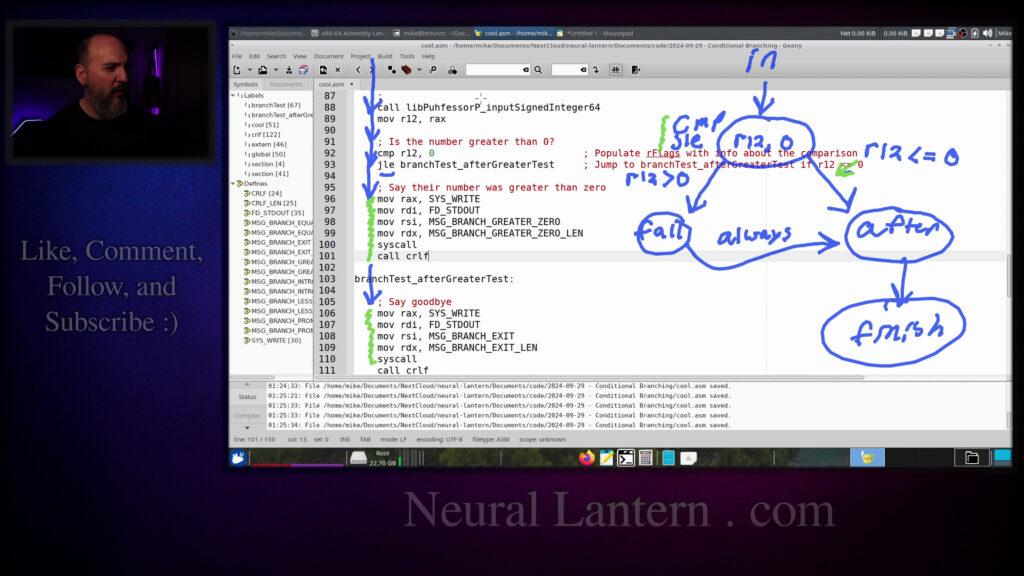
- Visual flow diagrams explaining control flow
Perfect for students learning low-level programming, reverse engineering, operating systems, or anyone who wants to understand how if-statements, comparisons, and decisions are actually implemented at the machine level.
Highly recommended companion resource: Professor Ed Jorgensen’s free x86-64 Assembly Language Programming book (linked in comments).
Enjoy learning assembly!
Intro to Conditional Branching in Assembly 00:00:00
Recommended Book: x86-64 Guide by Ed Jorgensen 00:00:23
Unconditional vs Conditional Jumps 00:01:39
How Conditional Branching Works 00:02:06
The CMP Instruction Explained 00:03:21
Overview of Conditional Jump Instructions 00:04:50
Signed vs Unsigned Jump Instructions 00:06:10
Jump Equal & Jump Not Equal (JE/JNE) 00:07:00
Main Conditional Jumps Summary 00:08:14
Starting the Code Example 00:09:09
Program Structure & Printing Setup 00:10:35
Function Prologue & Getting User Input 00:13:21
First Branch: Is Number Greater Than 0? 00:15:17
Live Demo: Testing Greater Than Zero 00:21:53
Second Branch: Is Number Less Than 10? 00:22:52
Live Demo: Testing Range 0-10 00:26:06
Third Branch: Is Number == 5? 00:26:52
Live Demo: Testing Equal to 5 00:28:00
Jump Out of Range Error & Workaround 00:29:00
Final Summary & Closing 00:32:17
Thanks & Call to Subscribe 00:32:57
=-=-=-=-=-=-=-=-=
Thanks for watching!
Find us on other social media here:
- https://www.NeuralLantern.com/social
- Twitter / X: https://x.com/NeuralLantern
- Rumble: https://rumble.com/c/c-3696939
- BitChute: https://www.bitchute.com/channel/pg1Pvv5dN4Gt
- Daily Motion: https://www.dailymotion.com/neurallantern
- Minds: https://www.minds.com/neurallantern/
- Odysee: https://odysee.com/@NeuralLantern:5
Please show your support!
- Buy me a coffee: https://ko-fi.com/neurallantern
- Subscribe + Sharing on Social Media
- Leave a comment or suggestion
- Subscribe to Blog: https://www.NeuralLantern.com
- Watching the main “pinned” video of this channel for offers and extras
Hey there. In this video,
we’re going to talk about conditional branching in an assembly program.
We’re going to be looking at YASM x86-64 assembly or AMD 64 assembly
within Ubuntu, but this will probably be a useful video.
If you’re just thinking about how to branch in assembly in general.
So for starters, I’m going to promote one of my favorite books,
as I often do. This is a book that is free and open source. You can get a copy yourself. I did
not write this. The author of this book is a genius. His name is Professor Ed Jorgensen, PhD.
He made this whole book and released it under an open source license. So you can literally just go
to his website and get a copy of this for free. You can use this to make yourself into an assembly
expert. So I highly recommend this to everybody. Anyway, so I’m going to open up this book. I’m
up this book i’m going to assume that maybe you’ll get a copy or you’re just going to follow along
with what i’m doing on the screen but i’m going to open this book and i’m going to go to section 7
which is entitled instruction set overview i’m going to double click it so open out open the
subsections and then i’m going to click on 7.7 control control instructions and then under that
i’m going to click on 7.7.3 conditional control instructions so uh that’s a lot of subsections
So that’s a lot of subsections, isn’t it? I love a book with a ton of subsections. It makes things so much easier to find
If you or someone you know is going to write a book, especially if it’s technical, please use lots and lots of subsections
Anyway, so conditional control instructions in my last video
We talked about the jump instruction where we can just be sitting somewhere in our program and then just jump somewhere else
Anywhere we want based on the label so conditional branching or conditional control instructions
conditional control instructions are kind of the same thing except they will
decide whether or not to actually jump they might fall through to the next
instruction or they might jump away to somewhere else so conditional branching
or conditional jumping it basically kind of goes like this step one you compare
two values to each other they will probably be sitting in registers and then
conditional branching instruction or a conditional jump instruction there’s
lots of synonyms for these but basically in the regular jump instruction that I
just talked about in the last video you just jumped and it was only one thing
that you had to do but in this case we first have to compare two items and then
we’ll issue the jumping instruction because the jumping instruction will
have to decide whether to jump or not based on the result of your comparison
which makes sense right like if you’re going to implement something that’s like
if you know I’ll put like a expr for expression then well the first thing that we have to decide
before we jump either into the block of the if or if we jump into the block of the else is whether
or not that expression is true right so that’s kind of what the compare instruction is doing
sort of in higher level languages like c++ it can get a lot more complicated than that but you know
Okay, so we’re going to do conditional branching instructions.
Let me show you a few of those.
Okay, so for starters, here’s the compare instruction right here on page 126.
I think it’s actually 127 in the PDF, but basically, you know, 126.
We do CMP followed by two operands.
So if we want to compare, I don’t know, let’s say R12 with R13, that’s how you would do it.
just a two operand instruction there’s no results that are going to get stored in one of these
operands both of these operands are just for input the result actually gets stored in a special
register called r flags which we hardly ever use or look at in in the most common assembly
instructions and design patterns we just kind of like let the r flags do whatever it’s going to do
and the compare instruction will fill that up so imagine that you know depending on whether r13 is
is like greater than r12 or less than or they’re equal or something else is going on between the
two of them the compare instruction just fills up all sorts of flags defining the relationship
between those two registers or those two operands r12 and r13 and then after the r flags register
is all set up then the conditional branching instruction will sort of rely on r flags in
order to decide whether or not it’s going to jump or not okay so let’s see there are tons
there are tons of conditional well not tons i guess like half a page worth but there are lots
of conditional branching instructions we can use the first two i want to show you and after this
by the way i’m going to write a sample program just to show you how it is in practice but so the
first one is je which means let’s jump if the two operands were equal so again you know we compare
here we’ll say sets up r flags and then we’ll decide like what we’re going to do are we going
to jump if they’re equal to some label i’ll write some label here so that means uh the je instruction
will look at the r flags register and decide did compare think that r12 and r13 were equal if it
did then we’ll jump if not execution will fall down to the next line so i’ll put a nope instruction
So if they were equal, then we’ll end up jumping to some label.
And if they were not equal, we’ll end up letting execution fall through to the nope on line 10.
And same thing for jump not equal and all these other ones.
But there are actually two different versions of some of these instructions that kind of seem the same.
Like for instance, this one right here, JL, that means jump if the first operand was less than the second operand.
is a jump below that jumps also if the first operand was less than the second operand so
what’s the difference between these two let me get my pen I love excuses to do my little pen now
well I’ve got my pen it’s working oh I erased it okay okay it’s working anyway so notice how jump
less than and jump below are basically doing the same thing but there’s one difference one of them
One of them works on signed operands and one of them works on unsigned operands.
So keep this in mind.
If you’re comparing two signed integers, you want to use this group up here of instructions.
But if you’re using unsigned integers or just bits, then you want to use this group of instructions down here.
And you definitely want to know what kind of data you have that you’re comparing.
Notice though that jump equal and jump not equal, they don’t really care.
not equal they don’t really care if the operands are signed or unsigned that’s because if you want
to check to see if two things are equal you just look at all of their bits and if all of their
bits are the same then you just say they’re equal you don’t even care actually if it’s a signed or
unsigned integer if it’s a float if it’s a whatever you just you just go are all the bits equal or are
at least one of the bits unequal then we’ll say it’s equal or not equal that’s it so keep that in
mind for all of your jump instructions where you’re trying to see if things are equal or not
or not equal you’re going to definitely be using these whether you’re using signed or unsigned
integers or floats or anything else like that but when it comes to actually you know integers that
are signed or unsigned these are the instructions you use for signed and these are the instructions
whoops that you use for what have i done that you’ll use for unsigned i keep confusing the on
off button for the red button is what i’m doing oh okay whatever i guess we’re done anyway
I guess we’re done anyway.
So keep that in mind.
In this video, we’re just going to be using the signed integer instructions
because that’s the example that I have set up.
But just imagine you could very easily translate this to unsigned integers or floats.
Okay, so let’s see.
We’ve got jump less than, we’ve got jump less than or equal to,
then we’ve got jump greater than, and then we’ve got jump greater than or equal to.
And when you combine those with jump equal to or jump not equal to,
jump not equal to that’s pretty much all the comparison that you need and if you want to do
something much much more complex well then you can just you know start stacking logic on top of
logic and and branching on top of branching to do something that’s like this is what i’m talking
like if you want to do this expression and expression or expression and then maybe like a
expression, right? If you want to do something super complicated, like we can do in a higher
level language, you’re just going to have to make a bunch of mini jumps or find another
way to reduce your logic. But in this video, we’re just going to be taking a very simple
comparison. All right. So I think that’s everything that I can show you inside of this book. Let’s
go to the code now. So here’s a little empty code, source code, a page. I’m going to stick
all my code inside of it. Another reminder that if you don’t know how to write assembly
you don’t know how to write assembly at all you should see my other videos because i’m not going
to cover the basics of assembly in this video if you want to learn how to make a make file or compile
or assemble or like do all the basics that i’m not talking about in this video i’ve covered them all
in my other videos up to this point so for now we’re just going to focus only on conditional
branching conditional jumping inside of an assembly module so i’m going to start off by setting up my
and i’m gonna say paste and again you know this is covered in other videos but long story short
i’m just going to be printing out a bunch of strings while this program executes so
i’m going to announce that the branching test is going to begin and then i’m going to ask the user
for some input and then i’m going to based on whatever the user inputs i’m going to just print
out a message that sort of you know understands what the user inputted so if the user inputted
something greater than zero it’s going to output that if they entered something that was less than
10 it’s going to print that if they entered something that was equal to five it’s going to
print that and then it’s going to say we’ve ended the branching tests then i have like a crlf again
all this stuff is explained in other videos but we’re just basically printing so i’m going to
start the text section of my program which is where all the instructions are and i’m going to
a function that I can call on. Again, this video does not cover a bunch of other extra stuff. I’m
just going to show you how to branch. Just trust me when I say that this helps me easily print
numbers and things, or I guess in this particular case, it’ll help me input a number from the user.
But for you, if you’re trying to run this at home, you can just start hard coding numbers just to
make sure that you can branch correctly and then eventually work your way up to a library that can
videos in the distant future. I don’t know years from now. I don’t know.
I might release the library or some other stuff to the casual viewer.
So now here’s our entry point. Again,
I mentioned that there’s going to be other parts of this program that I’m not
showing. So this is a hybrid program where a C++ driver actually will call on
my cool function. So just imagine from somewhere else in the program,
you’re calling on the cool function. How do we know it’s a function?
a label called cool and then it has a return statement at the very end.
That’s pretty much all we need to know right now.
Let me get rid of that load.
I don’t know why I always have the word load in all of my things.
I think I put it in there on an early example
and then I just kept copy pasting to my heart’s content and never stopped.
We mark the function cool as global so that other modules can call on it
like the C++ module that I’m not showing you.
But if you’re writing a pure assembly module,
you don’t really need to mark your functions as global.
if everything’s within the same piece of source code it’s totally fine so then I’m going to make
a function call to a function called branch test so very quickly before I actually add branch test
I’m just going to add another function that we’re not covering in this video called crlf and long
story short all it does is just it prints a new line in the terminal and that’s it like it’s just
it’s a convenience function I like to be able to call crlf and have a new line okay so let’s start
our branch test function so here’s the signature it is just branch test with a
void in front of it I’m gonna put a ret to say that this is a function that we
will return from and I left myself a little note here saying that I’m gonna
use register r12 as the number that the user inputs so that means I’m gonna have
to preserve that because you have to respect the ABI and the ABI says that
The ABI says that R12 is a Kali saved register.
Again, see my other videos if you don’t know what I’m talking about.
But I’m just going to preserve it in a section that I call the prologue, or actually the
book calls the prologue.
I do that now though too.
And, you know, restore it in a section called the epilogue.
So we have prologue and epilogue.
We can have a push-pop pair.
And then in between, we can have, you know, the meat of our function.
Okay, so for the introduction, I’m just going to write a few instructions that just print
out a message.
print out a message. So we’re going to print out that intro message and then call
CRLF to print a new line and then return. So maybe actually at this point we could
probably check to see if this program works by trying to run it.
So let me say clear and make run.
Okay. So now the driver just prints hello. The driver is
elsewhere and we get that welcome message that says begin
branching test and then the driver retains control after that. So
let’s do let’s do a goodbye message real fast so we’ll do our goodbye message
it’s just another string that I’m printing it’s no big deal right now but
if I run the program again you can see that begin branching test and end
branching test okay so far we’re not really doing branching yet the next thing
we need to do is ask for a number so this is how I’m going to do it in my
this is how I’m going to do it in my program. In your program it might be different or you might
have a hard-coded number or something like that. So for now just trust me when I say that I’m going
to print a prompt basically saying could you please enter a number and then the next two lines
are going to be just calling on one of my custom functions that will input a number from the user
so the user can type at the terminal and we will receive their number through REX which is the
return value register for integer return values and we’re going to store it in R12. So that’s why
And we’re going to store it in R12.
So that’s why I had to preserve R12,
because I’m actually going to start,
you know, messing with the value of R12 now.
Okay, so we ask for a number,
and then we sort of don’t do anything after that.
If we run the program again,
it’s just asking for a number,
and I can just like type some stuff and hit enter,
and then the program ends, nothing actually happens.
We’re building, we’re building.
So now let’s ask ourselves,
is the number greater than zero?
So let me copy paste some code here.
some code here so right now we’ve just finished inputting a number from the user and we’ll ask
you know is that number that they inputted greater than zero so again the first thing we do is we use
a compare instruction cmp we give it two operands the order doesn’t necessarily matter um for
instance uh right now i’m asking is r12 greater than zero so i can do a jump less than or equal
to like a different branch or i can jump greater than equal to if i switch the operands or if i
in a different order, but I’m just choosing to say, let’s compare the two and then let’s jump
if R12 is less than or equal to, which basically means not greater than, this label right here,
which is just branch test after greater test. So I’m going to do a print statement right after that
and then I’m going to draw out what the code is kind of doing. So let me make a label here so
actually will compile. Whoops. I’m in the wrong window. Okay. There we go. So what am I saying
here? Okay. Do the comparison. And then if the condition seems to be satisfied, then we’ll jump
to this, which means we’ll just say goodbye and then exit the program because we’ll return to the
caller. But if that condition was not satisfied, then we’re going to end up executing this stuff
in the middle. So think about this. This is kind of the idea. Let’s see if I can remember how to
idea let’s see if I can remember how to draw this right now off the top of my head suppose we have
like some sort of an input I’ll call this in put and then maybe the input is going to be you know
whether r12 and r0 are equal or greater than or whatever so I’m just gonna say r12 and 0
god that’s awful I really need to practice this draw pad I spend like a whole week practicing
whole week practicing with a different draw pad and then when I come back to
this one I’m even worse than when I started so we we come in and we kind of
look at our 12 versus zero and then we will jump in one direction if that’s not
you know greater than or equal to or less than or equal to and we’ll jump in
another direction otherwise so basically here we’ll say jump less than equal to
um less than or equal to whoops maybe i’ll do r12 uh i need to somehow adjust the pressure on this
thing r12 less than or equal to and so this is sort of uh has to do with you know this branching
path that we take like if r12 was less than or equal to zero then we’ll take the right branching
to after, I’ll just put the word after,
we’ll jump to the after greater test sub label.
And otherwise, if R12 is, sorry,
I said less than or equal to, yeah,
if R12 is greater than zero,
then we jump to this other thing,
which is gonna be the fall through.
So it’s gonna be line 96, but I’ll just say,
I’ll say fall for fall through.
basically the jump won’t happen if it’s greater than or equal to so you could imagine if you
wanted to reverse the logic so you can use a jump greater than instruction you could but I’m choosing
to do it this way and then both of those will eventually reach let’s see will eventually
actually yeah the fall through instructions those will eventually reach the after instruction I’ll
here and then the after instruction will just kind of like finish the program
and exit and all that stuff. So if you think about the control path here,
we have an input we’re looking at R12 with the zero with the compare instruction
and then we use a conditional branching instruction. So maybe I should write,
what do you want to write here? Maybe I’ll just put JLE up here because usually the compare
usually the compare instruction and the conditional jump or branching instructions
kind of you know come as a pair so both of these combined mean let’s look at r12 versus zero and
if r12 is less than or equal to zero meaning if it will jump if we’re less than or equal to the
the right operand r12 less than equal to the right operand then we go down this path on the right
to the after label if that is false meaning r12 was greater than zero then we’ll fall through
this stuff right here and then whether or not we actually fall through will always end up at the
at the after area because we’re either going to jump directly to the after area or we’re going
to fall through and then the fall through falls through to the after area anyway as well let me
just show you that real fast oh man i’m having a hard time with this okay so let’s pretend that r12
less than or equal to. So that means instructions are coming, you know,
instructions are getting executed. We’re going down and down and down and down and down.
Once we see jump less than or equal to, if that’s true, then we jump to the after label,
which means we just kind of jump around this message. And so we’re not going to exit,
sorry, we’re not going to execute that code. So in the case where that is true,
where it is less than or equal to, we’re not going to execute those instructions.
So we’re not going to say their number was greater than zero. We’re just going to simply
We’re just going to simply say goodbye.
However, on the other hand, if that is not true, meaning if R12 was indeed greater than
zero, then we’re going to fall through because this jump less than or equal to instruction,
it will only jump if the R flags, if the comparison instruction thought that R12 was less than
or equal to zero.
If that’s not true, if it’s greater than, then instructions, the control path is just
the control path is just going to fall through.
So that means we will actually execute these.
And then when they’re done,
execution will continue to fall through to the rest.
So that means we’re either going to see a message saying
their number was greater than zero or not,
based on whether their number actually was greater than zero.
Okay, hopefully I explained that somewhat clearly.
Now let’s run the code and see if it works.
Hopefully I didn’t forget anything.
This is kind of a partial program at this point.
program at this point I’m gonna add a bunch more stuff to it so hopefully
this actually compiles enter an integer five notice how it says your number was
greater than zero and if I run it again and I just type zero it does not say
that it was greater than zero if I run it again I type like a negative five it
also does not say that it was greater than zero you know a huge giant number
here it’ll say your number was greater than zero you could probably type a
number that was just absolutely huge and have it overflow I actually don’t know
nines I need to type and I don’t even know what the behavior is going to be.
I don’t know if it’s just going to crash the program because this also relies on my ability
to input a number which is happening in a different library.
Let’s see if that even works greater than zero.
Okay.
It probably overflowed and went to a very, very low negative number.
So okay.
I guess at least I know my library will probably work sort of.
Okay.
So let’s go back to the code here and let’s upgrade it.
how to to check for jump less than or equal to um we’re going to say goodbye right there so now the
next thing we should do is check to see if the number was less than 10. so after the greater test
it’s going to be here so again the same thing like we can just reuse r12 because we’re not really
modifying it and we’re not calling uh well i guess even if we were calling a function r12 was supposed
supposed to be Kali preserved so we’re just comparing it and then maybe
printing a message if we want to and regardless we’re going to end up at 103
this after greater test label so then we’ll compare again r12 with the number
10 and we’ll say jump if it’s greater than or equal to branch test after less
so now at this point we’re saying compare r12 with 10 if it’s greater than or equal to 10 then
just skip over the message so if it’s greater than or equal to 10 then wait a minute wait wait
yeah yeah if it’s greater than or equal to 10 then skip the message otherwise the message
that is printed is going to say that their number is less than 10. so again you could imagine a
want me to write it out for you I don’t know I think once is probably enough but let me just do
it again we’ll do input is coming in and it’s just going to be you know comparing and then
jumping greater than or equal to the input is going to be where we’re just looking to see if
R12 how it compares to zero god the number one is awful my entire penmanship is awful okay one
we’ll do r12 and 10 and so that’s just sort of what we’re comparing with the compare instruction
and then the jump instruction and so if we go on the left i’m going to say that’s the fall through
path again and if we go to the right it’s going to be um r12 greater than or equal to 10 is going
and then here this is going to be after less I’ll say the after label the after less label
so if we fall through it’s just going to print a message maybe I should do another little bubble
here that’s just like print p for how about p for print p for print it’s going to fall through and
then it’s going to print and then it’s going to go to the after label so you can see that
the print instructions are only reached if r12 is not greater than equal to 10 which is the same
to 10 which is the same thing as saying it’s going to fall through if r12 is less than
10.
And then after we finally get to the after label, then we’re just going to do, you know,
the rest of the instructions.
We’re going to exit the program.
We’re going to say goodbye.
We’re going to do whatever.
Okay.
So say there never was less than 10.
And then regardless, here’s like the ending label that we were conditionally jumping to.
Let’s see if this works.
Make run.
So we’ll enter five.
we’ll enter five notice how it says your number was greater than zero and your
number was less than ten let’s do an 11 I guess it says your number was greater
than zero but it does not say that our number was less than ten because 11 is
not less than ten if I do a negative three here it says that our number was
less than ten but it doesn’t say that it’s greater than zero so we have like a
lot of decisions that we could make right like imagine if instead of just
based on something happening, you could call a full function or skip a bunch of extra code,
you know, whatever you want it to do.
So I’m going to go to the next condition where we’re going to compare R12 to the number five.
And we’re going to ask, you know, is R12 equal to five?
So this is going to be the jump not equal branch.
And again, you know, if you wanted to say jump, if it’s equal to the place where we
and then maybe like right after that fall through and just do an unconditional jump you can
I just think there are less jumps if I do it this way so uh here we’re just going to print you know
your number was equal to five and so basically if it was not equal we should have another label here
that allows us to skip that so all right so same thing I’m not going to draw the diagram this time
R12 with 5 and if it’s not equal to 5 then jump to this label down here which just means
let’s say goodbye and not actually say that their number was equal to 5.
But if it was equal to 5 then this JNE conditional branch won’t actually jump anywhere.
Execution will fall through to the next statements which is just printing the message that their
number is equal to 5 and then when that’s done it’ll fall through to this other label
and eventually fall through to the return statement.
the whole thing already nice that was easy um let’s do another run and um let’s enter the
integer one it says one is uh greater than zero and one is less than 10
greater than zero and less than 10 is there any way i can get nothing to print out
greater than zero and less than 10
you don’t think i can do it let me try it nine no
why did I even put 9 okay yeah it’s always gonna say 0 or 10 okay so let’s
do a 4 we’ll get both of those greater than 0 and also less than 10 let’s do a
5 now we should get all those messages your number was greater than 0 your
number was less than 10 your number was equal to 5 and if I just do a 6 in there
again it doesn’t print your number was equal to 5 and we have to enter an
actual 5 for that so that’s the that’s the basics of
conditional branching oh there’s one other thing that I wanted to make sure
in my previous video where we only talked about jumps bear in mind that
these conditional branching statements or instructions you know je j any all
these things they have a limited range of jumps of where they can jump to so if
you have a gigantic program and you’re trying to jump very very very far away
based on a condition you might have an assembler error where your program won’t
even compile won’t even assemble telling you i think the message is i wrote it
I wrote it down somewhere jump out of range coming from the assembler that basically means that these
instructions can only jump about 128 bytes away from whatever instruction they are at or whatever
memory location they are at so you know after your assembler assembles your program and after
your linker links your program and you just have like a binary you know if you were to inspect
all the instructions inside of your executable your binary you would see that they have offsets
offsets, right? You know, like one instruction is basically eight bytes away from the one that
comes right after it. But some instructions are a lot further away. So if you’re trying to jump
to an instruction that is 100 is more than 128 bytes away, it won’t work, you’ll get that error.
So how do you solve that problem? Well, maybe I’ll just write this down real fast. I’m not going to
make this part of the code example. But just imagine we have, you know, jump equal to some
and maybe I’ll do a comment very very far away and here’s the label some label right
so if your assembler says hey you can’t jump to some label because it’s too far away it’s a
jump out of range assembler error then basically you can just make some other labels here you can
say uh you can say short jump true and short jump false you know just make up some sort of a label
label and basically say if it is um well false yeah okay i guess this is the way i’ll do it this
is not super efficient but instead of jumping to the very far away label in the case of true you
can just jump to the true label so i’m going to say jump uh to the short jump true label otherwise
To the false label. So now you’re definitely jumping in either case and both of these labels are close by
So then I can pretty much just have the close by true label do an unconditional
Jump to some label and that overcomes the limitation of branching instructions
So, you know JMP the regular jump instruction
It has an unlimited jump that it can do it can go just to like very very very far away instructions
And then for the false, you know, I don’t know, do whatever you want and then jump wherever you want.
It doesn’t really matter.
I’m just trying to show you that if you make a short jump to a label that will only have an unconditional jump,
so it’s sort of like two jumps, you know, like a short jump and then a long jump,
then you can overcome that limitation.
Again, bearing in mind that some label is supposed to be very, very far away and sort of unreachable.
Okay, so let me just double check that I talked about everything that I wanted to.
We looked at the branching instructions, the sign in this, I drew a diagram for you.
We solved the jump out of range error.
Okay, so that’s, I think that’s basically it.
Hopefully you feel like an expert now at conditional branching and how to make decisions.
In future videos, I’ll talk about how to implement an if else block and how to implement loops
and all that stuff.
decisions in yasm x86-64 assembly and conceptually you can apply this to other assembly languages too
so thanks for watching my video i hope you learned a little bit of stuff and had a little bit of fun
i’ll see you in the next video
hey everybody thanks for watching this video again from the bottom of my heart i really appreciate it
i do hope you did learn something and have some fun uh if you could do me a please a small little
Could you please subscribe and follow this channel or these videos or whatever it is you do on the current social media website that you’re looking at right now?
It would really mean the world to me and it’ll help make more videos and grow this community.
So we’ll be able to do more videos, longer videos, better videos, or just I’ll be able to keep making videos in general.
So please do me a kindness and subscribe.
You know, sometimes I’m sleeping in the middle of the night and I just wake up because I know somebody subscribed or followed.
or followed it just wakes me up and I get filled with joy that’s exactly what
happens every single time so you could do it as a nice favor to me or you could
you control me if you want to just wake me up in the middle of the night just
subscribe and then I’ll just wake up I promise that’s what will happen also if
you look at the middle of the screen right now you should see a QR code which
you can scan in order to go to the website which I think is also named
somewhere at the bottom of this video and it’ll take you to my main website
where you can just kind of like see all the videos I published and the
all the videos i published and the services and tutorials and things that i offer and all that
good stuff and uh if you have a suggestion for uh uh clarifications or errata or just future videos
that you want to see please leave a comment or if you just want to say hey what’s up what’s going on
you know just send me a comment whatever i also wake up for those in the middle of the night i
get i wake up in a cold sweat and i’m like it would really it really mean the world to me i
appreciate it so again thank you so much for watching this video and enjoy the cool music
as as i fade into the darkness which is coming for us all
Thank you.