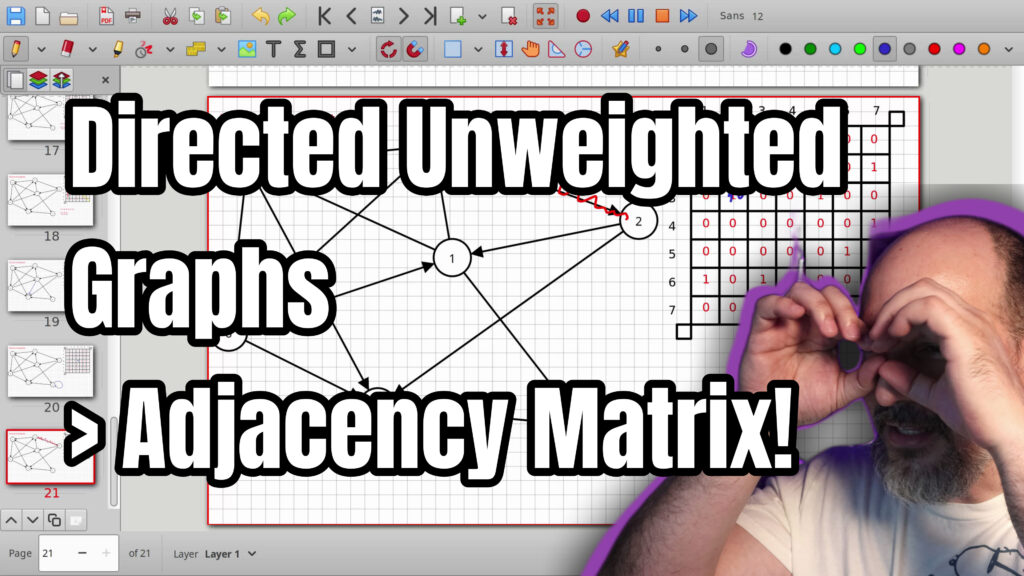

Learn how to represent a directed unweighted graph using an adjacency matrix. We cover why a two dimensional matrix is really just a one dimensional array under the hood, making cell access and updates extremely fast. For directed graphs the starting node is the row and the ending node is the column. A zero means no connection and a one means an edge exists. Self connections are not implied by default. Adding or removing an edge is constant time. Directed graphs do not produce a symmetric matrix like undirected ones. This is one practical way your program can store and work with a graph. If you have been following the previous videos on undirected graphs this builds directly on that. The next video will cover directed weighted graphs with an adjacency matrix. Thanks for watching and I hope you picked up something useful.
00:00 Intro to Directed Unweighted Graphs
00:01 Matrix Stored as Contiguous 1D Array
03:09 Building the Adjacency Matrix
04:25 Filling Outgoing Edges Node by Node
09:43 Directed Graphs Are Not Symmetric
10:36 Adding a New Edge
11:08 Adding Self-Connections
11:53 Removing an Edge
13:04 Adding Bidirectional Edges
15:28 Next Video and Outro
=-=-=-=-=-=-=-=-=
Thanks for watching!
Find us on other social media here:
- https://www.NeuralLantern.com/social
- Twitter / X: https://x.com/NeuralLantern
- Rumble: https://rumble.com/c/c-3696939
- BitChute: https://www.bitchute.com/channel/pg1Pvv5dN4Gt
- Daily Motion: https://www.dailymotion.com/neurallantern
- Minds: https://www.minds.com/neurallantern/
- Odysee: https://odysee.com/@NeuralLantern:5
Please show your support!
- Buy me a coffee: https://ko-fi.com/neurallantern
- Subscribe + Sharing on Social Media
- Leave a comment or suggestion
- Subscribe to the Blog: https://www.NeuralLantern.com
- Watch the main “pinned” video of this channel for offers and extras
Hello there. Let’s talk about representing a directed, unweighted graph inside your
machine using an adjacency matrix. It’s going to be fun.
Okay, sorry about that. Anyway, so I hope you’ve been watching my previous videos.
We covered already how to do an undirected weighted graph and also unweighted graph
using an adjacent
and also unweighted graph using an adjacency matrix we’re going to basically represent a graph
inside of the machine like this is one of the ways that your machine can do it we’re not going to
talk about code exactly but you know kind of allude to code but this is this is a really good
way to you know get started in practicing the concept okay first thing i want to say i’ve said
this in my previous videos i’m sorry if you’ve been watching all of them is that this matrix
this two-dimensional matrix it’s really just a one-dimensional array think about this we have
Thank you for watching.
array think about this we have some numbers in an array I’m going to put six numbers in there
we could just as easily represent this as a two-dimensional matrix a two-dimensional array
right it’s the same amount of numbers what’s really happening under the hood when you have
a two-dimensional array is your computer just has it as a one-dimensional array so the question is
why is that useful oh hang on okay anyway so what i wanted to say is that you see
So what I wanted to say is that you see a two-dimensional matrix,
but really what’s happening inside your computer is a one-dimensional matrix.
I’m just going to make a one-dimensional matrix.
I’m going to say we’re putting numbers in the matrix.
I’m just going to put like, you know, six hashes or pound signs or hashtags in the modern era.
So a one-dimensional array could be represented as a two-dimensional matrix
if we just reformat it a little bit.
last part of that first array on a second line that’s what’s happening in the computer
even if you’re working with a two-dimensional array in your computer it’s still just a
one-dimensional array under the hood which means it’s incredibly fast to access one particular
index not necessarily to scooch things remove things and add things but if i wanted to go to
index three and a one-dimensional array if you know time complexities already that’s really fast
That’s constant time. We’ll do time complexities in another video, but um if
but um if i wanted to access you know a certain row in a certain column intuitively you think
well i gotta like scan down and scan to the right uh so maybe it’s slower but it’s not because it’s
still just going to be math to find exactly the right offset in uh your two-dimensional matrix
because it’s really a one-dimensional array all of the items in this array i didn’t say this in
previous videos all the items in this array are contiguously allocated so all we really have to
do is compute an offset from some
compute an offset from some starting memory location so it’s incredibly fast
to read a cell in this matrix and to modify a cell in this matrix you’ll see in a second
that’s well you’ll see in several minutes why that’s one useful feature of a of an adjacency
matrix okay so adjacency matrix uh suppose you’re presented with this matrix you see
i’m sorry with this diagram you see right here this is a graph it’s got direction on all the
edges i really hope i didn’t forget any particular edge i think i’ve got arrows on all of them
think i’ve got arrows on all of them we’ve got nodes and edges and i just
need to figure out how can i put that into a matrix so my computer
my program understands the graph and it it has a representation of the graph
so with directed graphs the start row uh sorry the start node and the end node
actually matter a lot in my other videos where we talked about
undirected graphs we could just easily swap the row and the column
in this matrix and it didn’t really make a difference because the whole matrix
was going to end up being a mirror anyway.
was going to end up being a mirror anyway but that’s not going to happen this time so what i’m
going to say for the way that i like to do things is the starting node is the row and the ending
node is the column so this is also an unweighted diagram an unweighted graph so we don’t really
need to store floats or infinities or anything like we did in the other video we can just say
that no connection means no connection is a zero and yes connection is a one of course you could
You could still do that with floats if you want to,
of course you could still do that with floats if you want to but whatever you could have a a matrix
of booleans if you really wanted to like true and false and true and false but you know for this
diagram we’re going to say 0 and 1. so i’m going to start with node number one and node number one
therefore is going to be the the source node and i’m going to see where does where does it go out
to what edges are outbound from the number one so the start node is the one that means the row is
one that i’m working with and the destination nodes or the end nodes or the sync nodes those
Those will be the calls.
nodes are the sync nodes those will be the columns so i’m not really going to look at how six is
coming into one because i’m only interested right now in what uh what one starts uh in terms of an
edge you know what edges come out of one so one forget about the six and the two those are incoming
edges i’m just going to look at the outgoing edges so one goes out to three and four and five so
by default in our diagrams at least at this point we’re going to say
our diagrams at least at this point we’re going to say that self connections are not implied
meaning by default if i don’t see an actual edge on the diagram going from one back into one then
i’m going to say one is not connected to itself so i’m gonna put a zero to say there’s no connection
uh one going to uh the two that’s not happening because two is actually going into one
so i’m going to put another zero then uh there uh one going to three that is happening
uh one going to three that is happening so i’m gonna put a one so one does have an outbound
connection or an edge to three so i’m gonna put a one in that row and column
one going to four uh yes so i’m gonna put a one one going to five uh yes so i’m gonna put a one
there one going to six uh no so i’m gonna put a zero there i should have put you know
edges that go back and forth uh to make this more interesting but you can probably imagine
imagine well i’ll add that maybe later in this video so one going to seven uh nope someone put
a zero so that’s the first row we represented all of the outbound edges from one to some other node
and we used a zero to say it doesn’t exist and a one to say it does exist so then we just move on
to the two so if i’m focusing on the two node then i’m on the two row and its outgoing connections
are going to be represented in the columns.
in the columns so does two go to one yes I’m going to put a one there does two go to itself
self-connections are not implied at this point and then uh hang on a second
does two go to three um nope because three goes into two and not the other way around
uh we’ll add those other edges in a second does two go to four nope does two go to five
nope there’s two
nope does two go to six um i don’t see that so i’m going to say nope and then does two go to seven
uh yes i’m going to put a one so now we’re done with the two um this is a directed graph by the
way so like i said about my previous videos we will not see a mirror at least we won’t necessarily
see a mirror we might accidentally make a mirror depending on what the graph is but we’re not going
to see a mirror. So we have to do this whole graph with no shortcuts. So the
shortcuts so the three uh does it go out to the one that’s a no does it go out to the two
um where the heck is the three oh yeah it goes out to the two
uh no implied self-connections three goes to the four nope three goes to the five yes
3 goes to the 6
nope
3 goes to the 7
uh three goes to the seven nope okay so now we’re done with the three
and then we’ll say now does four go to the one i’m looking at the four where the heck’s the four
i’m losing the four oh four doesn’t go anywhere except for the seven so i can actually just put
like zeros in this whole thing you know just to save a little time oh god there we go but the
four does go to the seventh. I’m going to put a one right there. Okay.
the sevens i’m gonna put a one right there okay so uh the five um it has outbound connections i’m
gonna i’m gonna be cheap here i’m gonna be cheesy the five goes to six and seven so i’m just gonna
put zeros everywhere else so whoops in fact i probably could have just copied that whole row
of zeros and then just overwrote the last two but i guess so the five goes to the six that’s a yes
The 5 goes to the 7. That’s a yes also.
the seven that’s a yes also and then we’re ready for the six the six has three outbound connections
one three and seven so i’m just gonna you know what i’m just gonna copy a whole row i wish i
had a whole row of zeros and i’m gonna maybe change that to a zero real fast and then i’m
gonna say all right where does where does six actually connect to let’s change those zeros to
ones six connects to the uh the one and the three and the seven
and the 7 okay so 1 goes to 1 3 goes to 1 and 7 goes to 1 okay then the 7 uh has no outbound
connections so this is indeed a row of zeros maybe i could have done that one first it would
have been fun oh well uh notice one more time that there’s no mirror so if we like you know
if you trace your eyes along this identity line right here and you were expecting to see a mirror
you would be sadly disappointed.
a mirror you would be sadly disappointed because what would actually happen is not a mirror let me
do the highlighter here and we’ll say we have like an identity line that goes down the middle
and then i’ll just try to highlight some stuff let’s see the three four five six over here on row
uh one and and those columns let’s go now to uh column one and notice how it’s like not the same
three four five six so that’s not
five six so that’s not a mirror because those numbers don’t match so there’s no mirror in
directed graphs in terms of the matrix anyway let’s see i’m going to get rid of these little
pound signs these hashtags uh the next question is uh let’s do a self-connect how do we add an
edge like if i wanted to add an edge from uh you know one to seven for example actually let me
duplicate this first, and then we’ll work on it.
first and then we’ll work on it if i just wanted to add a brand new edge going from one to seven
uh then i just have to make sure that i look at the row one and then look at the seven column
and then just change that value to a one to say did i do that yeah to say that uh the edge now
exists right so that’s pretty easy to add a brand new edge let’s look at self connects now just in
in case um if i wanted to say that four connects to itself i have to do an arrow
4 connects to itself. I have to do an arrow by the way. Did I do an arrow on the last one?
Yeah, okay. 4, we’re saying now it connects to 4. So before we assumed that there were no
self-connections by default. So all the nodes had no self-connections. But the 4, we just added
a self-connection. So that means right here, that 0 is going to change to a 1. Pretty easy and fast
to add an edge. And by the way, how fast was it to just access a cell and modify a value?
modify a value it’s constant time again big O is going to happen in other videos but uh this
is lightning fast for adding and removing edges okay so then the other thing is um let me see
can I do oh I gotta get rid of that how do we remove an edge oh bro bro what’s happening here
just select that oh how do we remove an edge we talked about this in other videos
we talked about this in other videos for our adjacency matrix but it’s pretty easy we just say
all right suppose i just want to kill this edge going from three to two so now there’s
no connection no edge going from three to two um well i just have to go find the appropriate
part of the matrix and that’s it so row three because three was the start node or the source
node row three and then two is the destination node so i’m just gonna like overwrite that with
the zero and now we have effectively removed an edge remember the computer doesn’t actually
See you next time.
Remember, the computer doesn’t actually see this diagram that you’re looking at on the left.
The computer just has the matrix.
The computer doesn’t really even need to know that the 3 is on top visually.
It just needs to know what the 3 is actually connected to.
At least most applications of graphs.
There are some where it’s more visual, and so there needs to be some coordinates.
But just the easiest and most simple way right here with an adjacency matrix doesn’t need that.
Okay, so then the next thing I want to do is…
is um i want to add edges that kind of like point towards you know two nodes that sort of point
towards each other like you know opposing is this going to work yeah opposing uh edges that’s not a
technical term so suppose for the sake of argument that you’re looking at the three and you say well
the three can go outbound to the two but can the two go outbound to the three yeah totally
Okay, so I now have two edges, each going in a different direction between the 3 and the 2.
And by the way, in your mind, you might be thinking,
hey, isn’t that what undirected graphs are doing?
Yeah, basically, you have just an edge that goes in both directions.
Here we have to draw two separate edges.
Then we just have to update the matrix to match.
So I added an edge going from 3 to 2.
So I’m going to go row 3, and then column 2, and…
Oh, sorry, sorry.
originally which worked from three to two that’s why is that what that’s why
there’s a one there but now I just added an edge from two to three so we look at
row two and then column three and then I update that to match so that zero became
a one and it did become a little bit more like a mirror if we went ahead and
added these like you know opposing edges on every single pair of nodes then the
matrix would start to look like a mirror anyways what else can I talk about we’re
We’re at about 16 minutes.
about we’re at about 16 minutes and i’ve lost my mouse cursor what the heck oh there we go i need
i need accessibility controls you know it’s true actually i really need glasses i’ve needed glasses
for a couple of years maybe like five years and for some reason i just can’t get myself to go so
what’s happening now is when people show me memes on their phones my face goes it goes backwards
like this it’s like a it’s like a repellent for my face if you show me a meme i’m like
me a meme i’m like not not fun to live that way so i gotta get glasses should i get a chain i want
a gold chain that’s like studded and like blinged out and then like i have the glasses here only
when i need to read and then it hangs the rest of the time and it maybe it plays music or something
i don’t know i don’t think i’m gonna go that far so uh when we did undirected unweighted i’m just
trying to make sure that i didn’t forget anything there’s no cheesy broccoli in this video directed
and unweighted. Yeah, I guess that was it.
weighted yeah i guess that was it okay so we’re at the end of this particular video i’m going to do
one more before we shift topics the next one is going to be how to represent a directed and
weighted graph inside the machine um using an adjacency matrix okay thank you for watching
this video i hope you learned a little bit of stuff and had a little bit of fun i’ll see you
soon i’m gonna go have a burrito no i’m not i’m just gonna keep recording hey everybody
hey everybody thanks for watching this video again from the bottom of my heart i really
appreciate it i do hope you did learn something and have some fun uh if you could do me a please
a small little favor could you please subscribe and follow uh this channel or these videos or
whatever it is you do on the current social media website that you’re looking at right now
it would really mean the world to me and it’ll help make more videos and grow this community
so we’ll be able to do more videos longer videos better videos or just i’ll be able to keep making
Thank you.
or just i’ll be able to keep making videos in general so please do do me a kindness and uh and
subscribe you know sometimes i’m sleeping in the middle of the night and i just wake up because i
know somebody subscribed or followed it just wakes me up and i get filled with joy that’s exactly
what happens every single time so you could do it as a nice favor to me or you could you could troll
me if you want to just wake me up in the middle of the night just subscribe and then i’ll i’ll
just wake up i promise that’s what will happen also uh if you look at the middle of the screen
right now you should see a
look at the middle of the screen right now you should see a QR code which you can scan in order
to go to the website which I think is also named somewhere at the bottom of this video and it’ll
take you to my main website where you can just kind of like see all the videos I published and
the services and tutorials and things that I offer and all that good stuff and uh if you have a
suggestion for uh uh clarifications or errata or just future videos that you want to see please
leave a comment, or if you just want to say, hey, what’s up? What’s going on?
to say hey what’s up what’s going on you know just send me a comment whatever i also wake up for
those in the middle of the night i get i wake up in a cold sweat and i’m like it would really it
really mean the world to me i would really appreciate it so again thank you so much for
watching this video and um enjoy the cool music as as i fade into the darkness which is coming for us
That’s all.
Thank you.